Article
Stop Typing, Start Talking: Meet Intelligent Mobile Forms Fill

The Smartsheet Mobile App is built for people who need to get real work done away from a desk. Capture field data, act on approvals, track progress, all from your phone. And now, with AI coming to mobile, the app is getting smarter about how you interact with it. The first example: forms.
Filling out forms on your phone has never been anyone's favorite task. Tapping into tiny fields, wrestling with the on-screen keyboard, fixing typos. It all adds up, especially when you're standing on a job site, moving between locations, or trying to capture information quickly before the moment passes.
What if you could just say what you need and let AI handle the rest?
|
|
AI Now Works Where You Do — On Your Mobile Device
With Intelligent Mobile Forms Fill, Smartsheet brings AI-assisted data entry directly to your phone. The feature uses a hybrid approach: voice-to-text transcription runs locally on your device, while the AI inference that interprets and maps your input to the right form fields happens in the cloud.
This split is deliberate. On-device transcription means you get fast, responsive voice capture without waiting on a network round-trip for every word you speak. Your raw audio never leaves your phone — it's converted to text right there, in your hand. The cloud-based AI layer then takes that text and does the heavy lifting: understanding context, matching fields, and filling in your form accurately.
For teams working with sensitive information like patient details, inspection findings, incident reports, or personnel records, that local transcription layer matters. Your voice data stays on your device, and only the resulting text is sent for processing. It's a practical balance between privacy and the power of cloud-based AI models that can deliver higher accuracy and continuous improvement.
The result is a workflow that feels fast and natural — speak, and watch your forms fill in — while leveraging the full capability of cloud AI where it counts most.
How It Works
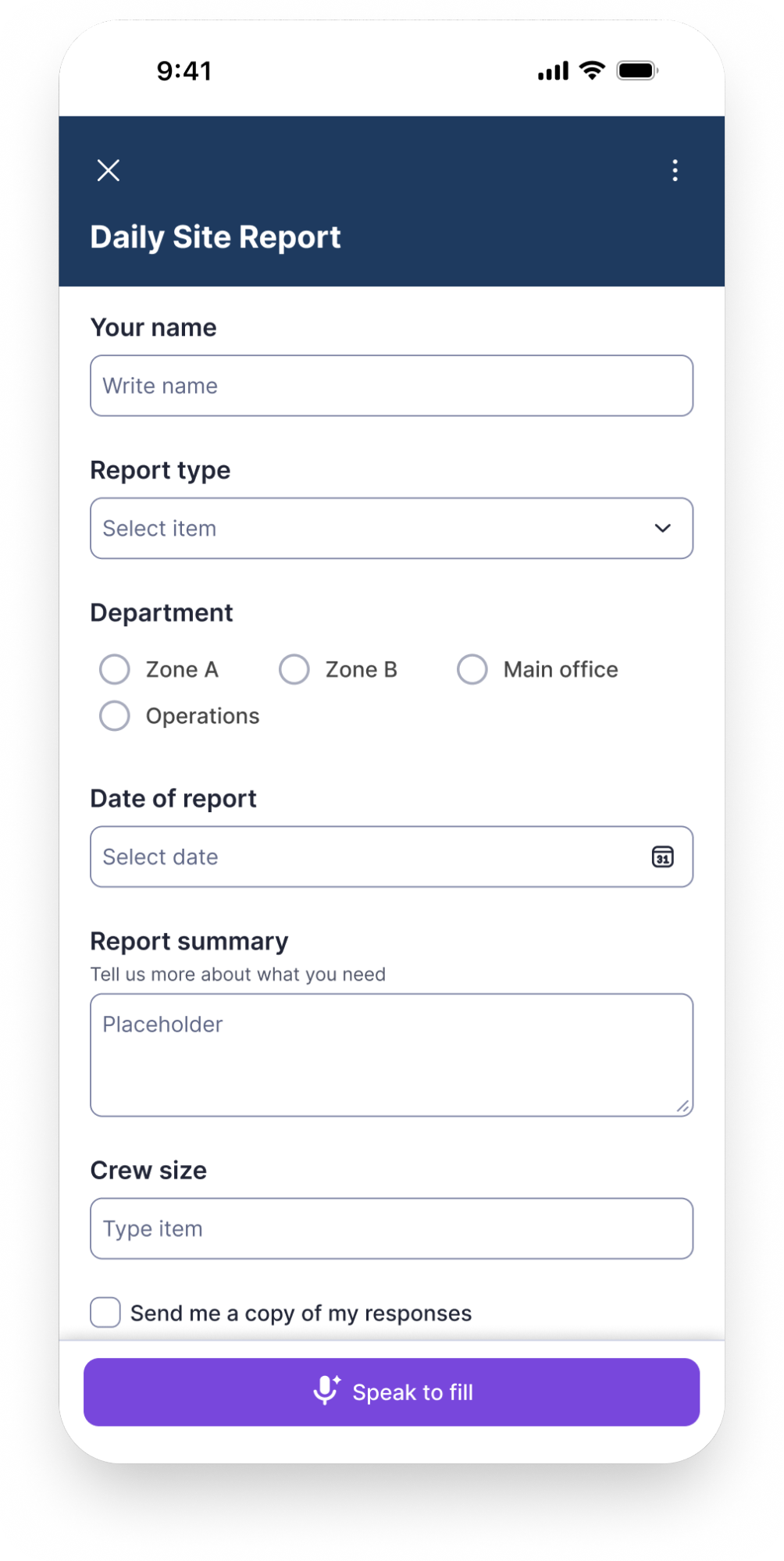
The experience is straightforward. When you open a Smartsheet form on your phone, you'll see a microphone icon next to the text fields. Tap it, and start speaking naturally — your words appear as text in real time, transcribed directly on your device.
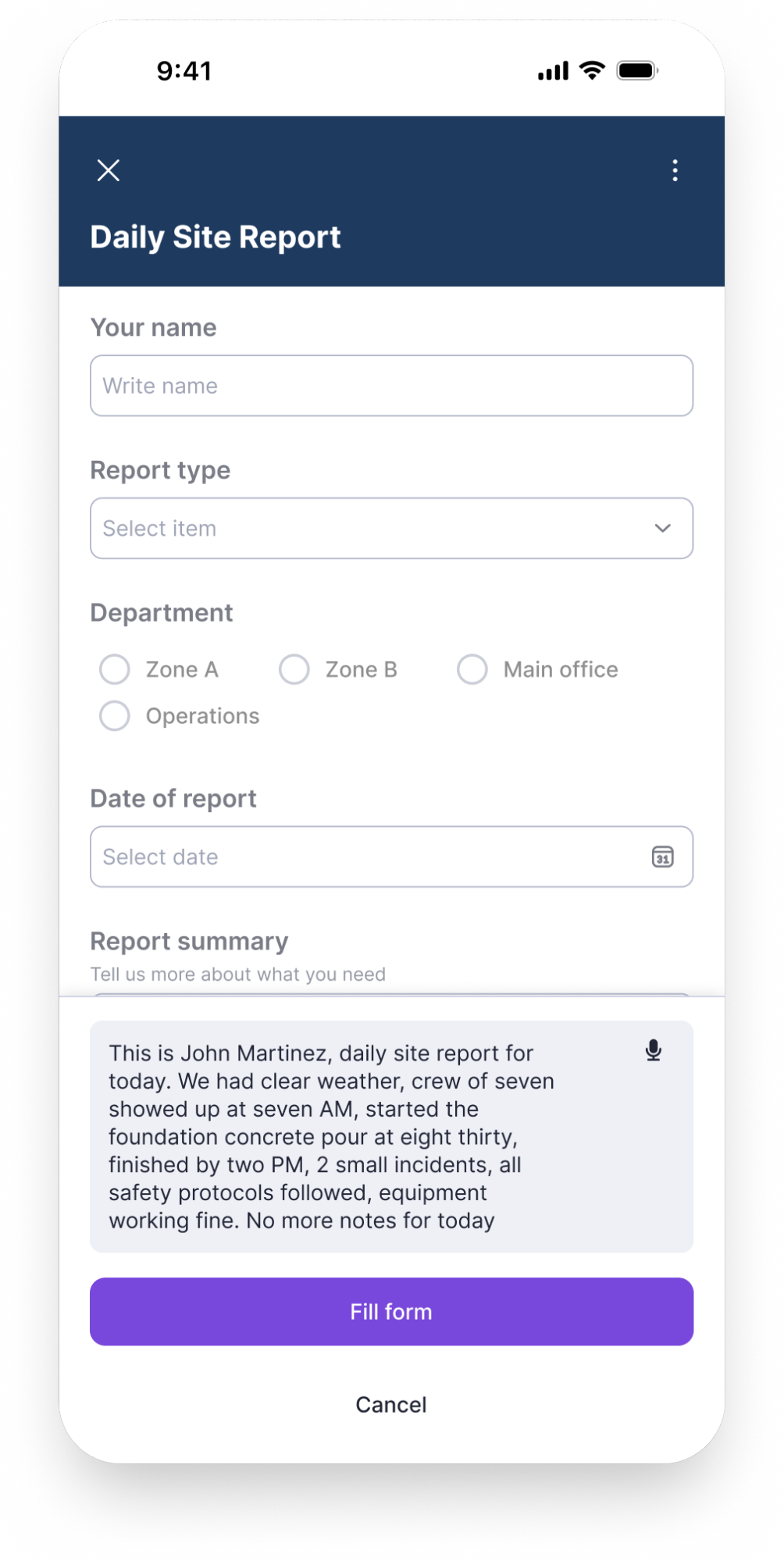
Once you've finished dictating, you'll see your full input captured in the field. From there, tap the Fill Form button, and the AI helps you do the rest: it analyzes your text, identifies the relevant fields, and populates them with the right values. If something isn't quite right, you can manually edit any field or add details the AI didn't capture before submitting.
For example, imagine you're on-site and need to submit a status report. Instead of tapping through multiple fields, you simply dictate: "This is a status report from John Doe for April 5th, 2026. All work is complete and safety protocols are in place."
The AI parses your natural language, identifies each piece of information, and maps it to the corresponding form field (like Name, Date, Status, Notes) filling them in automatically. From there, you review the results, make any adjustments, and submit when you're ready.
On first use, your phone will ask for microphone and speech recognition permissions — a standard one-time step. After that, it's tap, speak, fill, review, submit.
Why This Changes Your Day
You move faster. Voice is simply quicker than thumb-typing, especially for forms with multiple fields. What used to take a minute of careful tapping now takes a few seconds of natural speech.
Your hands stay free. Whether you're holding equipment, walking a site, or juggling tasks, voice input means you don't have to stop what you're doing to enter data. Capture information in the moment, not after the fact, back at your desk, trying to remember the details.
Fewer errors, less frustration. On-screen keyboards on mobile are typo machines. Speaking naturally reduces input mistakes and lets you focus on the actual information rather than the mechanics of entering it.
A More Accessible Way to Work
Voice-powered forms aren't just faster. They're easier to use for people who find precise touch input difficult. Motor impairments, limited dexterity, arthritis, a hand injury, or simply wearing gloves on a cold day can all make on-screen keyboards a real barrier. Voice input sidesteps that entirely: speak naturally, and the AI handles field placement. Haptic feedback confirms each action without requiring you to visually verify every field.
This isn't a separate accessibility mode. It's the same feature, available to everyone, that happens to remove the physical precision mobile forms normally demand.
Getting Started
Intelligent Mobile Forms Fill works out of the box — no setup or downloads required. The only step is allowing microphone and speech recognition access when prompted, which is a standard one-time permission on both iOS and Android.
If you'd rather not use the feature, you can easily disable it with a simple toggle in the form's context menu. It's there when you want it, out of the way when you don't.
The feature is available on both iOS and Android for Pro, Business, Enterprise, and Advance Work Management plans.
The Bigger Picture
Intelligent Mobile Forms Fill is the first step in a larger direction for the Smartsheet Mobile App. The idea is simple: AI on mobile should make your phone more capable, not more complicated. Forms are where we're starting because they're one of the most common and most tedious mobile interactions. But the principle behind this feature applies broadly: let AI handle the friction so you can focus on the work.
More is coming. This is just the beginning of what AI-powered mobile workflows will look like in Smartsheet. For now, try it on your next form and see what it feels like when your phone actually works with you.