Article
Smartsheet is now an interactive connector in Claude, starting with data quality audits beside your conversation
November 23, 2026
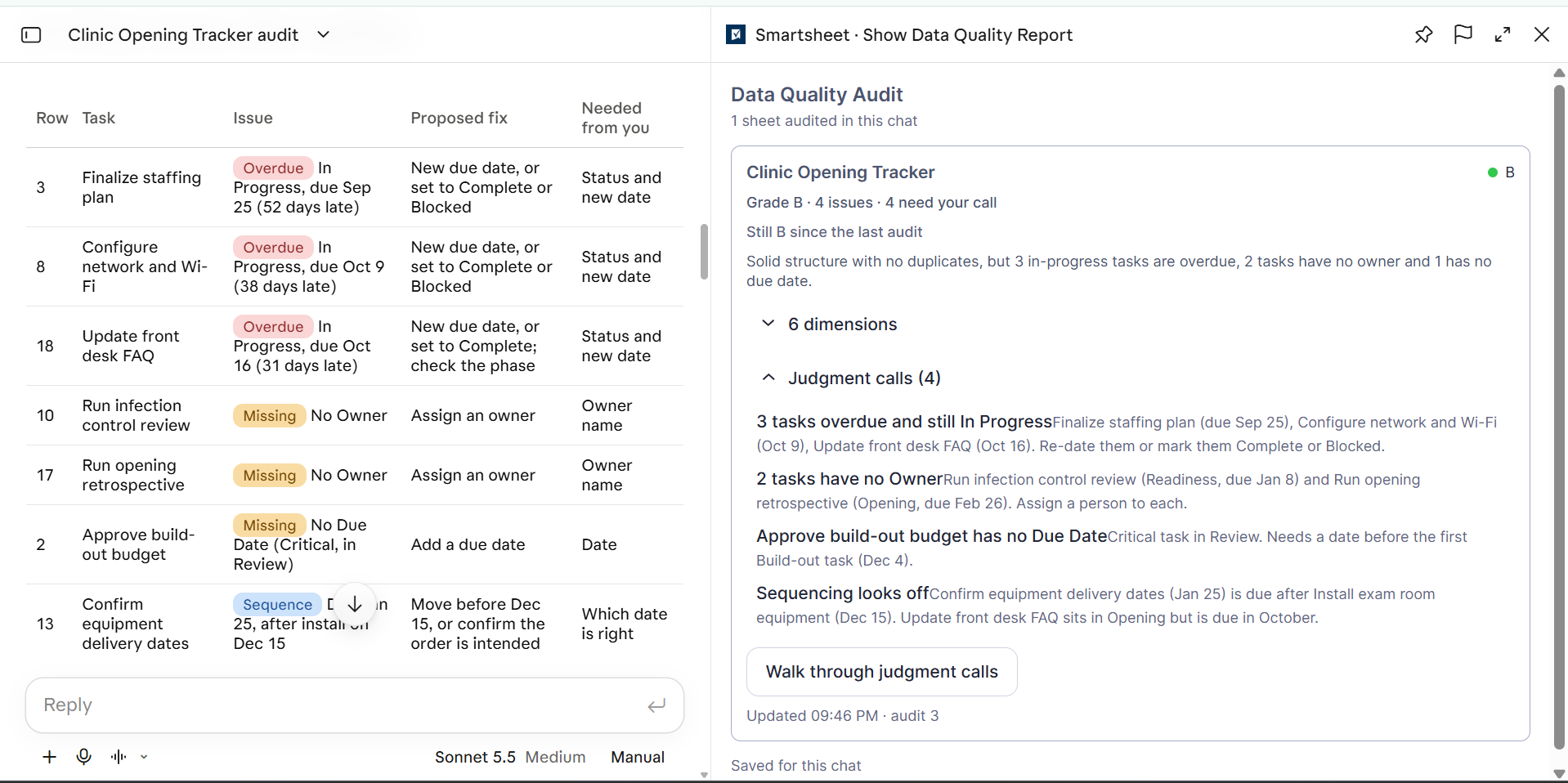
Smartsheet is now an interactive connector in Claude, among the first tools in Anthropic’s launch. Now you and Claude can work in Smartsheet together, starting with data quality analysis and auditing. Ask Claude to check a sheet, and a live data quality audit opens beside your conversation. It flags missing data, inconsistencies, duplicates, and stale rows using our Data Quality Agent. As you ask Claude to fix issues, the audit updates in real time, so you can see each change without leaving the chat. It's built on MCP Apps, an open extension to the Model Context Protocol, and it's the first of more Smartsheet interactive experiences coming to Claude.
What you can do:
- Run a data quality audit beside your chat: Ask Claude something like "Does this sheet look healthy?" or "What should I fix before I share this?" The audit opens in a side panel, so you can scan results while you keep talking with Claude.
- Fix issues and watch them clear: Ask Claude to fill in missing values, remove duplicates, or update stale rows, and approve each change the same way you approve other connector actions. The audit refreshes as changes are made.
- Work your way: Keep the audit beside the chat, expand it to full screen, or hide the chat column without closing it.
Good to know:
- It works through your existing Smartsheet connector in Claude, with nothing new to set up. It's rolling out in Claude on the web and Claude Desktop as part of the new Claude experience, so you'll see it once your account is updated or your organization turns it on.
- Audits run on one sheet at a time.
- If your organization allows all of the Smartsheet connector’s tools, the audit appears as it rolls out. If your admin restricts connector tools, ask them to set the default to Needs approval rather than Blocked, or the audit panel can't load.
- Claude can access only the sheets and workspaces you already have permission to use.
Get started: Connect Smartsheet to Claude from the interactive connectors directory in Claude or the Smartsheet Marketplace, then ask Claude to check a sheet's data quality.
Environment Availability: Commercial US, Commercial EU, and Commercial AU
Plan Availability: Smartsheet Business, Enterprise, and Advanced Work Management plans
Subscription Model Availability: Legacy Collaborator and User Model