Article
Smart Assist, Automations, MCP or the API: How to Choose

This is the first post in our new Smartsheet Builders Series: Building with Smartsheet MCP and Agents.
Ask, automate, connect or code? Smartsheet gives you four ways to get work done: ask Smart Assist, automate a rule, connect the AI assistant you already use through MCP, or write code against the API. This post helps you pick the right one for the job, and shows when to move from one to the next and how they work together.
A community member needed to audit the formulas in his sheets. He did what many of us would do and started building a Bridge workflow to collect them.
Partway through, he tried something simpler. He asked Smart Assist for the formulas. It returned them as a usable list, and the workflow he had been building was suddenly unnecessary.
Encouraged, he pushed further and asked it to build the audit sheet as well. That is where it stopped. Even when he broke the job into steps of 15 rows, it could not get there.
What he did next is the useful part. He started planning the work in ChatGPT or Copilot, then let Smart Assist make the changes in the sheet while he supervised. Thinking happened outside the product, doing happened inside it, and a person stayed in the loop the whole time.
In one small job he had touched three different tools and found the edge of each by running into it. Most of us learn it the same way.
The same question keeps coming up in the community, phrased differently each time. One member asked for a straight comparison of the options, with the risks and rewards of each. Another said the real challenge is knowing when plain API code is enough and when AI is worth adding. A third thread asks where MCP, Zapier and a direct API call divide the work.
You do not have to find every one of those walls yourself. There are four options, listed in the order most people meet them. For each one: what it is good for, where it bites, and a sign you have picked the wrong one.
Why that audit job kept changing tools
The task never changed, but what he knew about it did.
- Fetching the formulas was a bounded request inside the product. Smart Assist handled it.
- Building the audit sheet needed a plan before any change was made. He did the planning elsewhere.
- Had he needed the audit to run identically every week, it would have moved to a rule or to code.
That is the logic behind the four options below. In plain words:
- Smart Assist: You are working in a sheet and want help right there.
- Automations: Something should always happen when something else happens.
- MCP: You want your own AI tool to work with live data, across sheets or other systems.
- API: A developer writes code that must run the same way every time.
Here are the working rules at a glance:
| Option | Reach for it when | Watch out for |
|---|---|---|
| Smart Assist | The work is inside one sheet, should happen in the product, and you are there to check the result | Jobs that need a plan or many steps |
| Automations | The trigger is deterministic and the action is fixed: you can state the rule in one sentence | Rules that need judgment, and AI-built rules you have not read |
| MCP | The data changes between invocations and you need live access across sheets or systems | Answers that can differ from run to run |
| API | The knowledge is stable and must run identically every time | You own authentication, rate limits, retries and upkeep |
1. Smart Assist: when the work is inside one sheet and should happen in the product
The reward. There is nothing to build, connect or deploy. You are already in the sheet, you ask, and you see the result immediately. For bounded work with a person watching, that is hard to beat.
It starts from the sheet you have open, so it already has the context. Open it from the AI icon at the top right of a sheet, or from Home. It is not limited to that sheet: the Help Center notes that it can also query and act on data outside your current context, and you can upload a file for it to analyze. Its edge is still the sheet in front of you.
Examples. For many more prompts, see the Smartsheet MCP prompt library.
- Ask it to list the formulas in a sheet. That is the kind of request that saved the member in our story from building a workflow.
- "What is this sheet about?" or "What projects are behind schedule?" Both are example prompts from the Help Center, and Smart Assist answers them from the sheet you have open.
- "Find rows missing these required fields: Owner, Due Date, or Priority." Check what it finds before you change anything.
The risk. Scope. The moment a job needs a plan, many steps, or coordination beyond the sheet in front of you, you will find yourself slicing it into smaller and smaller pieces. That is the signal to plan elsewhere first, as he did.
You have picked the wrong one if you keep shrinking the task to make it fit, or you need it to happen when nobody is there to watch.
Plans. Smart Assist requires a Pro, Business, Enterprise or Advanced Work Management plan.
2. Automations: build them by hand, or just ask for them
The reward. Predictability. When this happens, do that, every time, and you stop thinking about it. What is new is how you get there. You can still build an automation in the builder, but you can also describe it in plain language to Smart Assist or to a connected AI tool such as Claude or ChatGPT. For example: "Send my team an approval request whenever a new row is added." The AI builds it, from simple alerts to multi-step workflows with approvals, update requests and assignments.
You can also ask what is already running on a sheet, turn automations on or off, delete the ones you no longer need, and, since early October, ask for changes to an existing one instead of rebuilding it.
One thing to keep straight. AI helps you build an automation. Once it is running, it behaves like any other automation: same trigger, same action, same result every time. The AI is not deciding anything at run time.
Examples.
- When Status changes to "Complete," notify the project manager.
- When a new row lands on an intake sheet, alert the team that handles requests.
- When a due date is three days away and the task is not done, remind the assignee.
Each is a one-sentence rule with no "it depends." Whether you click it together or ask for it, the test is the same.
The risk. Two kinds. The first is rigidity: when the right action depends on what a message says or on a judgment call, you start stacking conditions, and the rule gets harder to maintain than the work it replaced. The second comes with conversational building: an automation built from a sentence is only as right as the sentence, so read what it created before you switch it on.
Limits to know about. When conversational building launched, notifications went to Smartsheet users and contacts, Slack and webhook actions were not supported, and automations were viewed one sheet at a time. Availability also depends on your plan, so check the Help Center for current details. See the launch announcement for the original list.
You have picked the wrong one if your rule has more exceptions than cases.
3. MCP: when the data changes between invocations and you need live access across sheets or systems
MCP (Model Context Protocol) is an open standard that lets AI assistants connect to outside data. The Smartsheet MCP Server is what lets an assistant such as Claude or Copilot work with your Smartsheet data.
The reward. You work with an AI client in plain language, and it reaches into Smartsheet to work with what is true right now. Smart Assist runs on the same MCP server, so the difference is not the engine. It is where you work: Smart Assist lives inside the product, while MCP lets you reach Smartsheet from the AI tools you already use, alongside your other systems.
You can connect it to the AI assistants your organization already uses, including Claude, ChatGPT, Microsoft 365 Copilot Chat and Cowork, Gemini Enterprise Plus and Amazon Quick. Which one fits your work, and what to check before you connect it, is the subject of the next post in this series.

Smart Assist and the AI assistants you connect reach your data through the same MCP server.
It can also read free text, such as comments, and point out what looks off. A script only finds what you told it to look for.
Examples.
- Ask: "Which open items are more than a week past their due date, and how many are in each status?" On a sheet with thousands of rows, the answer came back as an exact count, not an estimate.
- Follow up: "Who owns them?" It reused the same filter and returned the breakdown by owner, with no need to repeat the conditions.
Both ran on a single sheet. Across several sheets, the AI client makes several requests and combines the answers. That is the idea, but test it on your own sheets before relying on it.
A detail worth knowing. "More than a week" is not something the tool understands. The AI turned it into a specific date before filtering. That is fine for exploring, but it is exactly the kind of decision you will want to write down once a question starts to matter (more on that in the ladder below).
Ask for counts, not rows. Asking for raw rows from a large sheet returns a sample, not everything. For counts and totals, ask in a way that leads to aggregation. The counting happens on the server, not in the model, which is why the numbers come back exact.
The risk. The flexibility that makes it useful also makes it non-deterministic, because the model decides how to reach the answer. Be deliberate about permissions: it works with yours, so it sees only what you can see and can change anything you can change. Check anything it writes before it matters, and do not use it for jobs that must be identical on every run.
You have picked the wrong one if you have asked the same question in the same way for the fifth week in a row. That question has stabilized and deserves a sturdier home.
Plans. MCP-enabled AI assistants require a Business, Enterprise or Advanced Work Management plan.
4. The API: when the knowledge is stable and must run identically every time
The Smartsheet API is how code talks to Smartsheet directly: someone writes a script, and it runs the same steps every time.
The reward. Control and repeatability. Same input, same output, and it can be tested, versioned, reviewed and audited. This is also the answer to the "when do I just use the API?" question: when you can fully describe what should happen and need it to happen the same way every time.
Example: the overdue check, hardened. The definition lives in one function, written in Python, so it can be tested without calling the API:
from datetime import date, timedelta

def find_overdue(sheet, today=None, days=7,
                 status_col="Status", due_col="Due Date", closed="Closed"):
    """Not Closed, with a due date more than `days` days ago."""
    today = today or date.today()
    cutoff = today - timedelta(days=days)
    col_id = {c["title"]: c["id"] for c in sheet["columns"]}

    def value(row, title):
        for cell in row["cells"]:
            if cell["columnId"] == col_id[title]:
                return cell.get("value")
        return None

    overdue = []
    for row in sheet["rows"]:
        due = value(row, due_col)
        if not due or value(row, status_col) == closed:
            continue
        if date.fromisoformat(str(due)[:10]) < cutoff:
            overdue.append(row)
    return overdue
The function is tested against sample data, including the edge cases: an item due exactly seven days ago does not count, a closed item does not count, and a missing date does not count. To use it, you would wrap it in a call that reads the sheet through the API, with paging and a wait-and-retry for rate limits.
The risk. You own everything: authentication, rate limits, retries, error handling and maintenance. Writing code for a question you will ask once, or one that keeps changing shape, is slower than asking it. If you take this route, Part 3 of our Mastering Smartsheet API series covers authentication, and Part 4 covers rate limits, retry logic and error handling.
You have picked the wrong one if you are rewriting the code every time the requirement shifts.
Where do Bridge and other connectors fit?
Connector tools such as Zapier sit between automation and the API. They suit a repeatable flow between apps when you do not want to write and host code. The trade-off is that you work within what the connector exposes, and you manage another tool with its own pricing and limits. When a flow needs behavior the connector cannot express, that is the point where the API becomes the better home.
Bridge by Smartsheet is the native option when a workflow has to reach into other systems. It connects data across systems and automates routine tasks, and events on a sheet can trigger its workflows. It is a premium feature, so check whether your organization has it.
The ladder: explore loose, harden tight
These choices are not permanent. They form a ladder.
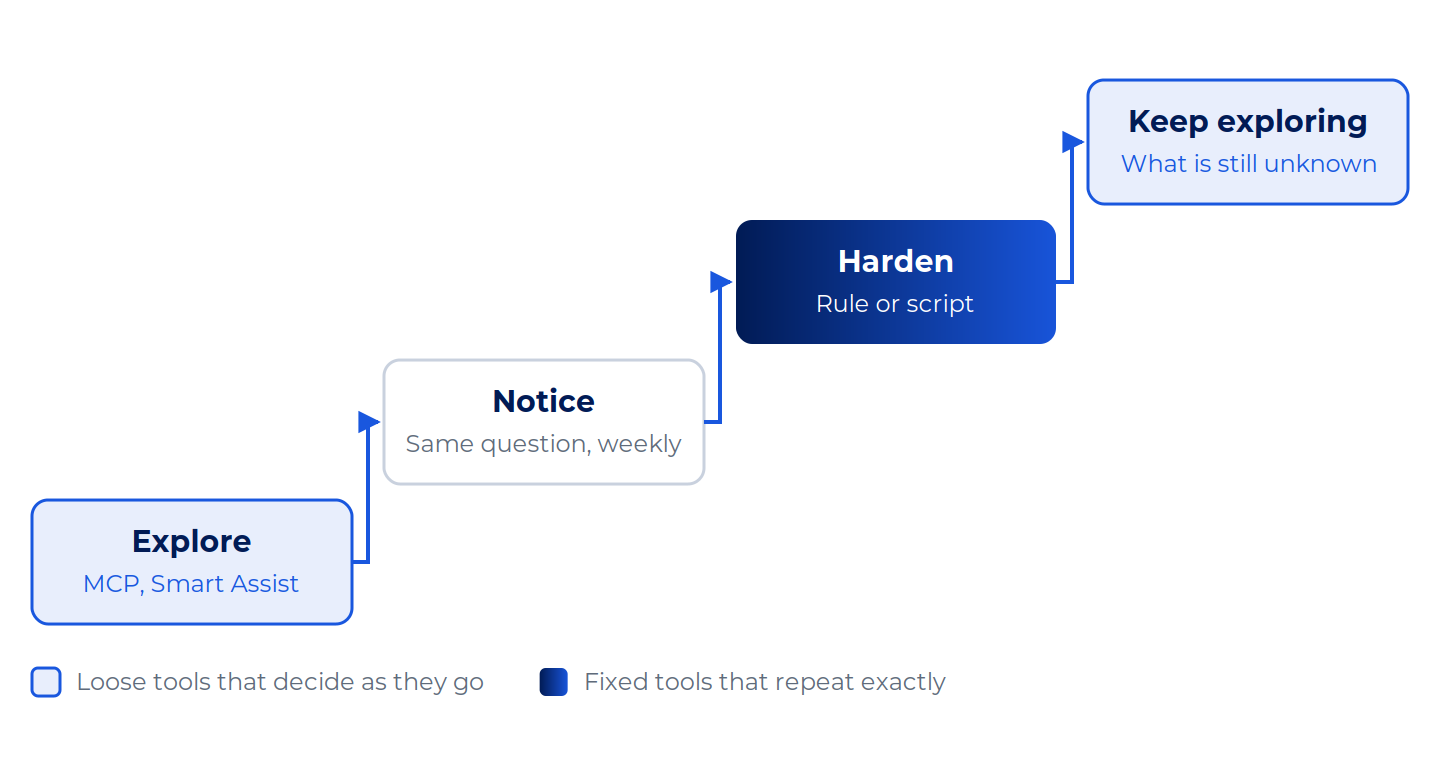
Loose tools find the shape of a problem. Fixed tools keep it.
Here is what climbing it looks like with one job, using a small demo tracker.
Explore. You ask your AI client which open items are more than a week past due. It turns "a week" into a specific date, applies it, and answers with a count and a breakdown by status. For the demo tracker, the answer is 6 items: three In Progress, two To Do and one Blocked. The Smartsheet MCP tools return exactly this, and the owner breakdown comes out as two, two, one and one. A follow-up ("who owns them?") works on the same filter without you repeating it.
Notice. The answer is useful, so the next Monday you ask again, and the Monday after. That is the signal: the question has stopped changing. The one thing still loose is the definition, because the AI picks a date each time.
Harden. Write the definition down once: not Closed, due date more than seven days before today. Put it in a function and test it against the edge cases. That function can read the sheet through the API and give the same answer every time, whether or not anyone remembers to ask.
Keep exploring. The follow-ups ("why is this one late?") still go to the AI client. The definition is fixed. The curiosity is not.
AI is good at finding the shape of a problem. Code is good at keeping that shape fixed once you have found it. Moving between them as a job matures is not a failure of your first choice. It is how the work should go.
One more way to ask: is the path known?
There is a second test that gives the same answer from a different angle. If you can write every step in advance and each step is a rule, the path is known: use an automation or your API. If the next step depends on what the last one found, such as reading comments to work out which projects are at risk and why, the path is found along the way. That is where Smart Assist and MCP earn their place.
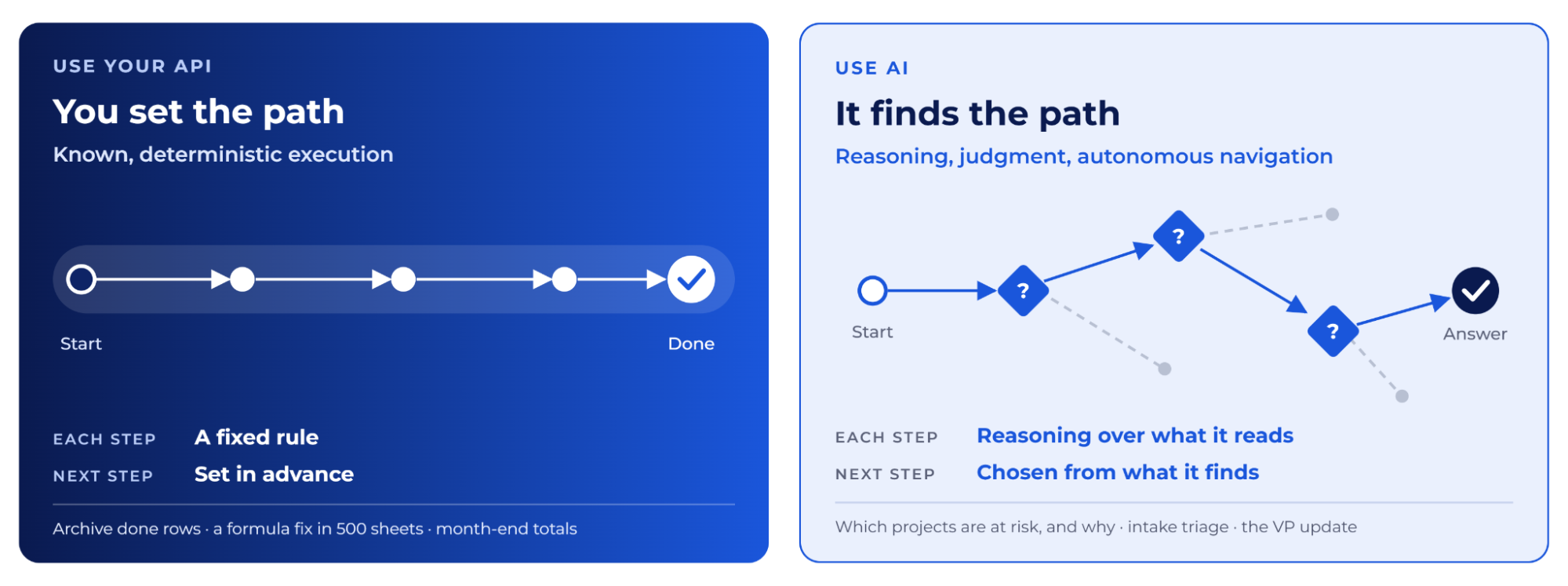
Your scripts keep running either way. MCP is another caller of the same API, not a replacement for it.
Four questions to ask in sixty seconds
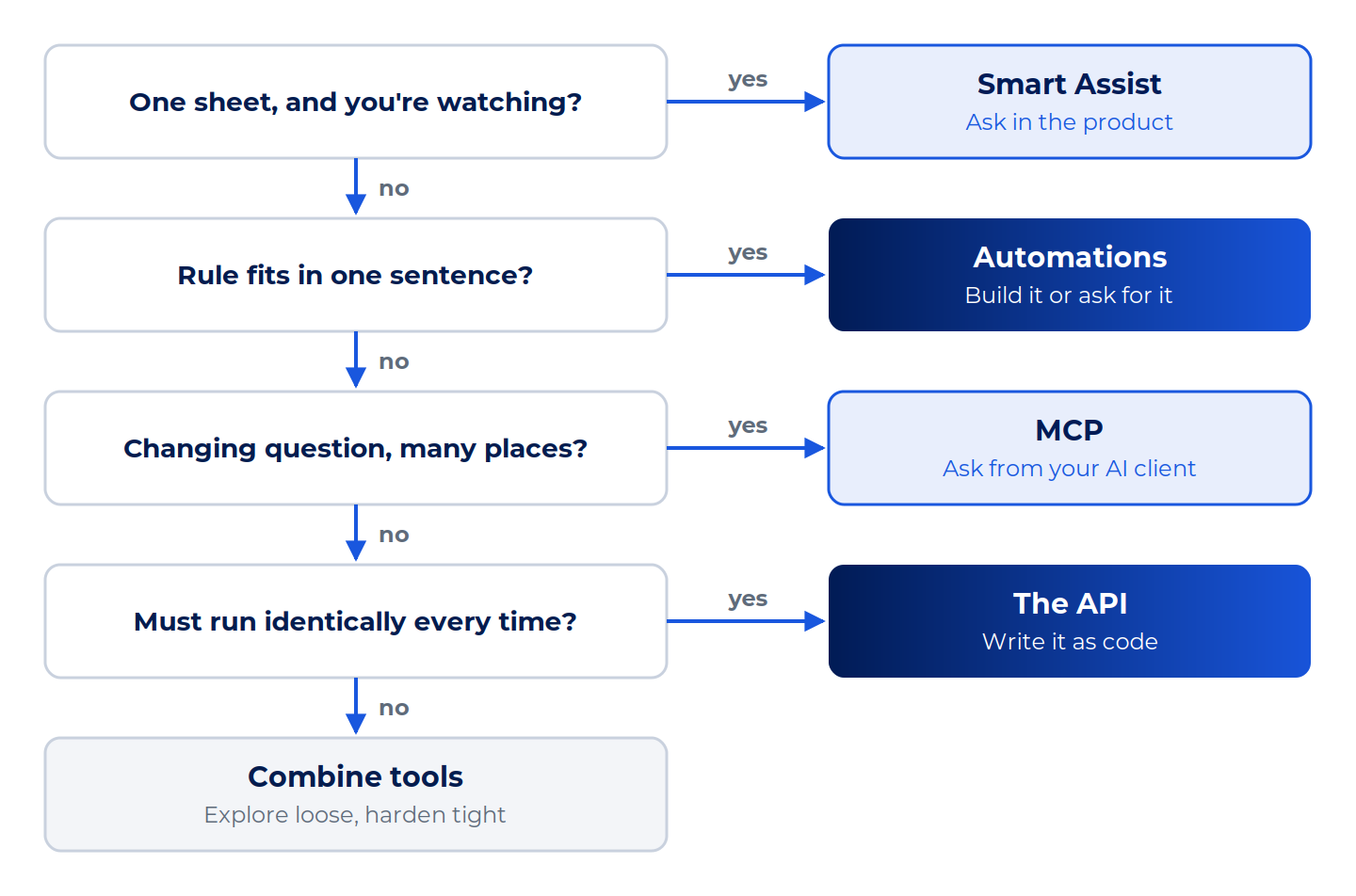
Start at the top and stop at the first yes.
If you answered yes to more than one, you are probably looking at a combination. That is normal, and the story that opened this post is a good example of one. Most real jobs are a mix. Code can compute the month-end totals while the AI explains what moved, or the AI can draft a change while the API applies it.
Your turn
Which of these do you reach for first, and where did it stop being the right one? Tell us in the Smartsheet Builders: MCP, Agents, and API community what you tried and where it broke. The best parts of this post came from members doing exactly that.
Since MCP is another caller of the same API, a solid API foundation puts you closer to AI-ready than you think: we’ll show how at From API Confidence to AI Readiness at ENGAGE 2026 (November 5, 4:00–5:00 PM).
Next in the series: how to use the AI you already have on your real work, and what to check before you connect it, from your AI client to your plan and your region.

