Article
Introducing CLI Power Tools for Smartsheet: Local agents. Platform depth. And the start of a library that's only going to grow.
Before the product, some beliefs.
We believe customers should bring whichever AI they already love. Claude, Copilot, Gemini, Agent 365, whatever ships next quarter — they all speak MCP, they all plug in. The AI layer is yours to choose. We're not trying to sell you a chatbot; we're trying to give yours something worth connecting to.
We believe AI should come to users where they already work. Chat window, sidebar, email assistant, IDE, terminal, Desktop app — same knowledge graph underneath, same governance, same permissions. The interface is the user's call. The intelligence is Smartsheet's job.
We believe depth matters more than demos. For years, our depth was held against us. We were the platform that did the most complex work — multi-year programs, full dependency graphs, row-level discussions, governance built before "AI governance" was a phrase — and the trade was that simpler tools were easier to learn.
Then AI showed up. And it turned out the thing that made Smartsheet "too complex" was exactly what AI needed to be useful. Generic AI on a thin product is a chatbot pretending to know your work. AI on Smartsheet is reading the dependency graph, the threads, the formulas, and the structure that exists because the work is real.
The depth wasn't a flaw waiting to be smoothed out. It was the substrate. And every project you run on Smartsheet makes the AI sharper, because it's reading real work, not a generic training set.
And we believe Claude Code — yes, the agentic surface everyone's been told is for developers — is actually one of the most powerful places a project manager can reach for today, when it's pointed at something deep enough to earn it.
That's the belief stack. Here's what we're shipping to prove it.
Introducing CLI Power Tools
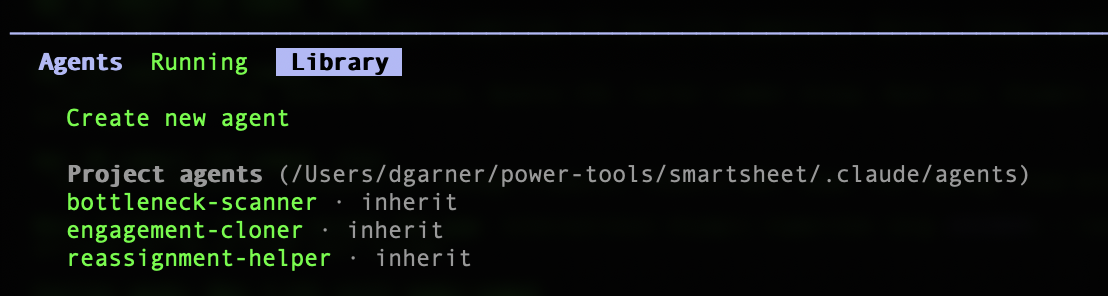
Today, we're releasing CLI Power Tools — a free, open-source pack of three Claude Code agents for project managers, purpose-built against the Smartsheet MCP server. They install in 60 seconds. They turn three of the most common PM tasks into a sentence you type instead of an hour you click through.
Power Tool | Stage | What it does |
|---|---|---|
bottleneck-scanner | READ
| Finds overloaded people across your portfolio. Reads row-level discussions for context before suggesting anything. Strictly read-only. |
reassignment-helper | WRITE
| Moves one person's work to another across every sheet they touch. Previews, confirms, batches, leaves a paper trail. |
engagement-cloner | CREATE
| Clones a project sheet's structure (not its data) into a new engagement. Flags anything client-specific that shouldn't carry over. |
Three tools, three stages of how humans actually build trust with AI on their work: Read → Write → Create. Use them individually. Chain them together. Schedule them to run before you wake up. Share them across your team like code.
These three are just the start. We're treating Power Tools as a growing library — a Daily Cadence pack, a Governance pack, a Setup pack, and more after that. Each one will solve real PM, PMO, and program work the same way: opinionated, scoped, and ready to install in a minute. Pull requests welcome. The catalog grows from here.
How it works
Claude Code now runs in two places: the terminal you grew up calling scary, and the Code Tab inside Claude Desktop that you can click without ever opening a shell. Same engine, same agents, same Power Tools. Pick the one you're comfortable in.
Shell
npm install -g @anthropic-ai/claude-code
# Option 2: Claude Desktop (Code Tab is built in)
# Download from claude.com/download
# Then, in either:
git clone https://github.com/smartsheet/cli-agent-power-tools
claude mcp add --transport http smartsheet https://mcp.smartsheet.com
claude
Then type:
None
And watch.
Three prompts. Three hours back.
Most AI tools have no idea who's on your team, what they said in a comment last Thursday, or what "overloaded" looks like in your specific practice. These do — because they're reading your actual work in Smartsheet, not a generic training set.
"Who's the bottleneck across my active projects?"
bottleneck-scanner reads every active sheet in your portfolio, counts tasks per owner, and reads discussion threads on the people it flags. If Sarah left a comment on Thursday saying she's underwater on the Atlas account, the agent has already read that before it considers adding anything to her plate.
Today, manually | With AI, conversationally |
|---|---|
~45 minutes of opening sheets and counting by owner | ~20 seconds, sourced live, with context from the threads |
"Reassign everything from Alex to Jordan."
reassignment-helper scans every sheet Alex owns, reads row context so nothing moves mid-blocker, and shows exactly which rows will change, grouped by engagement. Nothing updates until you confirm. If Jordan doesn't have access to a sheet, the agent flags that first rather than breaking the reassignment halfway through.
Today, manually | With AI, conversationally |
|---|---|
~30 minutes of filtering each sheet and clicking each row | ~15 seconds, full preview, one confirmation |
"Clone this project sheet for a new engagement."
engagement-cloner reads structure — columns, dropdowns, hierarchy — not the previous engagement's data. It proposes a clean sheet and flags anything client-specific that shouldn't carry over.
Today, manually | With AI, conversationally |
|---|---|
~60 minutes to find, copy, clear, rename, re-share | ~25 seconds to preview, approve, populate |
In a recent analysis with one of our customers, a global consulting firm, those three prompts alone added up to hundreds of hours reclaimed per month. There are 121 more prompts in the Cookbook.
What it actually looks like running
I ran all three Power Tools in parallel against a Q2 Platform Launch demo sheet I built for testing — 24 rows, four fictional team members, one prompt. About two minutes later, here's what came back.
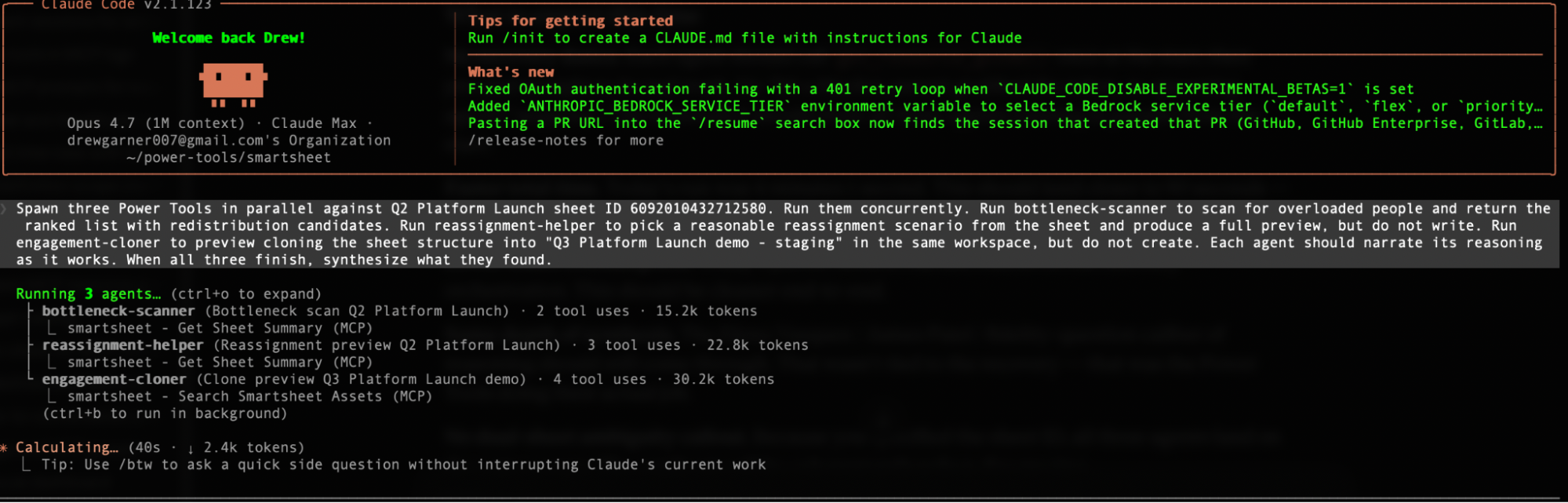
Three specialized agents, one prompt, running concurrently against the same live work graph. Each in its own context, each with its own restricted toolset, each doing its own job. Try that in a chat window and you're opening five to ten separate sessions, copying context between them, re-typing what you already explained, hoping you don't lose track of which conversation said what. Here, it's one prompt, three answers, and one synthesized read-out. That's the gap.
When all three finished, the synthesis came back something like this:
Sarah Chen — underwater, self-flagged. Five active rows, 100% overdue, weighted load roughly 22.5 against a team average of 11. She left a discussion comment on Mar 28 saying she's stretched too thin across API work and frontend.
Marcus Wong — looks overloaded, actually externally blocked. Three critical/high rows, two stuck on AWS account approval since Feb 28, and Okta sandbox creds. Reassigning him is net-negative; he needs escalation, not bodies.
Tension worth flagging: the bottleneck scan's top recommendation was Sarah → James (idle, accessibility/UI background). The reassignment preview chose Sarah → Lisa (more open capacity but docs/training, not React). Before writing, decide which: James fits the skillset, Lisa has the bandwidth.
Three things happening here that are worth dwelling on.
First, the agents read the discussion threads. Sarah's "stretched too thin" comment from Mar 28 — that's not in a status field, that's not in a priority column, that's a thread comment buried in a row. Most automated tools would have flagged Sarah as overloaded based on her row count and stopped there. This one understood why she was overloaded, in her own words.
Second, the agents disagreed with each other and surfaced it. Look at that last paragraph. The bottleneck scanner thought James should absorb Sarah's work because of the skillset fit. The reassignment helper picked Lisa because of available capacity. They reached different conclusions about the same sheet, and instead of papering over the disagreement or just picking one, the parent agent surfaced it as a "tension worth flagging" — gave me both perspectives, named the actual trade-off, and waited for me to decide before any writes.
That's the difference between AI doing work and AI doing thinking. Both are useful. The second one is what changes how you run a portfolio.
It's also what I meant when I wrote in March about the "expert in the middle" principle: AI analyzes and recommends, humans decide. The synthesis above is that principle as code — two agents looked at the same data, reached different conclusions, and the system surfaced the disagreement instead of papering over it. Nothing wrote until I picked.
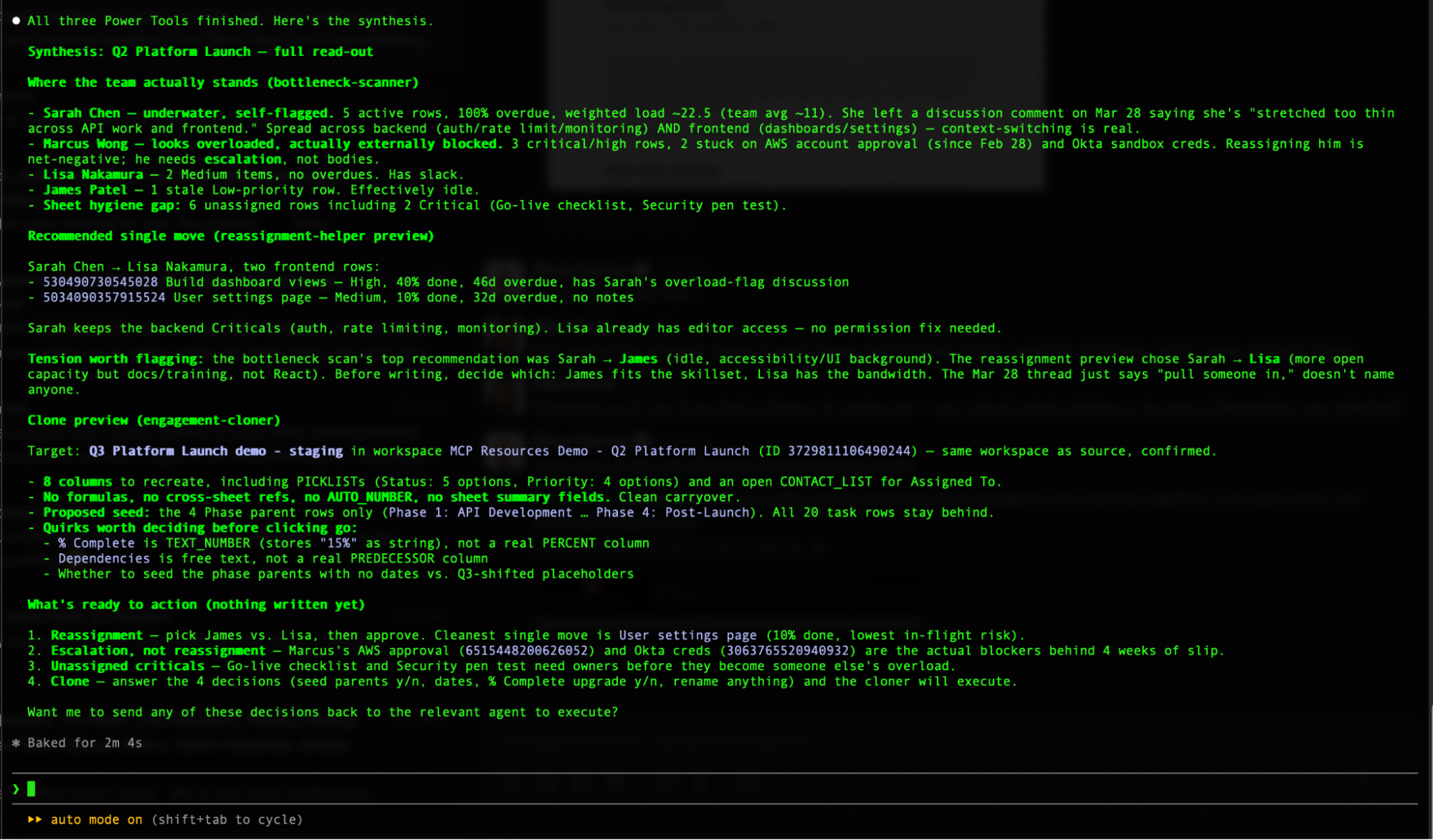
Third, every safeguard held. No writes happened. No assignments changed. The clone didn't execute. Three agents fanned out, did their work, came back with everything I needed to make the call, and stopped at the moment a human decision was required.
Yesterday, this would have been a Friday afternoon. This week, it was a prompt and a coffee.
Every safeguard you'd want is already there
Responsible AI isn't a value statement at Smartsheet. It's an architectural requirement. I wrote about why earlier this year — the four pillars we design every AI capability against. Power Tools weren't an exception to those principles. They were the first chance to ship them.
In practice:
Every write is previewed before it happens. Every change requires your approval. Every chain of actions can be stage-gated with explicit human sign-off at each step. Every Power Tool runs inside your existing Smartsheet permissions — it cannot touch anything you can't already see. And every action leaves a paper trail in discussions, so you can audit exactly what was done, when, and by whom.
This isn't AI doing things to your projects. This is AI doing the hard thinking while you stay in charge of every decision that matters.
But wait — why Claude Code? I already have Claude in my browser.
Years ago Neal Stephenson wrote a wonderful essay called In the Beginning… Was the Command Line. One passage in it has stuck with me for twenty-five years.
He describes two drills. The first is the Black & Decker most of us have in the garage — plastic, light, safety-conscious, forgiving. Perfect for hanging a picture. The second is the Milwaukee Hole Hawg — a professional framer's drill, all metal, no clutch, designed to drive a 1-inch auger through a stack of floor joists. It has no interest in being forgiving. If the bit binds, it will twist your arm. Professional framers love it anyway, because it does what lighter drills cannot: it does the real work, at the real pace, on the real job.
Stephenson's point was that these aren't better or worse tools. They're tools for different jobs.
The chat window is the Black & Decker. Beautiful, approachable, forgiving. Perfect for asking a one-off question about one sheet. You should keep using it. It's doing real work for you.
Claude Code is the Hole Hawg.
It's the tool you reach for when the job is bigger than one question. When you want a scan to run Monday morning whether you remember it or not. When you want the same prompt running consistently for every PM on your team, instead of each person typing their own version. When you want your AI output to pipe straight into Slack, or email, or your BI stack without you being the copy-paste bridge. When the job is portfolio-scale, not curiosity-scale.
And — here's something most people miss — Claude Code now runs inside Claude Desktop. The Code Tab is right there in the app you already have open. You don't have to open a terminal to use it; you can if you want, but you don't have to. Same agents, same Power Tools, two front doors.
Same AI. Same MCP. Same conversational interface. Different tool, different job.
Here's what that means in practice — three limits you've probably already bumped into with chat, and three things Claude Code unlocks instead:
Chat limit | Claude Code unlock |
|---|---|
Chat conversations end when you close the tab. Your prompt doesn't exist tomorrow unless you remember to type it again. | Your workflows run whether you're there or not. The same scan you'd type in chat can run Monday morning at 8 a.m. automatically. Daily overload scans landing in Slack before standup. Friday stakeholder drafts waiting in your inbox Monday morning. Entire categories of work move from "things I do" to "things that happen." |
Chat lives in a walled garden. You can copy-paste output to Slack or email, but the conversation can't connect to anything else. | Your AI becomes the connective tissue between your tools. A bottleneck scan can post straight to Slack. A reassignment can trigger when someone hits a roll-off milestone. A weekly rollup can auto-draft into email. Chat is a conversation. Claude Code is a nervous system. |
Chat prompts live in your head. Your genius scan is a thing you know how to ask for. Your team doesn't. | Your best prompts become shared team muscle memory. Your scan becomes a file you share the same way you'd share a template. Every PM runs it the same way and gets the same result. Your junior PM starts day one with your senior PM's instincts already installed. |
The chat window is a great drill. Claude Code is the Hole Hawg. Pick the right tool for the job you're actually doing.
The pointed part
Everyone in enterprise software this quarter is gluing a chatbot onto a shallow product and calling it AI. Talk to your todo list. Ask your spreadsheet a question. Cute demos; not much underneath.
Our MCP isn't reaching into a todo list. It's reaching into twenty years of workflow engine, a full dependency graph, row-level discussion threads, workspace hierarchy, formula resolution, cross-sheet references, a permission model, and governance that existed before "AI governance" was a phrase anyone said out loud. The four pillars we design AI against — privacy, accountability, reliability, transparency — aren't bolted onto Power Tools. They're the substrate Power Tools were built into.
Put a terminal on top of a calendar app — you get a gimmick. Put a terminal on top of that — and a project manager can run a portfolio from it.
Claude Code isn't the point. The Smartsheet knowledge graph is. Local agents are how you finally get to compose against twenty years of operational depth at the speed of a sentence — in whatever surface you're already comfortable in, with whichever AI you already picked. The compounding advantage of using Smartsheet AI on your work is that it gets sharper the more you run it. Generic AI starts from scratch every time. Ours doesn't.
And nobody else in our category has this yet. That's the window.
Go get it
github.com/smartsheet/cli-agent-power-tools
Sixty-second install. Free, MIT-licensed. Three Power Tools today. Many more coming — Daily Cadence, Governance, Setup, and packs we haven't even named yet. PRs welcome.
Bring whichever AI you like. We've got the depth; you've got the keyboard.
Go reclaim your Friday afternoon.
Drew Garner is SVP of AI & Platform Strategy at Smartsheet. Former Linux admin. Recovering clicker. Still reads Neal Stephenson.