Article
4+1 solutions developers can build on Smartsheet API - from bi-directional integrations to AI-powered intelligence
Most developers know Smartsheet as a work management platform. Fewer know it's also enterprise-grade API infrastructure — processing 1 billion API calls daily across ~120 endpoint paths, with full CRUD operations, real-time webhooks, bulk endpoints, and SDKs.
That's not a sandbox. It's production infrastructure purpose-built for the complexity Fortune 500 companies demand.
Whether you're connecting enterprise systems, automating workflows that currently eat up hours of manual effort, or building custom applications on top of the Smartsheet work management engine, the API gives you full programmatic control.
Here are four real-world builds that show the range of what's possible today — plus a look at what's coming next. Each one starts with the same first step, and there's a video at the end that gets you there in minutes.
1. Bi-directional CRM sync
The problem: Sales closes deals in your CRM. Delivery teams manage projects in Smartsheet. The gap between them? A manual, error-prone handoff that delays project kickoffs, creates data inconsistencies, and frustrates both teams.
What you build: A custom integration using Smartsheet REST API and webhooks that listens for closed-won events in your CRM, automatically provisions Smartsheet project structures from templates, and pushes delivery milestones back to the CRM in real time. Webhooks eliminate polling overhead — your integration responds to events as they happen, not on a schedule.
Technical highlights: REST API for CRUD operations on sheets and rows. Webhooks for event-driven triggers that fire instantly when data changes. OAuth 2.0 for secure cross-platform authentication. SDK support in Python, Java, C#, and Node.js to accelerate development.
Developer impact: No more maintaining brittle polling scripts or debugging sync failures at 2 AM. Webhooks handle event detection natively, OAuth 2.0 eliminates credential management headaches, and SDKs in your language of choice mean you're not writing raw HTTP calls. One integration codebase handles both directions — build it once, maintain it minimally.
Business impact: Single source of truth across revenue and delivery teams. Zero manual handoff. Project kickoff time drops from days to minutes.
Here's what the webhook handler looks like — under 25 lines to receive real-time Smartsheet changes and push them to your CRM. If you want to learn more on how webhooks work, check out this guide.
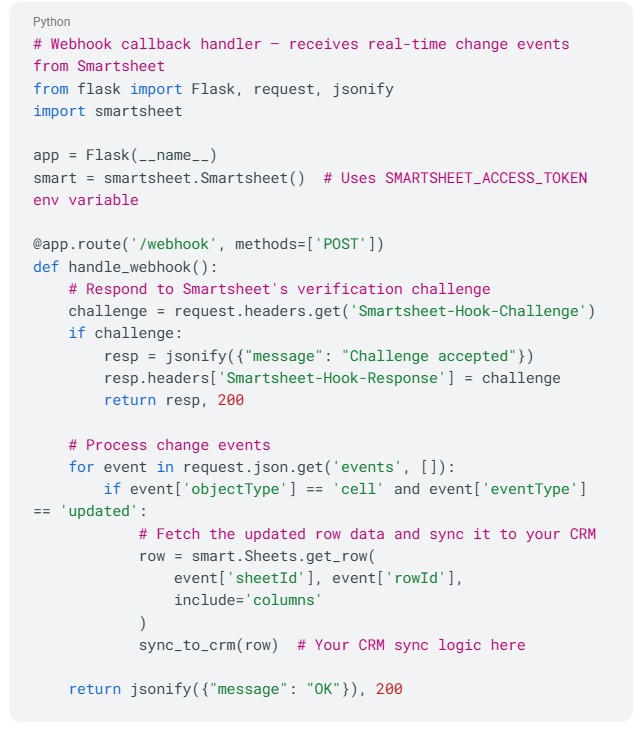
*Code examples are provided for illustrative purposes and may require adaptation for your specific implementation.
2. Automated cross-portfolio reporting engine
The problem: Someone on your team spends hours every week manually pulling data across dozens of project sheets, compiling it into executive summaries, and distributing them. The process is tedious, error-prone, and outdated by the time it reaches leadership.
What you build: A custom reporting engine that uses the API's bulk operations and cross-sheet capabilities to aggregate data across your entire portfolio, apply transformation logic, generate formatted outputs, and distribute them — either on a schedule or triggered by webhook events when key milestones change.
Technical highlights: Bulk operations API for efficient data retrieval at scale. Webhooks for event-triggered report generation. Cross-sheet references API for pulling data across multiple sheets. Token-based pagination for handling large datasets without memory issues.
Developer impact: Stop being the person who gets pinged every Monday to "pull the numbers." Bulk operations and pagination mean you're not writing workarounds for rate limits or memory constraints. Webhook-triggered generation means reports build themselves when data changes.
Business impact: Hours of manual compilation eliminated every week. Leadership gets consistent, accurate reporting with real-time triggers — not stale weekly snapshots that are outdated before they're read.
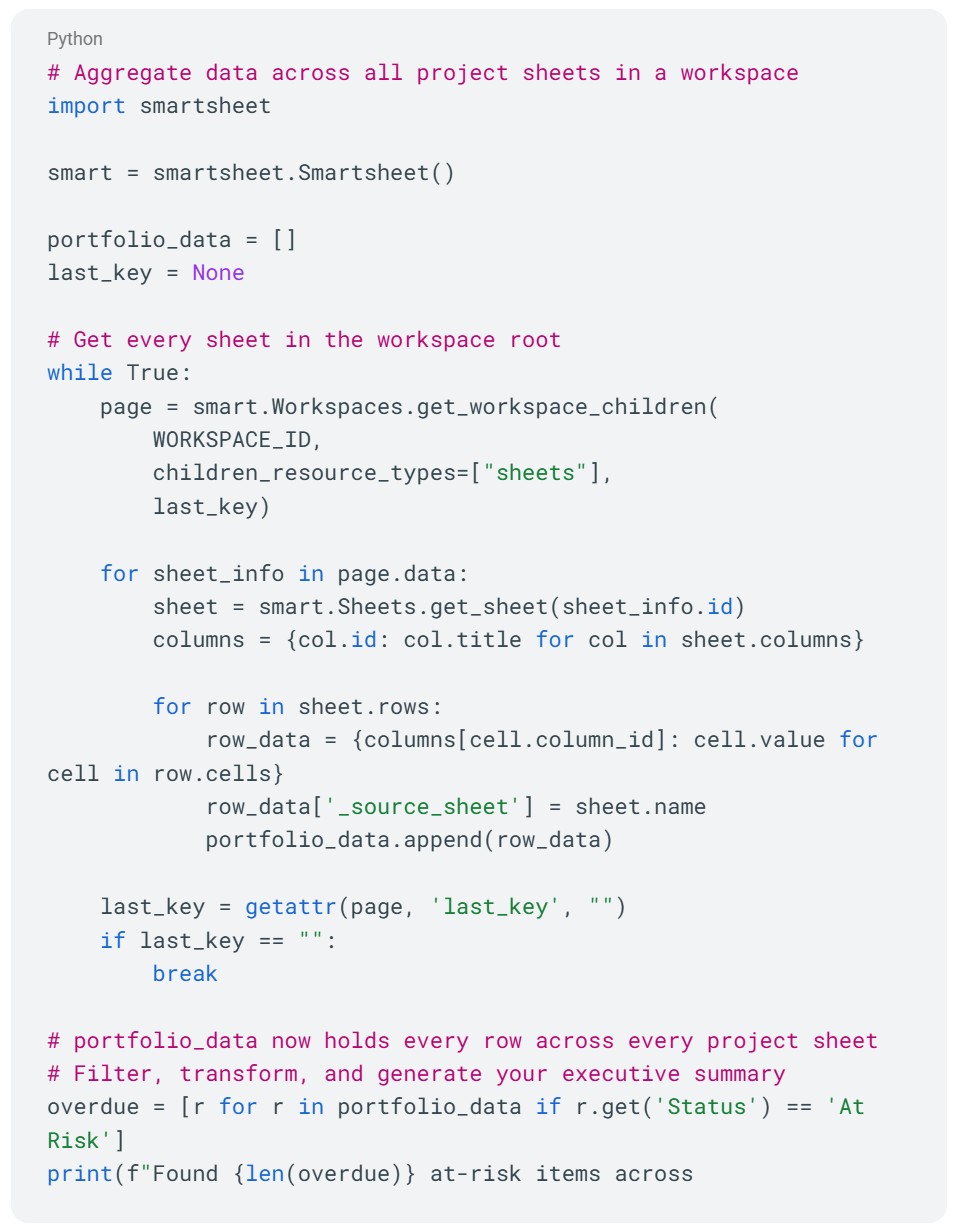
Here's how little code it takes to pull data across an entire portfolio — every sheet, every row, one unified dataset:
3. Client-facing project portal
The problem: External stakeholders need project visibility, but granting additional platform licenses isn't practical at scale and sharing individual sheets creates governance headaches. You need a way to give clients a branded, controlled view of their project data.
What you build: A custom web application using your preferred frontend framework that authenticates via OAuth 2.0, pulls live project data through the REST API, and presents it in a branded portal. Clients log in, see their project status, milestones, deliverables, and documents — all with role-based access controls you define. They never need a Smartsheet account.
Technical highlights: OAuth 2.0 for secure delegated access without sharing credentials. REST API for real-time data retrieval. SDKs for streamlined backend development. Cell history and audit capabilities for full transparency on changes.
Developer impact: Build with whatever frontend framework your team already knows — React, Vue, Angular, it doesn't matter. The API handles data retrieval and permissioning, so you're not reinventing access control logic. No Smartsheet-specific UI constraints. You own the UX entirely, and the SDK handles the plumbing.
Business impact: Professional, branded client experience without additional platform licenses. Fewer "where are we on this?" emails. Full control over what external stakeholders see and when they see it.
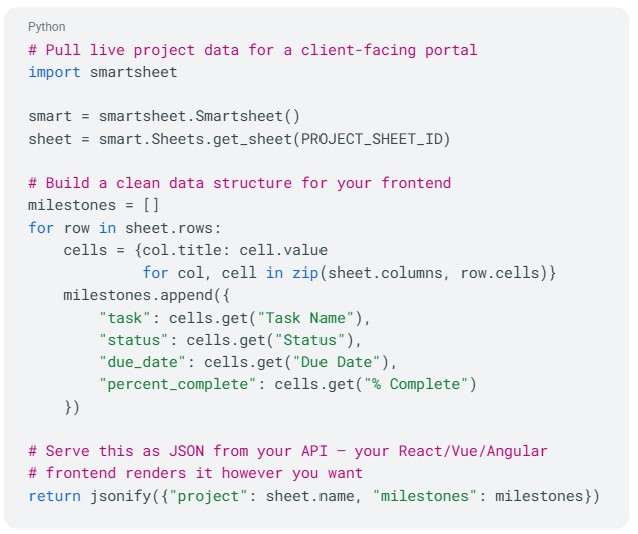
The API call behind a client portal is straightforward — fetch the sheet, shape the data, serve it to your frontend:
4. Bulk operations for portfolio management
The problem: Managing hundreds of project sheets means structural changes — adding columns, updating cross-sheet references, replicating templates, enforcing naming conventions — become a multi-day manual grind with high risk of inconsistency. One mistake propagates across your entire portfolio.
What you build: A programmatic portfolio management tool that applies changes across your entire sheet inventory in minutes. New column structures, updated formulas, template replication with custom parameters, and cross-sheet reference management — all with validation logic, error handling, and rollback capabilities built in.
Technical highlights: Bulk operation endpoints for mass updates in single requests. CRUD operations on columns and sheet structures. Cross-sheet references API for maintaining relationships. Import/export endpoints for data migration scenarios.
Developer impact: This is the kind of tooling that makes you a hero internally. Instead of fielding 50 tickets to "add a column to every project sheet," you write one script with validation and rollback built in. Bulk endpoints mean you're not looping through hundreds of individual API calls. Less code, fewer failure points, and a pattern you can reuse every time the PMO changes its mind.
Business impact: What took days of manual work completed in minutes with perfect consistency. This is especially valuable for agencies, consultancies, and enterprise PMOs managing hundreds of similar project structures where one structural change needs to propagate everywhere, reliably.
Instead of manually updating hundreds of sheets, one script handles the entire portfolio — with error tracking built in:

What’s next
Everything above, you can build today. What follows is what's coming — and it changes what "building on Smartsheet" means for developers working with AI.
AI-powered project intelligence
The problem: Project data lives in Smartsheet, but extracting insights like overdue tasks, resource conflicts, or risk patterns still requires manual queries or custom dashboards. And building a separate integration for every AI tool? That's duplicated effort across a fast-moving landscape.
Coming soon: A Smartsheet MCP Server that allows teams to connect any MCP-compliant AI tool (like Claude, ChatGPT, Gemini or custom ones) to your Smartsheet data. One protocol. No vendor lock-in. Rich contextual metadata that powers real intelligence, not generic answers. Stay tuned!
Get started: Your first API call
Every one of these builds starts the same way: generating an API access token, making your first call, and understanding the response structure. We've put together a step-by-step video that walks you through the entire process — from zero to a working API call in minutes.

Once you've made your first call, here's where to go next:
- Developer Portal — Your home base for building on Smartsheet
- API Documentation — Full reference for all endpoints, authentication, and SDKs
- SDKs — Client libraries in Python, Java, C#, Node.js, and more to accelerate your development
- Developer Community — Forums and support channels where developers share solutions and troubleshoot together
Build on proven enterprise infrastructure
Smartsheet API isn't an afterthought — it's enterprise-grade infrastructure that Fortune 500 companies depend on for mission-critical operations. Whether you start with a CRM sync or an AI-powered reporting engine, you're building on the same battle-tested foundation processing 1 billion daily API calls.
Start with the video. Explore the docs. Build your first integration. And for complex enterprise implementations, the Smartsheet Professional Services team can help accelerate your architecture.
Watch the getting started video | Explore the developer docs | Visit the developer portal
We want to hear from you
What are you building with the Smartsheet API? Which of these use cases resonates most with the challenges you're solving? Are there integration patterns or technical deep-dives you'd like us to cover next?
Drop your thoughts in the Smartsheet Developer Community — whether it's a question about getting started, a feature request, or a showcase of something you've built. Your feedback directly shapes what we write about, what we build, and how we evolve the developer ecosystem.
And if you've built something you're proud of, we'd love to feature it.
Reach out to us — the best API stories come from the developers using it every day.