Article
Building The Business Case to Switch from Microsoft Project

Microsoft Project has long been a standard for project planning, but for many organizations today, it’s becoming harder to justify as collaboration needs evolve and Microsoft Project Online approaches its retirement in September 2026.
In this article, we’ll walk through how to build a clear, compelling business case to switch from Microsoft Project. We’ll cover how to understand your team’s workflows, quantify the benefits of switching, plan and communicate the rollout, and compare leading alternatives so you can confidently justify the move to a modern project management solution.
Understand How Your Team Likes to Work
When choosing a Microsoft Project alternative, it’s important to understand how your team likes to work. Teams vary in how they plan schedules, collaborate, and track progress. Understanding these preferences helps you choose a solution that fits your workflows and has a high adoption rate. It should also justify moving away from Microsoft Project.
Consider the following factors when making your decision:
- Existing Systems: Identify the key systems that your organization relies on that Microsoft Project integrates with. These may include Microsoft 365 tools such as Outlook, Teams, or SharePoint. Consider whether your MS Project alternative will need to integrate with these same systems to preserve workflows and data continuity.
- Scheduling Complexity: Assess how deeply your team relies on Microsoft Project’s critical path analysis, task dependencies, baselines, and resource leveling. Some teams use Project primarily for detailed, daily scheduling, while others only maintain high-level timelines. The nature of your schedules will determine whether you need a full-fledged replacement for those capabilities or a lighter, more collaborative planning tool.
- Collaboration Model: Identify how updates and communication currently happen around Microsoft Project plans. Are project managers responsible for maintaining schedules while team members report status elsewhere, or do contributors update tasks directly? Many organizations move away from Microsoft Project because it centralizes ownership with project managers.
- Portfolio-Level Visibility: Understand how leadership currently gets cross-project insight from Microsoft Project. Are teams using Project Online, Project Server, Power BI connections, or manual rollups in Excel to see portfolio health? If reporting and executive dashboards are a pain point today, keep this in mind when evaluating these features in alternative tools.
Methodology Flexibility: Clarify whether Microsoft Project is being used for traditional Waterfall scheduling, hybrid delivery, or alongside Agile tools like Jira or Azure DevOps. Teams often outgrow Project when they need Kanban boards, sprint planning, or continuous reprioritization.
Benefits of Switching from Microsoft Project
Switching from Microsoft Project can help organizations improve productivity, transparency, and day-to-day execution across teams. While Microsoft Project is known for its scheduling capabilities, many teams find that newer alternatives better support real-time collaboration, multi-project visibility, and broad team participation without requiring every contributor to be a specialist user.
Here are some benefits to switching from Microsoft Project:- Increased Productivity: In many organizations using Microsoft Project, project plans are accessed by project managers but not the wider team. By enabling team members’ access to project details, managers reduce the amount of time spent manually making updates and tracking down statuses. This leaves more time to focus on project execution and result delivery.
- Centralized Control: Under many Microsoft Project licensing configurations, users who need direct access to full project schedules typically require a Project license, and read‑only access is often restricted to licensed users. Many alternatives offer a more flexible view‑only or guest access, which reduces time spent answering questions and providing information. It also increases transparency for stakeholders.
- Improved Visibility: In Microsoft Project, it can be difficult for non-PM stakeholders to maintain visibility into the work getting done. With real-time visibility into project tasks and responsibilities, you can identify items that could be at-risk and quickly mitigate any potential issues. Additionally, with a clear, real-time view into the work getting done, users can help keep team members on track.
- Access on Any Device: When access to Microsoft Project is limited to certain devices, it hinders productivity. With the right alternative, remote access and the ability to update plans from a mobile device can empower teams to make updates as they come in.
Why This Shift Matters Now
This move toward more collaborative, adaptive platforms mirrors broader industry trends. According to PMI’s 2025 Pulse of the Profession report, high-performing organizations are increasingly prioritizing business alignment and adaptability over rigid, schedule-centric delivery models originally built for Waterfall planning. That shift underscores why many leaders are re-evaluating tools like Microsoft Project and making the case for modern platforms designed to support these evolving priorities.
Develop a Plan for Launching the Microsoft Project Alternative
To develop a plan for launching a Microsoft Project alternative, leaders should audit their current Project usage and define success metrics. Get input from real teams when piloting the new tool. Make sure to standardize templates and permissions, provide role-based training, and secure executive sponsorship. It also helps to migrate projects in phases while tracking adoption, productivity, and portfolio-level visibility.
Once you’ve outlined the business benefits of switching from Microsoft Project, build a structured implementation plan and secure organizational buy-in. Here are the steps to develop this plan:
- Gather Stakeholder Input
Involve project management, operations, and IT teams early to understand technical requirements, risks, and dependencies. Gather input from the users who will be making the transition and how it will change their processes. Prepare to clearly explain how the investment will improve productivity and outcomes. - Secure Executive Buy-In
Present the strategic rationale for the change and align the rollout to business goals. Approval from sponsors will make it easier to allocate resources and drive adoption across teams. - Plan the Transition
Identify which current processes, projects, and resources will be affected so teams are able to adjust to the change. Define the scope, sequence the rollout, and break large migration tasks into manageable phases. - Track Progress and Accountability
Set measurable targets, milestones, and success metrics for each stage of the rollout. Assign ownership for tasks and notify team members of their responsibilities to maintain momentum. - Manage Work and Documentation Centrally
Use a single system to plan the migration effort and store key documentation, training materials, and decisions. This way, stakeholders always know where to find the latest information. Report on Status and Risks
Create an implementation dashboard or report that surfaces deadlines, progress, risks, and upcoming milestones. This allows leaders to quickly assess whether the transition is on track and intervene when needed.Create a Change Management Communication Plan
To create a change management communication plan for switching from Microsoft Project, ensure proper communication and feedback channels. Define your key messages and identify impacted roles. Assign internal experts for each department to lead adoption, and schedule ongoing updates before, during, and after rollout. A strong plan emphasizes transparency, two-way feedback, and flexible training resources.
Ensure your change management plan focuses on the following factors:
- Communicate Openly: Provide clear and open lines of communication between everyone at the organization, including stakeholders, upper management, and individual contributors.
- Facilitate Feedback: Offer avenues for teams to express questions and concerns with the new tool in order to mitigate any issues.
- Designate a Champion: Identify a person on each team or within each department to be the subject matter expert when it comes to the new solution or process. This will empower those who have adopted the tool and minimize friction.
- Equip Your Team: Provide tools to help teams through the transition and adoption, such as tutorials, guides, trainings, or open discussions to address concerns.
- Make Learning Flexible: Store resources regarding the change in one location that is easily available to everyone, at any time, and continue to update these resources as you keep using the tool and getting feedback.
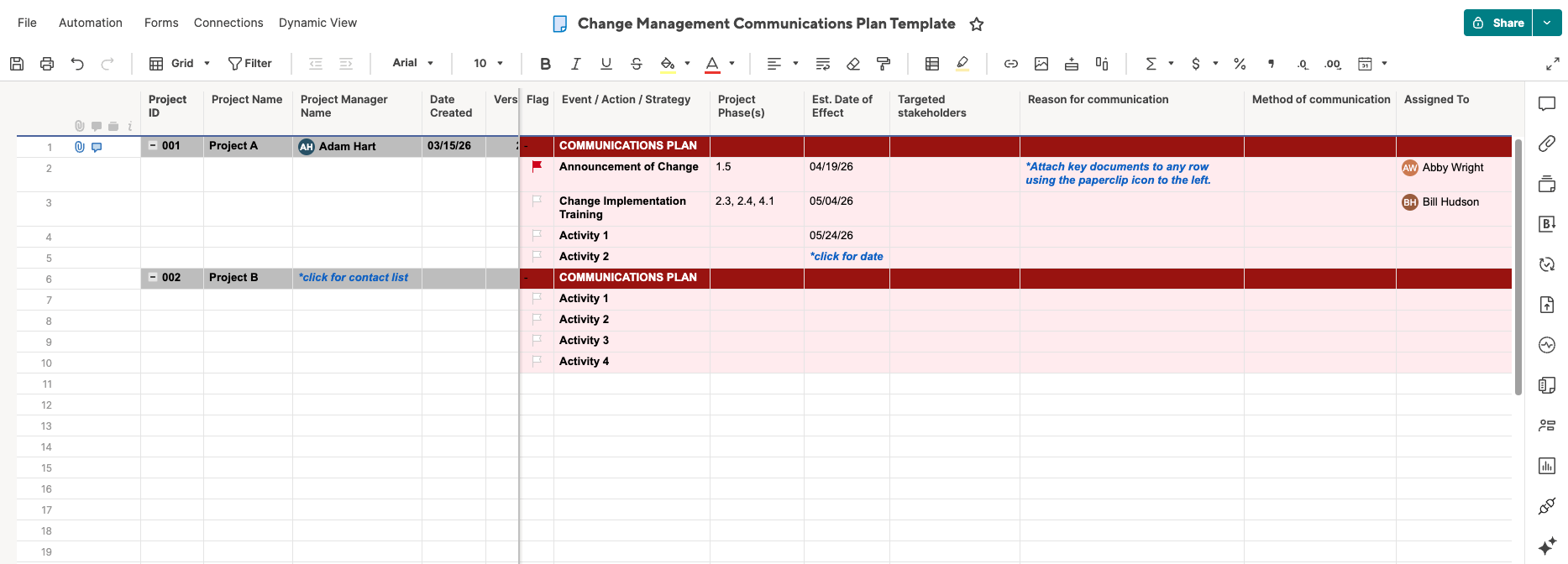
Get the Change Management Communication Plan Template for Smartsheet
Use this template to help your team clearly communicate their plan for switching from Microsoft Project. It provides space to note the reason for and method of communication, and to flag high-priority items.
For more help developing your plan, try one of these downloadable change management communication plan templates. You can also find expert tips in this guide to writing an effective change management plan.
Start Building Your Case for the Microsoft Project Alternative
To make the case for switching from Microsoft Project, leaders should connect evolving needs to measurable outcomes. Delivery needs include real-time collaboration, dynamic reprioritization, AI-assisted work, and portfolio-level visibility. Business outcomes include productivity, adaptability, and ROI.
For decades, Microsoft Project has been valued for its rigorous, schedule-driven planning. But today’s project environments look very different. Teams are managing fast-changing priorities, cross-functional workstreams, distributed contributors, and increasing executive pressure to prove strategic impact.
Key findings in the 2026 Project and Portfolio Management Priorities Report underscore this shift:
- 97% of project and portfolio management professionals report already using AI in their work, yet fewer than half trust AI to operate without human supervision. This highlights the gap between experimentation and real operational value in many current toolsets.
- 98% say they must frequently reprioritize work due to business change, signaling that static, schedule-centric planning models are no longer sufficient for most organizations.
- While 74% worry their role could be replaced by AI within five years, 87% believe AI can help transform how they work. This indicates a growing demand for platforms that augment human decision-making rather than complicate it.
- 61% report that their current tools make it difficult to demonstrate measurable contributions to project outcomes, and only 39% say their systems clearly connect day-to-day execution to strategic objectives. These are two major red flags for leaders trying to justify continued investment in legacy planning software.
Together, these findings suggest that many organizations are outgrowing tools designed primarily for long-range scheduling and controlled environments. To justify a move away from Microsoft Project, business cases increasingly focus on these three strategic imperatives:
- Dynamic Prioritization: With nearly all PPM professionals constantly adjusting plans to reflect changing business conditions, modern alternatives emphasize flexible scheduling, real-time updates, and collaborative replanning. These capabilities help teams respond faster than file-based or project management-only systems.
- AI Adoption With Accountability: Although AI is now ubiquitous in project work, trust remains limited when insights are disconnected from execution. Leaders evaluating Microsoft Project replacements are looking for platforms that embed intelligence directly into planning, forecasting, reporting, and risk identification. These platforms allow AI to become operational rather than experimental.
- Demonstrating Outcomes and Strategic Impact: When most teams struggle to show how project delivery ties to business goals, the business case naturally shifts toward tools that unify work data, dashboards, and portfolio reporting. Visibility into progress, resource usage, and strategic alignment is central to executive decision-making.
Framing the Business Case
An effective business case for replacing Microsoft Project does more than compare feature lists. It connects tool limitations to organizational pain points: slow updates, limited access for contributors, manual reporting, difficulty adapting plans, and weak visibility into strategic outcomes.
By anchoring the conversation in productivity gains, faster decision-making, improved transparency, and stronger portfolio governance, leaders can move the discussion from “What software should we buy?” to “How will this change improve how the business executes?”
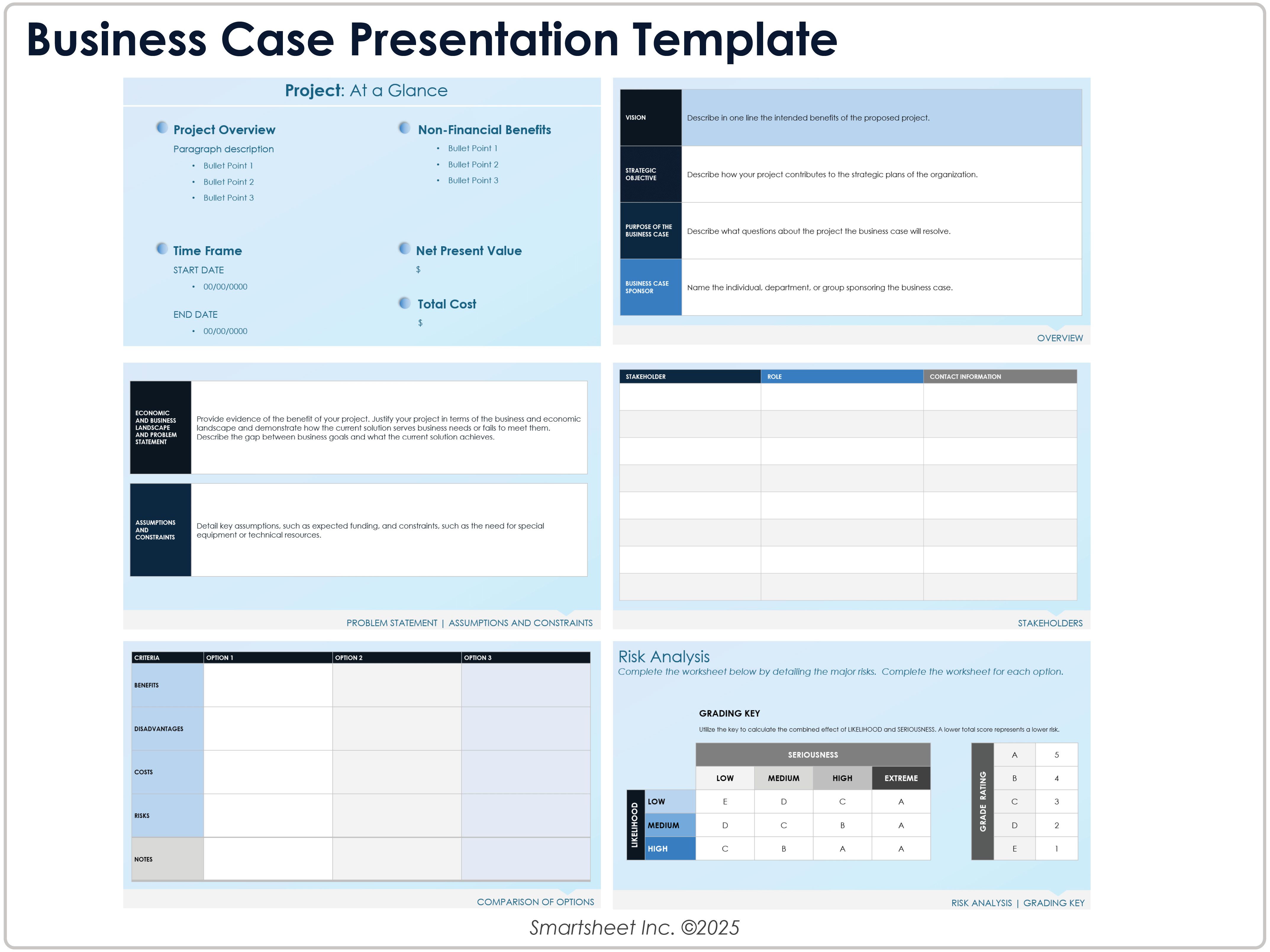
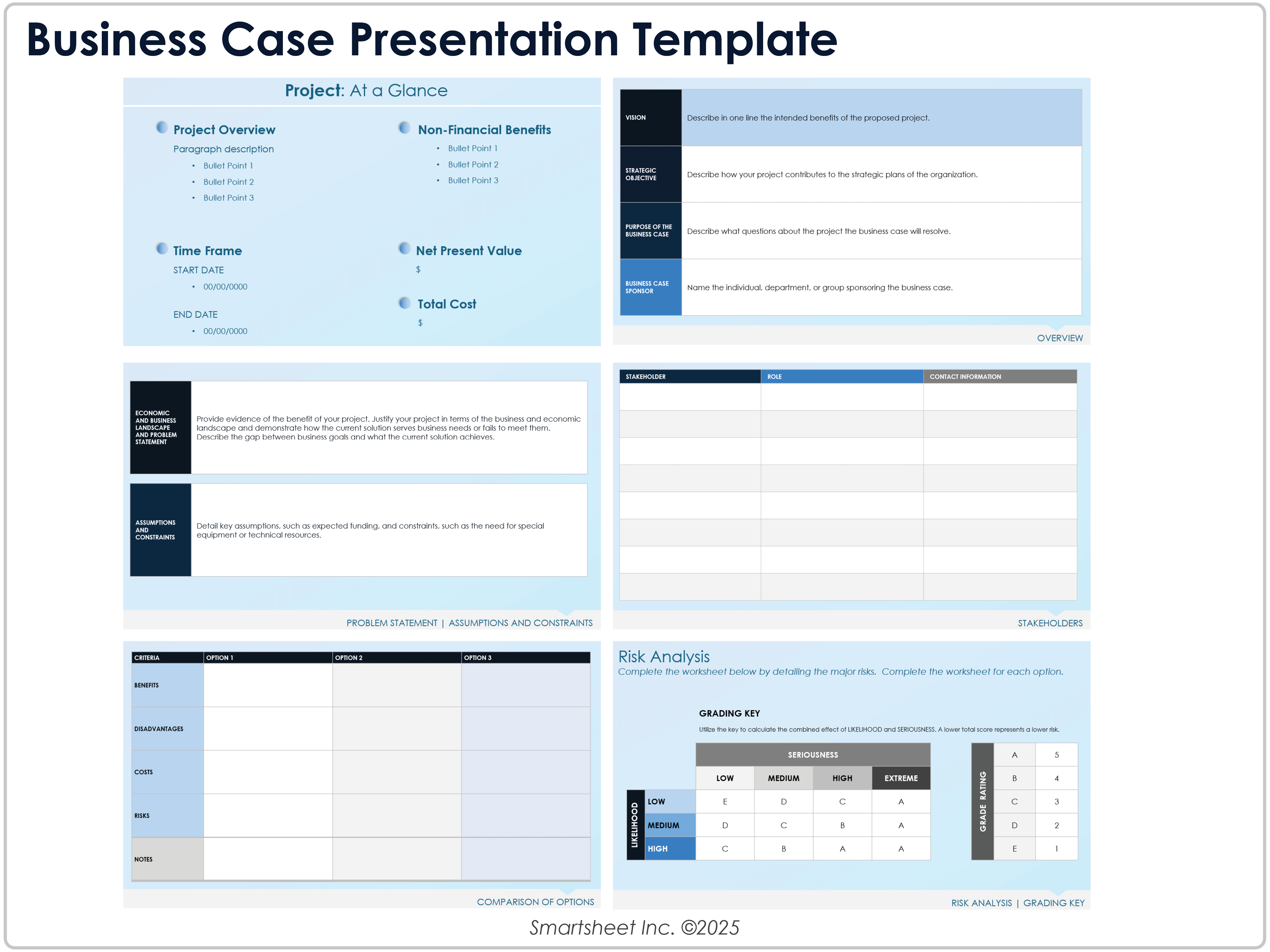
This template is designed to help leaders structure and present a formal proposal for a major initiative, such as replacing Microsoft Project. It includes sections for describing the problem statement, analyzing options, and going into financials, benefits, and risks. It also provides space to recommend a solution. Use it to clearly compare alternatives, quantify ROI, align stakeholders using a polished, board-ready format, and ultimately gain executive approval.
For more helpful free tools and expert advice, see these business case analysis examples.
Microsoft Project Alternatives
When evaluating Microsoft Project alternatives, it’s important to look beyond basic scheduling and focus on how modern platforms support collaboration, adaptability, portfolio visibility, and executive reporting. To help you jumpstart your research, we’ve compared the leading Microsoft Project alternatives to highlight important differences, such as enterprise security credentials, file import options, and more.

Start migrating away from Microsoft Project.
Learn how easy it is to make the switch to Smartsheet today.