5x5 Risk Matrix Template
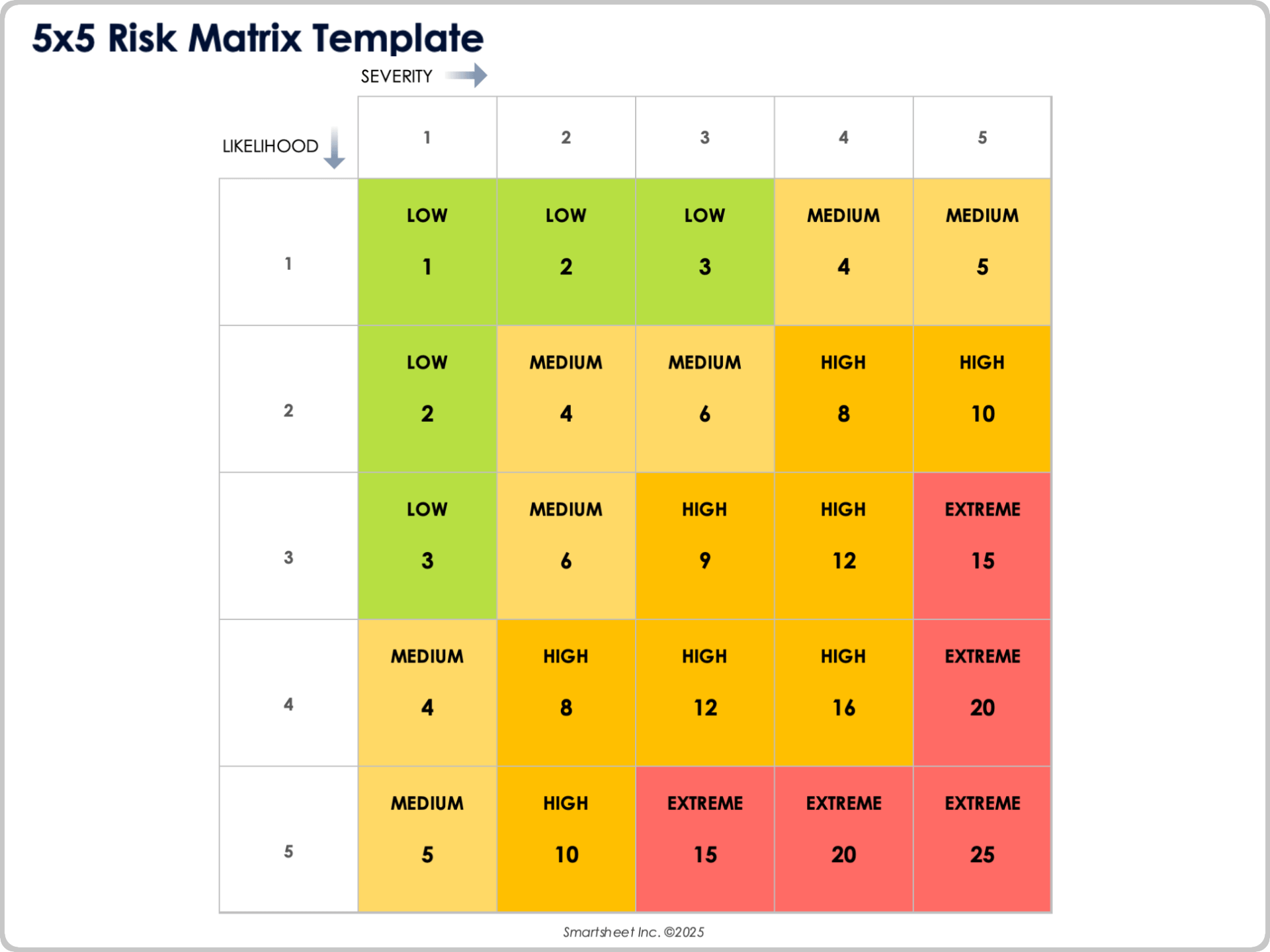
Download a 5x5 Risk Matrix Template for
Excel
|
Microsoft Word
|
PowerPoint
|
Adobe PDF
When to Use This Template: Use this 5x5 risk matrix template when you need to visually evaluate risks based on their likelihood and severity. It’s a bit more nuanced than a typical 3x3 grid and is ideal for comparing risks side by side and identifying which items require immediate attention.
Notable Template Features: This template provides a full 5x5 matrix with color-coded severity levels (low, medium, high, and extreme). It also includes axes labeled Likelihood and Severity for a simple, structured way to plot and communicate risk levels.
Browse these compliance risk assessment template resources to review controls, scoring methods, and mitigation steps.
3x3 Risk Matrix Template
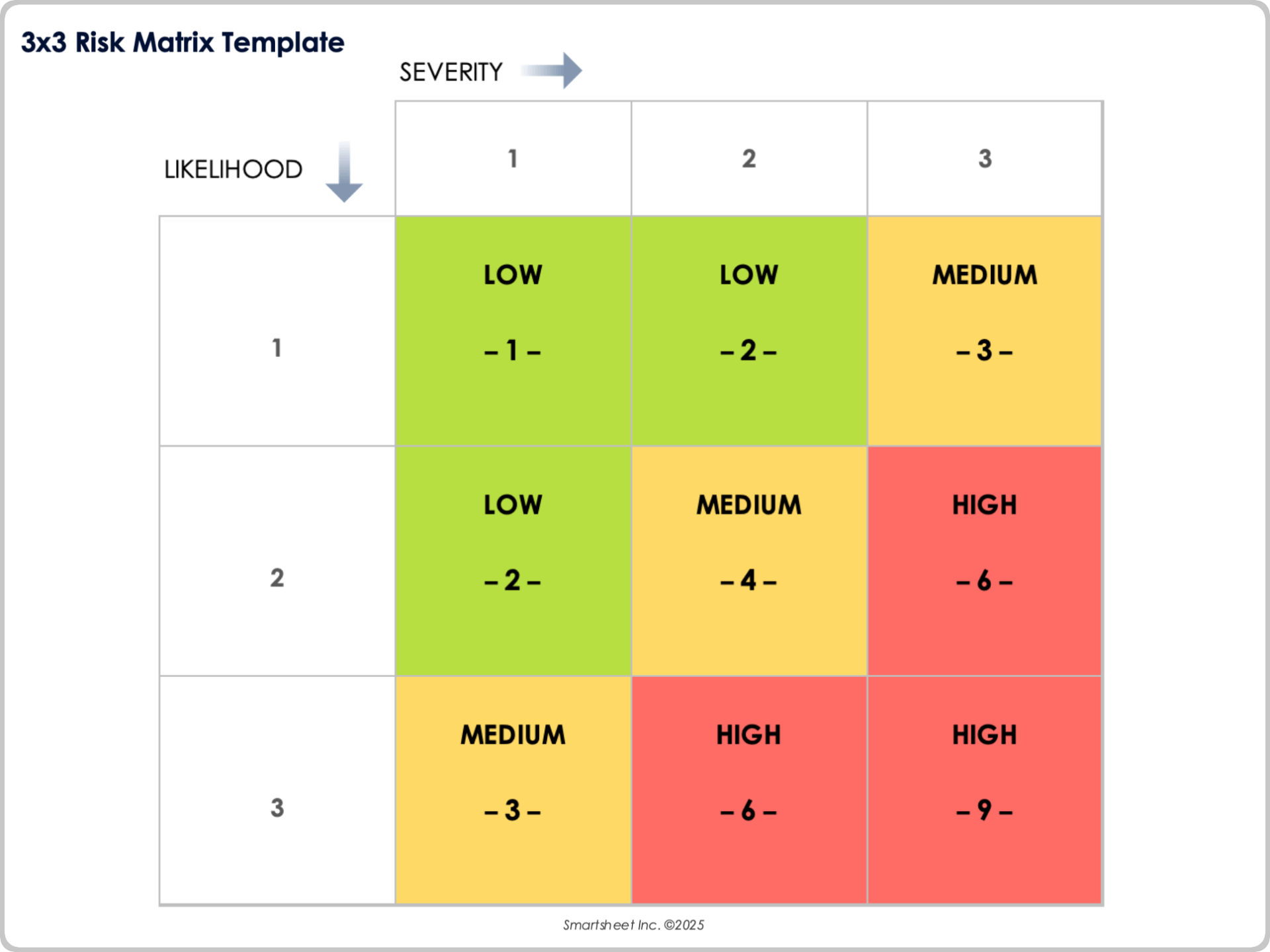
Download a 3x3 Risk Matrix Template for
Excel
|
Microsoft Word
|
PowerPoint
|
Adobe PDF
| Google Sheets
When to Use This Template: Teams can select this template for a fast, high-level read on overall exposure and to keep evaluations simple and easy to compare. This format works well for early project scoping, small operational reviews, or any situation where you need quick alignment without deep scoring.
Notable Template Features: This template displays a compact 3x3 grid with clearly marked axes labeled Likelihood and Severity to place each risk accurately. A color-coded set of nine cells creates an immediate visual distinction between low, medium, and high combinations, making prioritization straightforward.
Learn more in this guide on how to create a risk management plan, including key components, examples, and implementation tips.
3×4 Risk Matrix Template
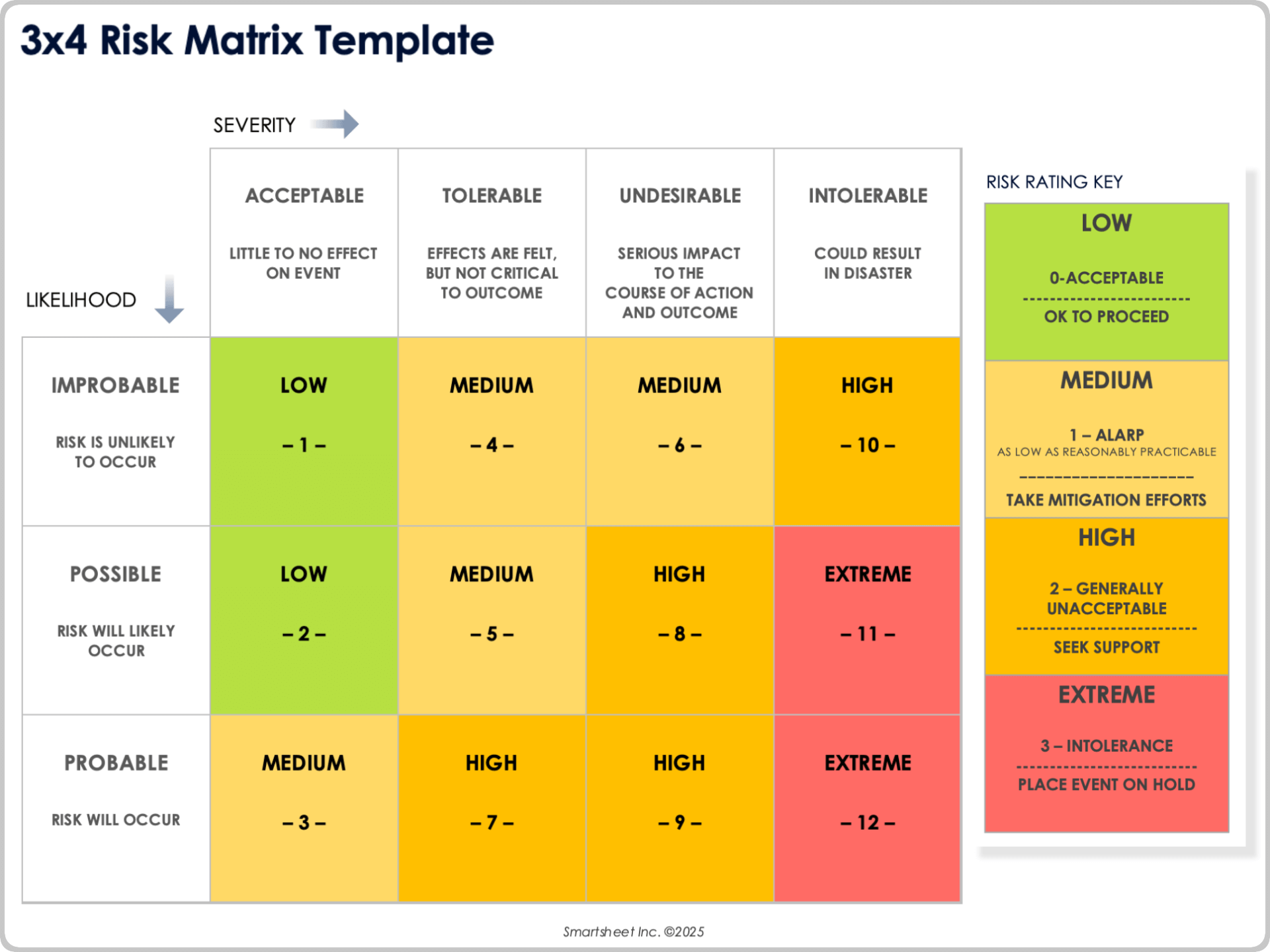
Download a 3x4 Risk Matrix Template for
Excel
|
Microsoft Word
|
PowerPoint
|
Adobe PDF
When to Use This Template: Use this 3x4 risk matrix template when you need more detail than a simple 3x3 grid but don’t require the complexity of a full 5x5 model. It’s especially useful for situations when risk severity varies across distinct categories, such as Acceptable, Tolerable, Undesirable, and Intolerable.
Notable Template Features: This template displays a 12-cell matrix with color-coded combinations of likelihood and severity levels, including labeled severity tiers that describe the potential effect on the event or outcome. Its four-level severity scale provides clearer differentiation between risk consequences, which makes prioritization and escalation decisions more straightforward.
Risk Management Matrix Template
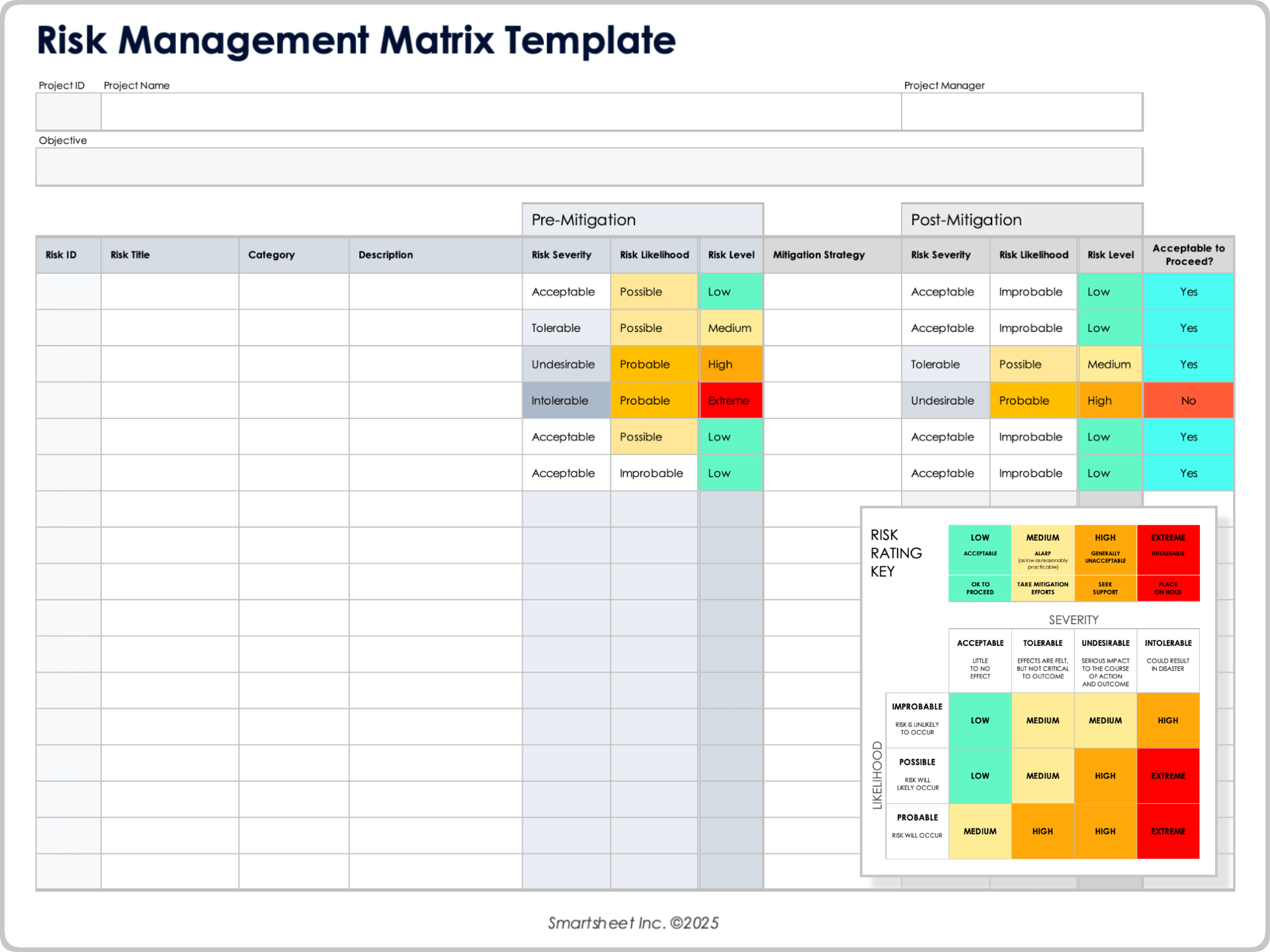
Download a Risk Management Matrix Template for
Excel
|
Microsoft Word
|
Adobe PDF
When to Use This Template: Use this risk management matrix template for a complete view of risks from identification through scoring, mitigation, and residual exposure. It’s a practical option for teams that want a single workbook containing a color-coded matrix, definition tables, and a full risk register for consistent evaluation.
Notable Template Features: This template includes a color-coded 3x3 or 5x5 Probability times Impact matrix with automated formulas, conditional formatting, and drop-down menus for scoring. A complete risk register — with fields from Risk ID through Auto Residual Risk Score, and Probability and Impact definition tables — provides a structured, ready-to-use risk management system.
Risk Control Matrix Template
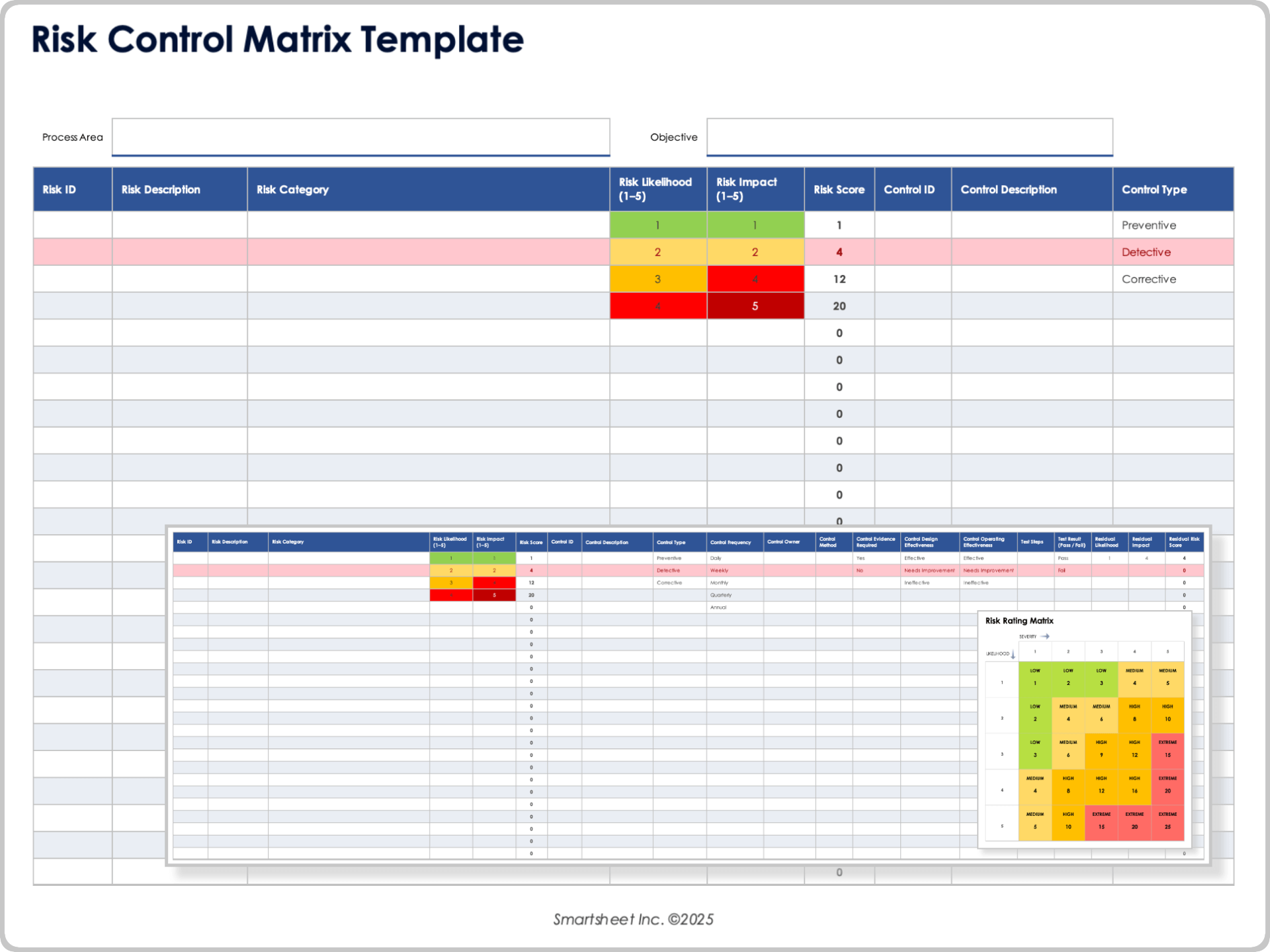
Download a Risk Control Matrix Template for
Excel
|
Microsoft Word
|
Adobe PDF
When to Use This Template: Use this risk control matrix template to document risks alongside the controls designed to prevent or detect them. It’s a strong fit for audit, compliance, finance, and operations teams that must evaluate control design, test operating effectiveness, and track residual exposure after mitigation.
Notable Template Features: This template includes a complete risk-and-control table with fields from Process / Area and Objective through Auto Residual Risk Score, along with Probability and Impact definition tables and a Controls Summary section that shows counts by type, inherent versus residual levels, and controls that need improvement or are failing tests. Automated formulas, conditional formatting, and drop-down menus support scoring and consistency in the Excel version.
IT Risk Assessment Matrix Template
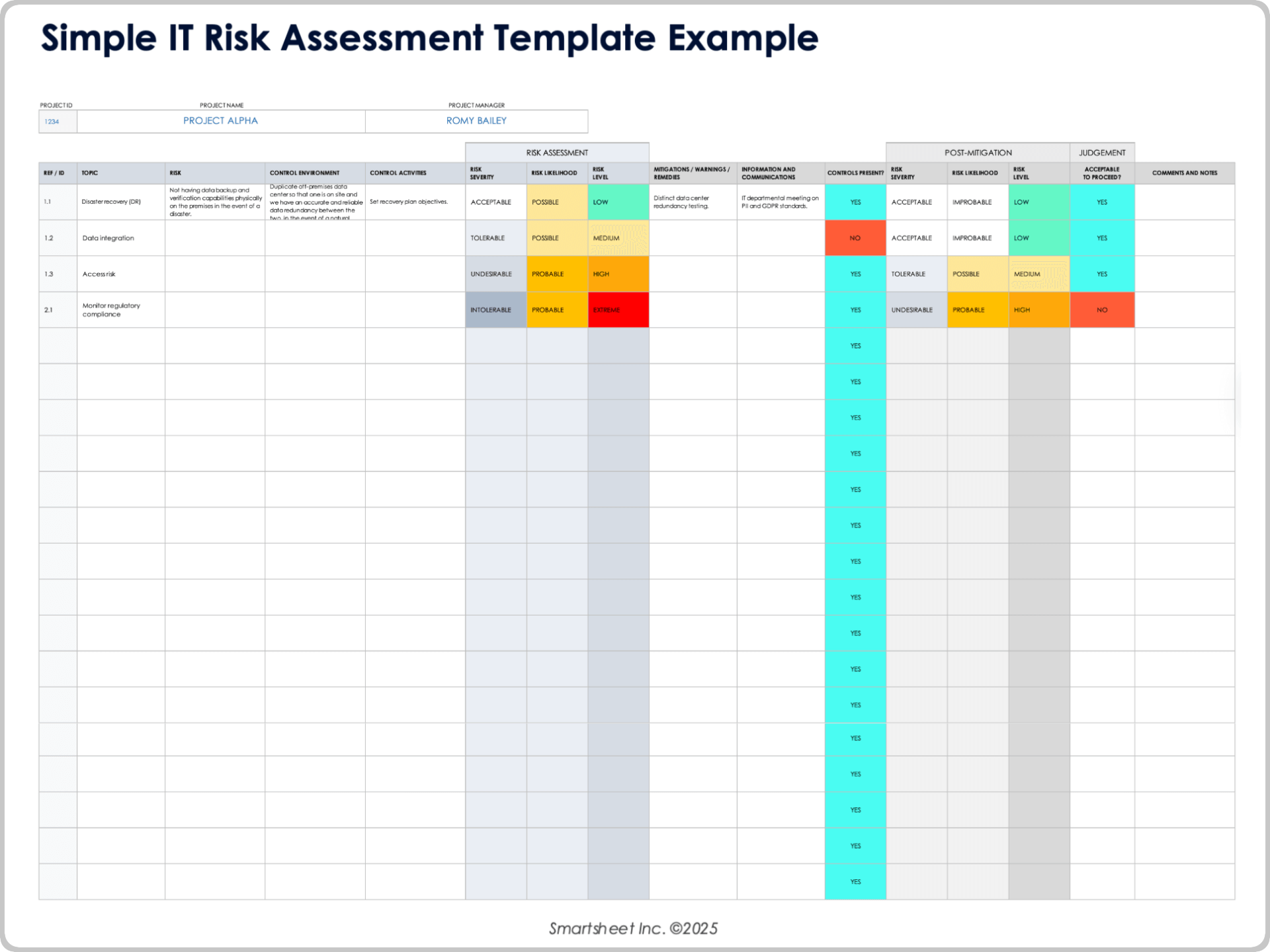
Download a Sample Simple IT Risk Assessment Matrix Template for
Excel
| Google Sheets
Download a Blank Simple IT Risk Assessment Matrix Template for
Excel
| Google Sheets
When to Use This Template: Use this IT risk assessment matrix template when you need a clear view of technology-related risks, such as system outages, security vulnerabilities, data issues, and operational disruptions. It’s well suited for IT teams that want a simple way to evaluate likelihood, severity, and overall risk level before planning remediation.
Notable Template Features: This template includes a color-coded matrix that combines likelihood and severity ratings, along with structured fields for documenting each IT risk, its assessment, required controls, post-mitigation rating, and final judgment. Consistent scoring categories and drop-down selections help standardize evaluations and make it easier to compare risks and prioritize corrective action.
Business Risk Assessment Matrix Template
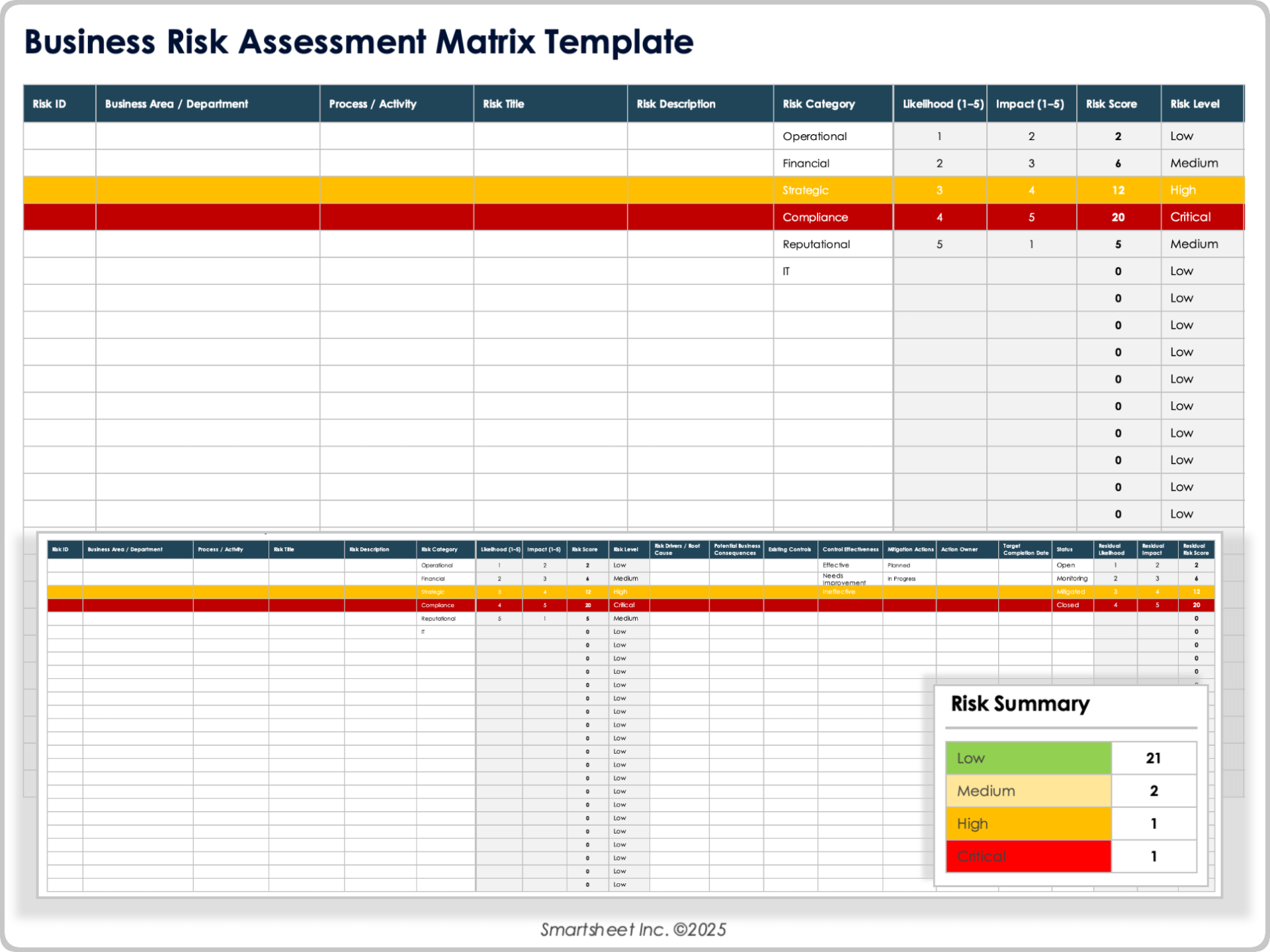
Download a Business Risk Assessment Matrix Template for
Excel
|
Microsoft Word
|
Adobe PDF
| Google Sheets
When to Use This Template: Teams can use this business risk assessment matrix template to evaluate risks across departments such as finance, operations, strategy, compliance, IT, or reputational areas. It’s ideal for teams that want consistent 1–5 scoring, clear visibility into risk levels, and an organized process for tracking mitigation actions and residual exposure.
Notable Template Features: This template includes a color-coded Likelihood × Impact matrix and a full business risk register, with fields from Risk ID and Business Area through Auto Residual Risk Score. It also includes Probability and Impact definition tables, built-in scoring formulas, drop-down menus, conditional formatting, and a Business Risk Summary section (counts by category, risks by level, and top five risks).
Construction Risk Assessment Matrix Template
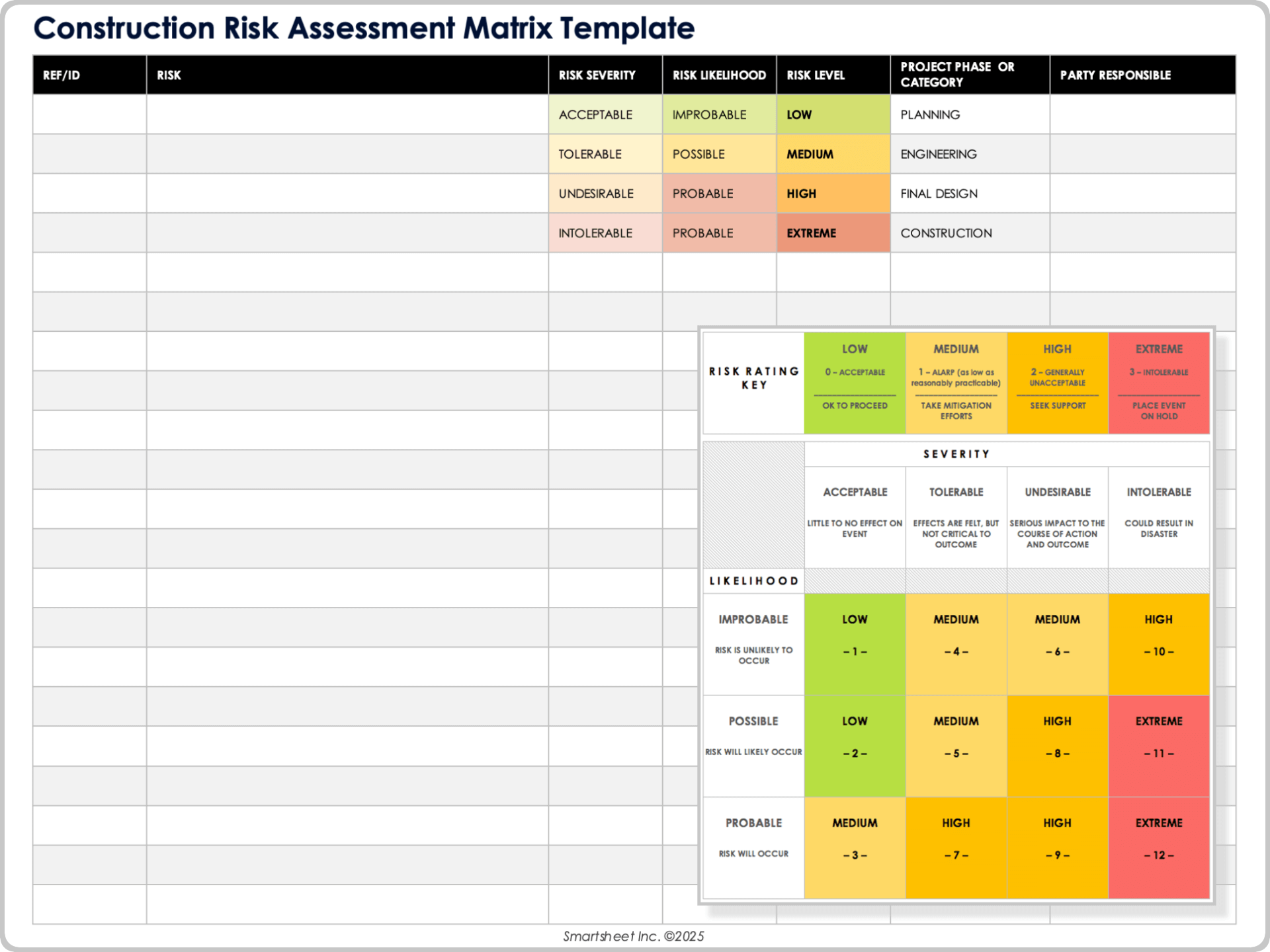
Download a Construction Risk Assessment Matrix Template for
Excel
|
Microsoft Word
|
Adobe PDF
| Google Sheets
When to Use This Template: Project managers and safety teams can use this construction risk assessment matrix template to evaluate safety, operational, environmental, or scheduling risks on a construction site. It’s ideal for teams that need a quick view of which hazards require monitoring, mitigation, or immediate escalation.
Notable Template Features: This template includes a color-coded Likelihood × Severity grid and fields to document each construction risk, its severity rating, its likelihood rating, its overall risk level, the project phase or category, and the responsible party. Consistent scoring and drop-down menus make it easy to compare hazards and highlight high-priority risks before they affect crews, timelines, or site operations.
Project Risk Matrix Template
Download a Project Risk Matrix Template for
Excel
|
Microsoft Word
|
PowerPoint
|
Adobe PDF
| Google Sheets
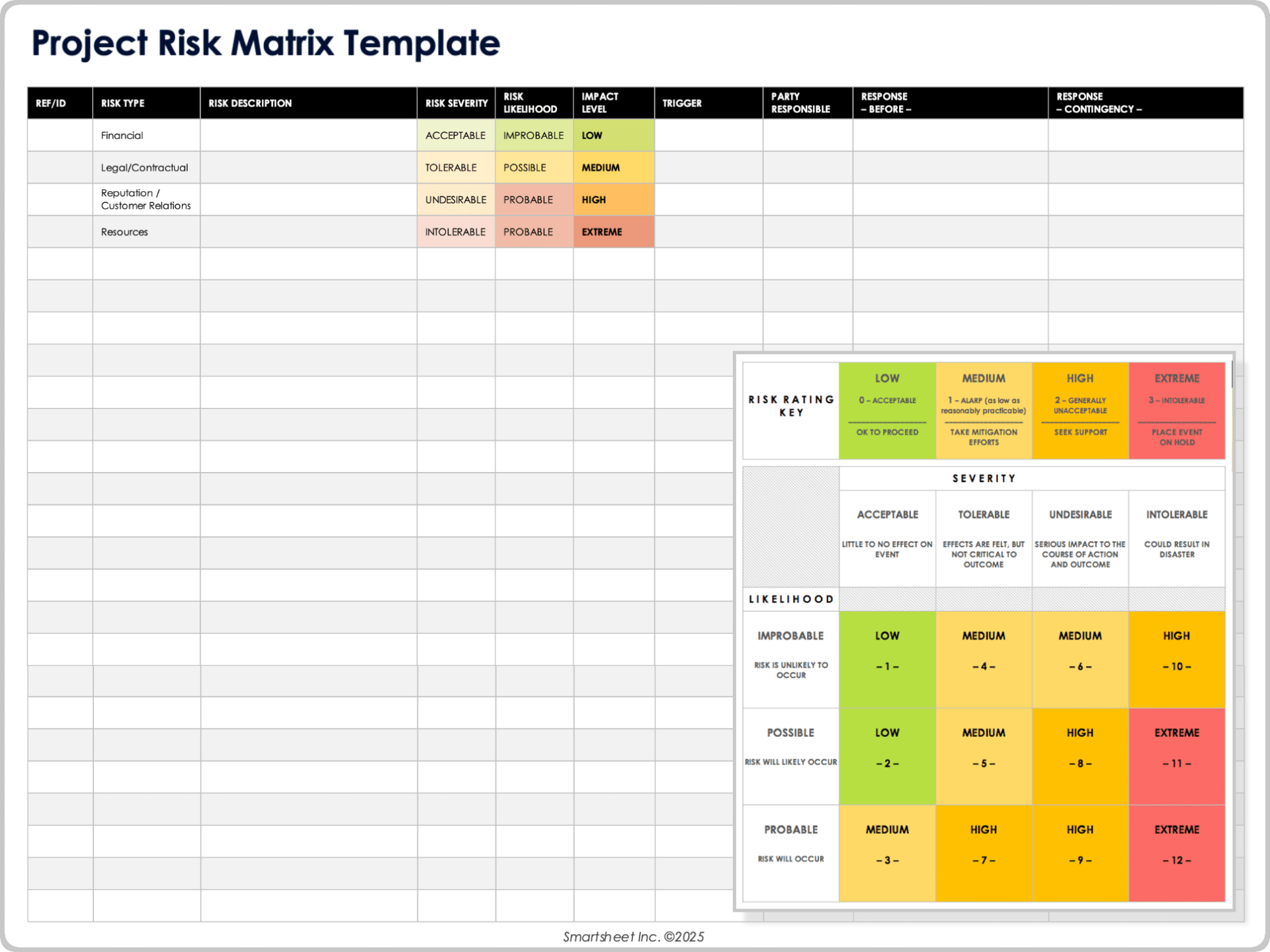
When to Use This Template: Project managers can use this project risk matrix template to evaluate risks related to timelines, budgets, scope, vendors, resources, or deliverables. It’s a great tool for comparing risks and deciding which items need monitoring, mitigation, or escalation.
Notable Template Features: This template includes color-coded ratings for risk severity, risk likelihood, and impact level, along with fields to document each project risk’s type, description, trigger, responsible party, and response plans. Structured inputs and standardized categories make it easier to compare risks and identify those most likely to affect project success.
Explore these project risk templates to track issues, monitor probability and impact, and standardize project-level risk reporting.
Risk Response Matrix Template
Download a Risk Response Matrix Template for
Excel
|
Microsoft Word
|
PowerPoint
|
Adobe PDF
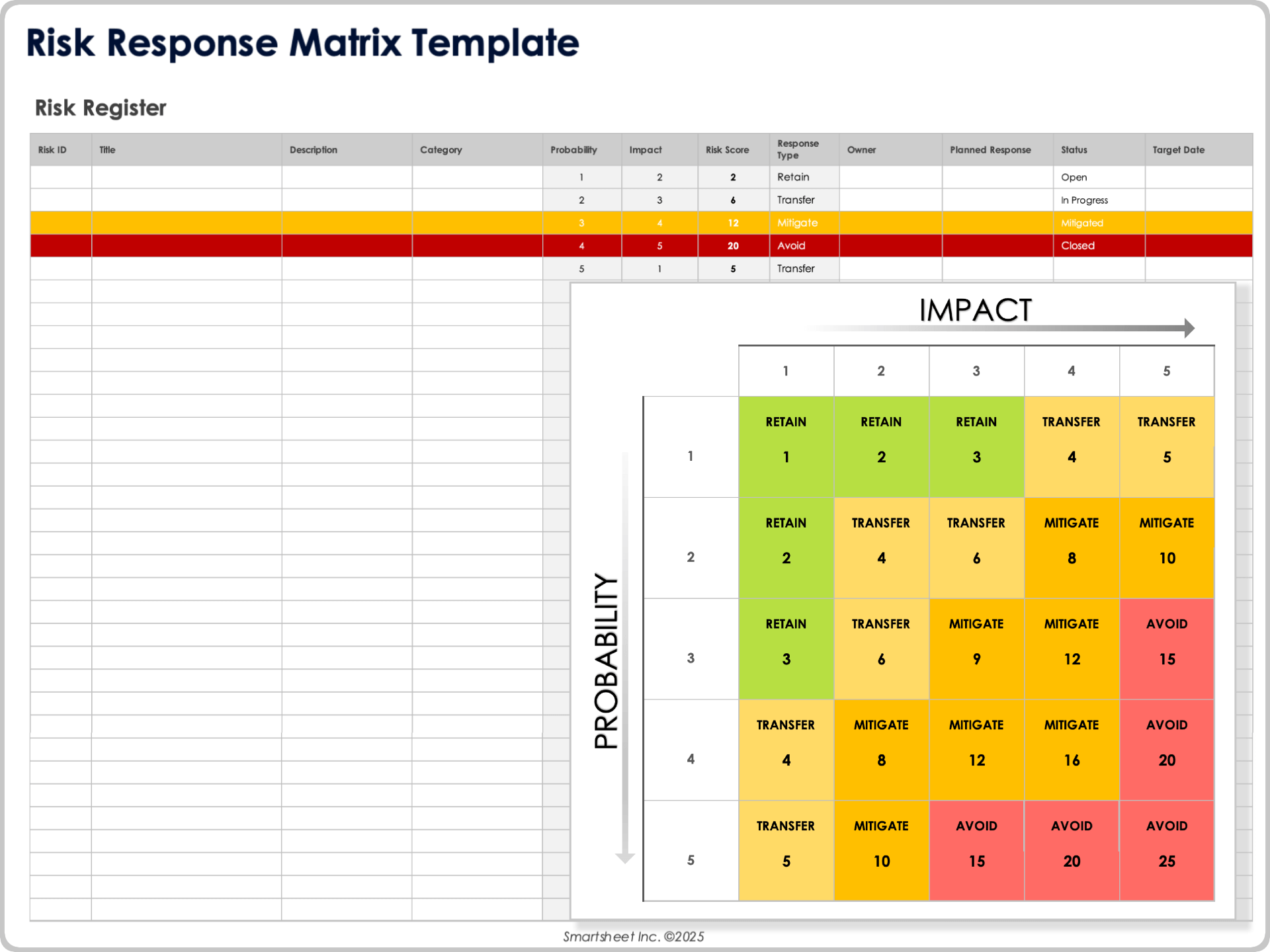
When to Use This Template: Choose this risk response matrix template when you need a clear framework (Avoid, Transfer, Mitigate, or Retain) for deciding how to handle each risk. It’s ideal for teams that want a combined matrix-and-register tool to score risks, assign owners, and determine the appropriate response strategy based on probability and impact.
Notable Template Features: This template includes a color-coded four-quadrant Probability x Impact matrix with clearly labeled response types, editable example risks, and a complete risk register covering fields from Risk ID through Target Date. Automated scoring formulas, response-type rules, drop-down menus, conditional formatting, a definitions section, and brief instructions make it easy to evaluate risks and apply the correct response approach consistently.
Probability and Impact Risk Matrix Template
Download a Probability and Impact Risk Matrix Template for
Excel
|
Microsoft Word
|
PowerPoint
|
Adobe PDF
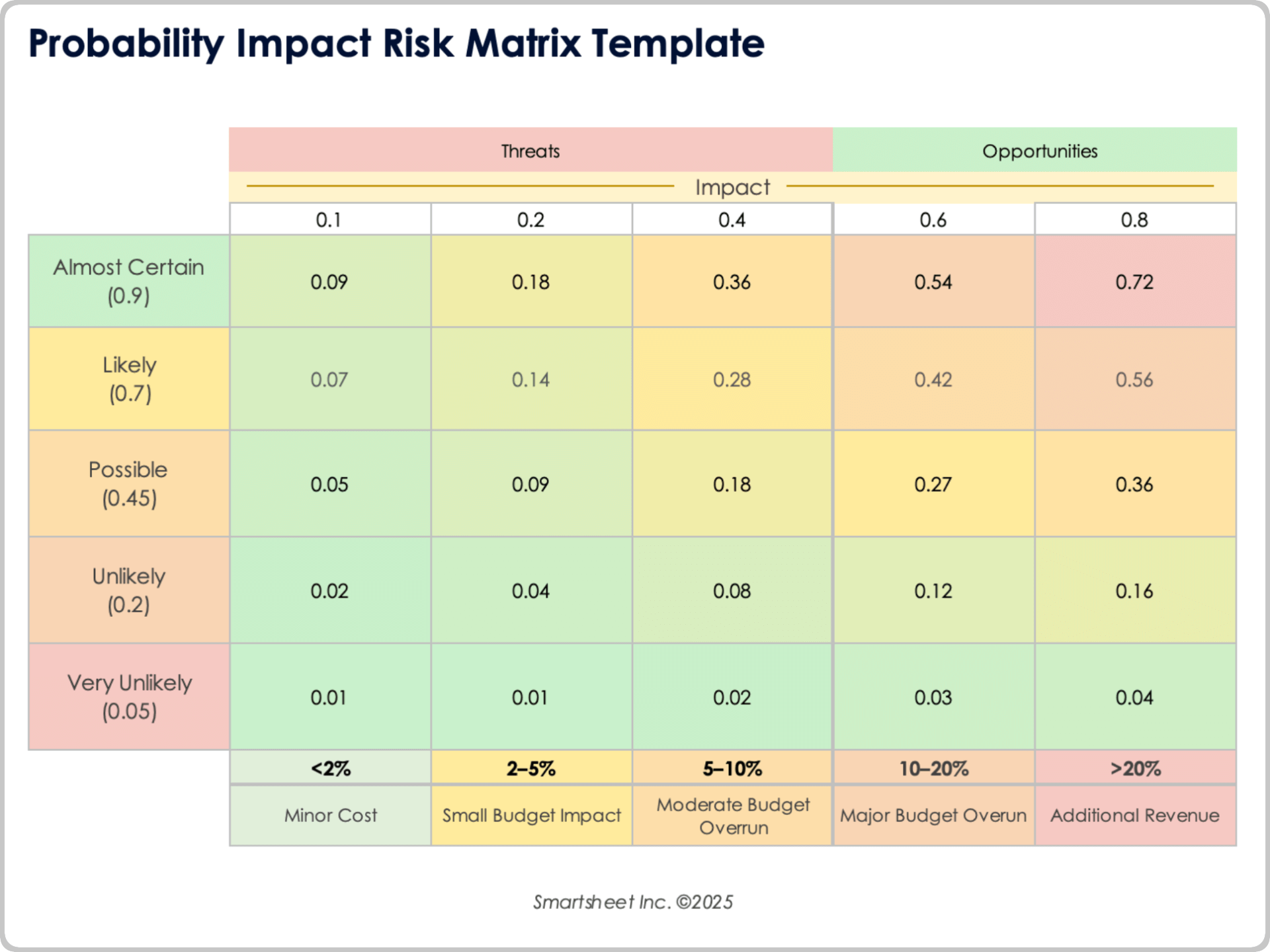
When to Use This Template: Teams can use this probability and impact risk matrix template as a clear, quantitative tool to compare risks by multiplying probability and impact values. It works like a visual heat map that shows threats and opportunities, with color-coded scores that make high-priority risks stand out.
Notable Template Features: This template displays a 5x5 Probability x Impact matrix with probability levels from Very Unlikely to Almost Certain and impact values from 0.10 to 0.80, grouped into Threats and Opportunities sections. Each cell shows a calculated score with color shading, along with impact ranges and optional example markers, so interpreting both negative risks and positive opportunities are straightforward.
Risk Priority Matrix Template
Download a Risk Priority Matrix Template for
Excel
|
Microsoft Word
|
Adobe PDF
| Google Sheets
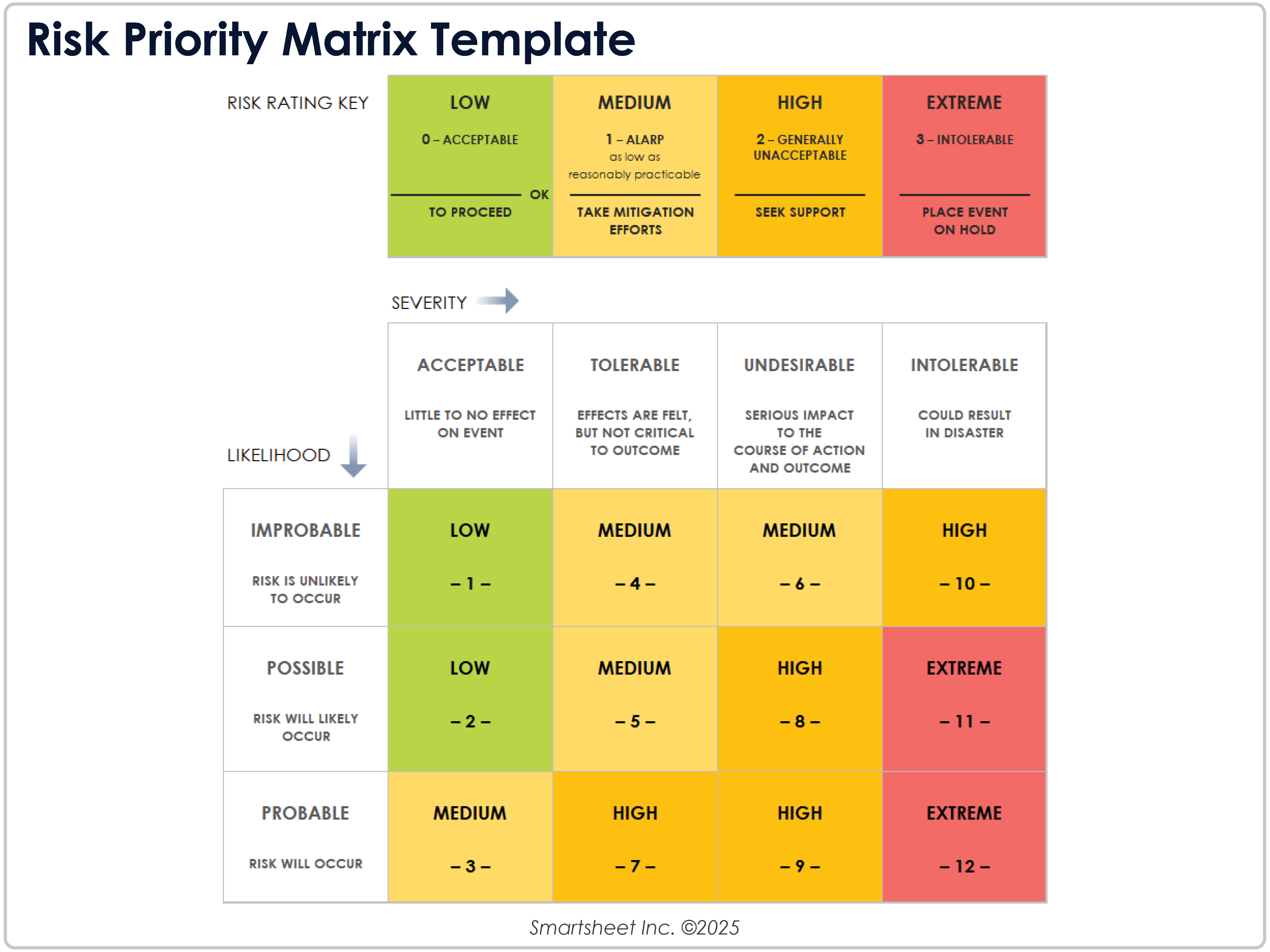
When to Use This Template: Select this risk priority matrix template to compare risks based on likelihood and severity. It works well for teams that want a fast visual read on which items are acceptable, tolerable, undesirable, or intolerable so that they can focus attention where it matters most.
Notable Template Features: This template displays a 3x4 Likelihood x Severity matrix with likelihood levels (Improbable, Possible, Probable) on the left and severity categories (Acceptable, Tolerable, Undesirable, Intolerable) across the top. Each cell includes a color-coded priority rating (Low, Medium, High, Extreme) and a numerical score, which makes it easy to distinguish low-risk items from those that require escalation.
Cybersecurity Risk Matrix Template
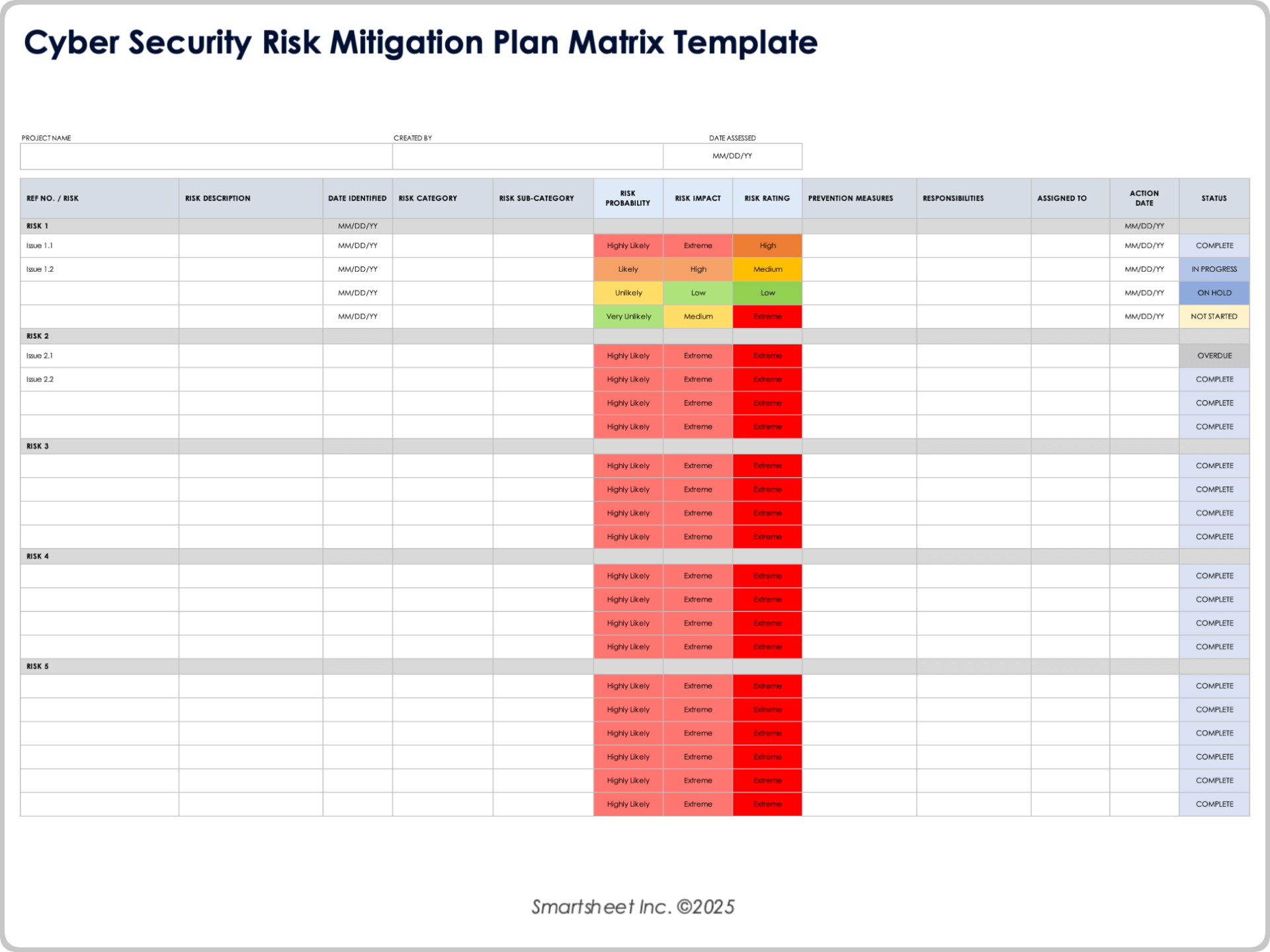
Download a Cybersecurity Risk Mitigation Plan Matrix Template for
Excel
|
Microsoft Word
|
Adobe PDF
When to Use This Template: Use this cybersecurity risk matrix template to assess threats such as data breaches, access failures, malware incidents, outages, or configuration vulnerabilities. It’s especially helpful for security and compliance teams that need quick visibility into likelihood, impact, and overall risk rating to decide which issues require mitigation, monitoring, or escalation.
Notable Template Features: This template includes a color-coded Likelihood x Impact matrix reflected directly in the Risk Probability, Risk Impact, and Risk Rating columns. It provides fields to document each cyber risk, its category and subcategory, prevention measures, responsible parties, assigned owner, action dates, and status. Consistent rating labels and clearly defined selections make it easy to compare risks and track mitigation progress across the plan.
4x4 Risk Matrix Template
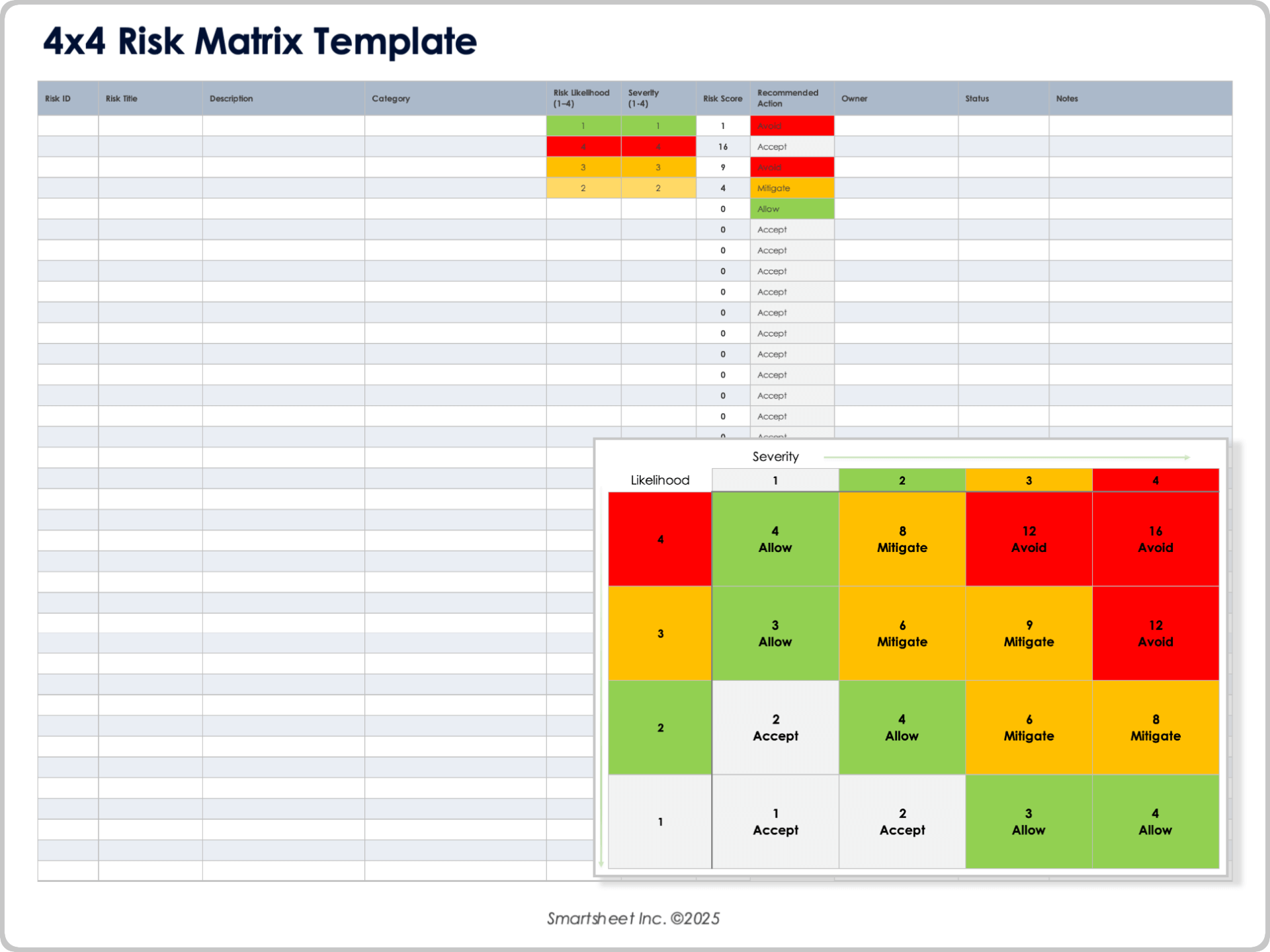
Download a 4x4 Risk Matrix Template for
Excel
|
Microsoft Word
|
PowerPoint
|
Adobe PDF
When to Use This Template: Use this 4x4 risk matrix template to evaluate risks using four levels of likelihood and four levels of severity. It’s ideal for teams that want clear, predefined action guidance — Accept, Allow, Mitigate, or Avoid — tied directly to each score on the grid.
Notable Template Features: This template includes a complete 4x4 Probability x Severity matrix: Each cell shows a calculated risk score and its matching action label. Color-coded blocks (green, yellow, red, and gray) make it easy to see which risks to accept, mitigate, or avoid. A simple risk register, drop-down scoring fields, automated score calculations, and consistent action rules help users classify and prioritize risks quickly.
What Is a Risk Matrix?
A risk matrix is a visual tool that maps the likelihood of a risk against its impact to show overall severity. It helps teams quickly identify high-priority risks, compare threat levels, and decide where to focus mitigation efforts.
A risk matrix chart provides a snapshot of the data collected in detailed risk assessment forms and is commonly used in the broader risk management process. While the matrix shows severity at a glance, the underlying forms identify risks, collect background details, calculate likelihood and impact, and define prevention and response strategies.
Risk management is the structured process organizations use to identify, analyze, and address risks, so they can meet objectives, protect budgets, and keep projects on schedule. It typically includes five stages: planning, identification, analysis, response, and monitoring. Creating a risk matrix is often an early analysis step once risks have been documented.
How to Use a Risk Matrix Template
To use a risk matrix template, score each risk for probability and impact, place it on the grid, and compare the severity across each risk. This approach helps you prioritize high-risk issues, choose appropriate responses, and keep your assessment updated as conditions change.
Below you’ll find a step-by-step guide to using a risk matrix template:
- Identify the Risks: List each risk you need to evaluate. Add a brief description and note the category or area it affects.
- Score Probability and Impact: Assign values (typically 1–5) for how likely each risk is to occur and how severe the outcome would be. Use the definition tables in the template to stay consistent.
- Use a Risk Matrix Template to Plot the Scores: Now that you’ve scored your risks, use the 5x5 risk matrix template to place each item on the grid. The color-coded layout helps you see which risks fall into low, medium, high, or extreme zones.
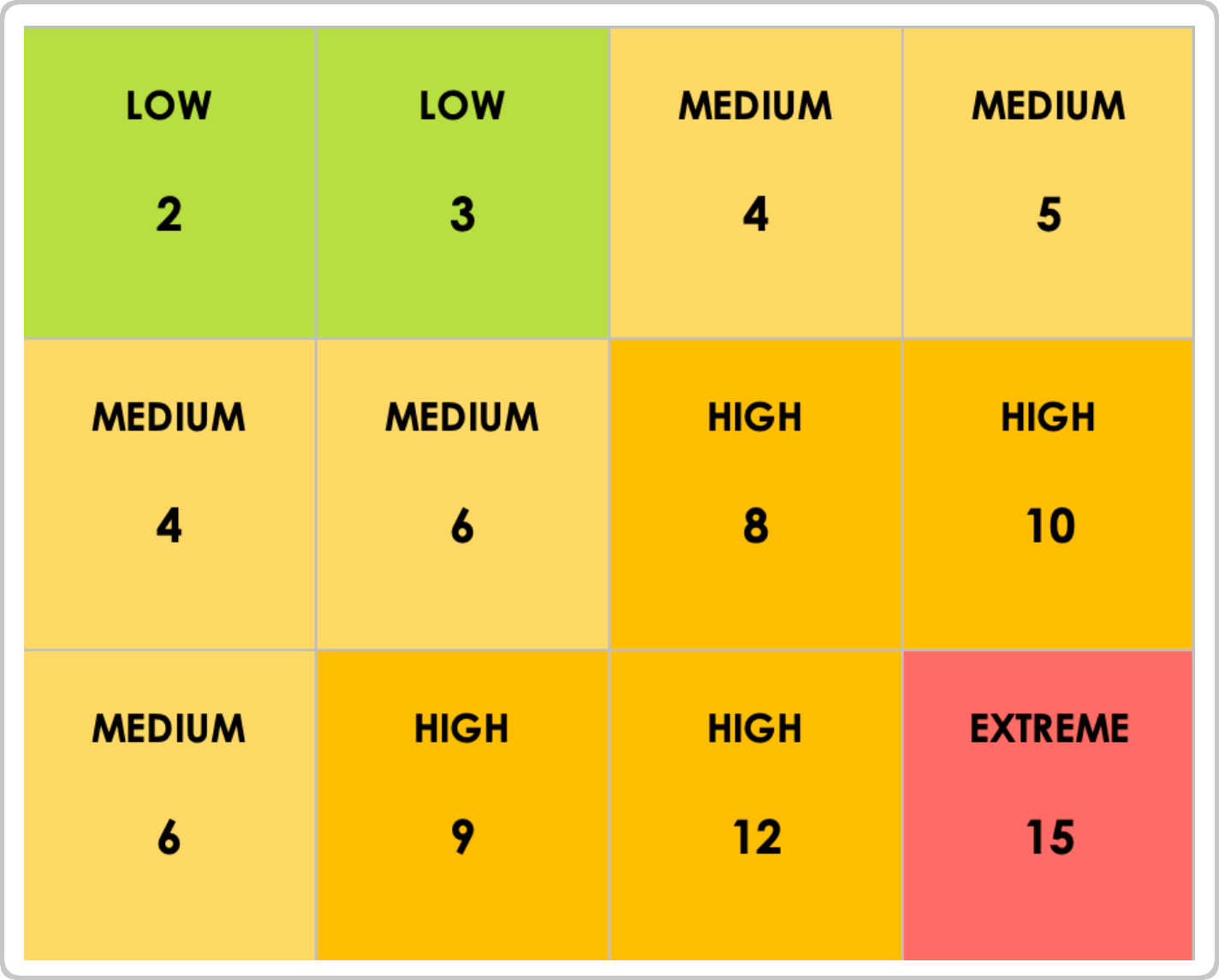
- Analyze the Results: Review the distribution of risks across the matrix. Items in high-severity areas typically require mitigation, while lower risks may only need periodic monitoring.
- Document Mitigation Plans: For each risk, outline your planned response, assign an owner, and note the actions that will reduce likelihood or impact.
- Monitor and Update Regularly: Revisit the matrix over time. Update scores, adjust responses, and track progress to keep your assessment accurate and current.
Classifying and Prioritizing Risk
After you place each risk on the matrix, classify it as low, medium, high, or extreme based on its color-coded position. Low risks need little attention, medium risks may require monitoring, while high and extreme risks should be prioritized for immediate response.
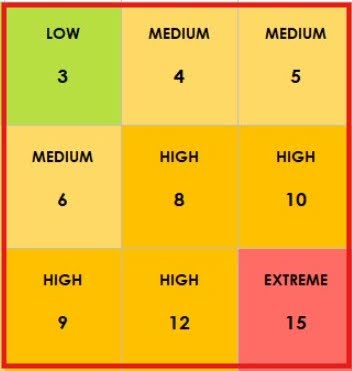
Many organizations use numeric scoring to calculate overall severity, but most results fall into four broad, color-coded risk categories. These categories help teams quickly understand which risks need immediate action and which can be monitored as work progresses.
- Low (green): Risks with minor consequences and low likelihood. These risks pose minimal disruption and typically require only routine monitoring.
- Medium (yellow): Risks that are somewhat likely to occur and moderately impactful. These risks may benefit from preventative steps but are not high priority.
- High (orange): Risks that are of significant impact and higher likelihood. These risks should be addressed soon to prevent delays or project issues.
- Extreme (red): Risks that pose severe consequences paired with high likelihood. These are top-priority risks that require immediate mitigation to protect the project or organization.
Risk Template Matrix Zones
Many organizations improve their risk evaluation by grouping matrix results into broader zones. These zones provide a clearer view of overall severity, helping teams quickly determine which risks are acceptable, which require closer monitoring, and which demand immediate mitigation to protect the project or organization.
- Generally Acceptable (GA): Covers the “low” region of the matrix. These risks have minimal impact or low likelihood and do not pose an immediate threat; many can be safely monitored or ignored.
- As Low as Reasonably Possible (ALARP): Includes both “low” and “medium” areas. Risks here are tolerable and not significantly damaging, so work can continue even if no immediate action is taken.
- Generally Unacceptable (GU): Encompasses “high” and “extreme” regions. These risks are severe and likely to occur, and they could potentially threaten project or organizational success. They require prompt attention and mitigation.
Validate Your Risk Response
The best way to validate a risk matrix is to test it with a real-world scenario. After choosing your template, fill in actual risks your organization faces, and review how the matrix scores their likelihood and severity. This helps confirm accuracy before creating a response plan.
Depending on your industry or organizational needs, you might have additional tools for risk assessment and response. For example, OSHA offers its hazard exposure and risk assessment matrix to help workers evaluate natural-disaster risks and operate more safely in hurricane-affected areas.
A risk matrix is ultimately a decision-support tool, and teams should always analyze both the matrix results and the underlying risks before choosing prevention or mitigation strategies. Risk matrices are widely used in project management to evaluate scope, schedule, and cost impacts, but they also support industries ranging from construction to IT. Explore the free risk matrix examples in this guide to find one that best fits your use case.
The Importance of Risk Assessments in Healthcare Organizations
Healthcare organizations face many risks, including clinical errors, facility issues, and security breaches of protected health information (PHI). Because the industry is highly regulated, performing regular healthcare risk assessments and mapping risks is critical to maintaining compliance, protecting patients, and keeping operations running safely and efficiently.
Here are the key considerations and best practices for conducting a healthcare risk assessment and managing PHI securely:
- Create a healthcare risk management plan to identify the most severe threats, assess their likelihood, and define mitigation strategies.
- Use risk assessments to locate all PHI and develop targeted responses that safeguard confidential patient information.
- Ensure healthcare risk assessments are comprehensive, accessible to authorized stakeholders, and thorough in how they identify and address threats to processes, systems, and data.
- Adopt a tool that helps you quickly identify, mitigate, and prevent risks, while providing real-time visibility into potential threats across the organization.
- Highlight identified risks, update likelihood and severity, and track how mitigation actions are progressing to keep everyone aligned.
- Use Smartsheet as a work execution platform to view and update risks with real-time dashboards, so teams can make timely, informed decisions.
- Configure sharing controls in Smartsheet dashboards, so only authorized users can access sensitive information, helping your organization maintain HIPAA compliance and protect PHI.
Interested in learning more about how Smartsheet can help you accurately and securely document healthcare processes and maximize your efforts? Discover Smartsheet for Healthcare.
Make Better Decisions, Faster with Smartsheet Dashboards
Empower your people to go above and beyond with a flexible platform designed to match the needs of your team — and adapt as those needs change.
The Smartsheet platform makes it easy to plan, capture, manage, and report on work from anywhere, helping your team be more effective and get more done. Report on key metrics and get real-time visibility into work as it happens with roll-up reports, dashboards, and automated workflows built to keep your team connected and informed.
When teams have clarity into the work getting done, there’s no telling how much more they can accomplish in the same amount of time. Try Smartsheet for free, today.

