As organizations handle more complex processes at faster rates, traditional ways of tracking work don’t suffice. AI assists by summarizing results, finding trends, and flagging risks, opportunities, and anything needing attention. These data-driven insights enable faster, well-informed decisionmaking. Explore its best uses, challenges, implementation, and future, including expert tips, an AI work readiness assessment, and a prompt pack.
AI helps organizations manage daily work. It can be used in team workspaces, task boards, communication threads, request queues, and more. It can draft updates, prioritize requests, spotlight stalled items, support handoffs, and keep information in sync. AI can be assistive, predictive, prescriptive, or autonomous.
Summary Overview
AI Is an Operations Issue: AI “failures” in work management are often symptoms of messy operating rhythms, rather than technical failures. AI reveals where your processes are weak or need more structure, and demand standardized inputs or tighter workflows. The real shift for project managers should be using AI not just to automate processes but to inspire operational discipline.
AI Delivers Stability, Not Just Output: AI shifts project managers’ success from pure speed (accelerating updates) to stability of flow (enforcing structured intake, rejecting incomplete requests, smoothing workload spikes). Project managers should focus on measuring variance, not velocity, as a core indicator of AI’s value.
Surface Metrics Are Misleading: AI can accelerate output to make surface metrics look healthier while quality slowly degrades because the model lacks business judgment. To catch this, project managers need new QA metrics — like correction rates, downstream rework, and prioritization accuracy — and they should audit AI decisions every few cycles.
Organizations are weaving AI throughout work management to coordinate daily tasks, stay in sync, and keep operations moving. In today’s fast-changing business scene, it is hard to keep up. According to the 2026 Smartsheet PPM Priorities Report, 98 percent of PPM professionals say they must frequently reprioritize due to business shifts.
Most AI in work management traditionally falls into three categories:
Assistive AI: This speeds up daily tasks. It drafts status updates, summarizes long comment threads, classifies incoming requests, sharpens task descriptions, crafts communications, and generates charts or formulas from plain language.
Predictive AI: Predictive systems scan patterns to zero in on stalled tasks, missed handoffs, work overloads, or backlogs getting out of hand. These alerts improve visibility, showing teams where work is slowing down so they can intervene sooner.
Prescriptive AI: This makes assessments and suggests specific actions. For example, prescriptive AI could absorb new information continuously and recommend reshuffling calendars, reassigning tasks or tickets, or reordering priorities based on what it finds.
But this is not the only way AI can be used to increase the velocity of work. More recent uses of AI involve orchestration, not just assistance. For example, intelligent work management at Smartsheet coordinates people, data, content, workflows, and AI and makes connections across these different aspects of an organization.
Autonomous AI: This takes it a step further than prescriptive AI and actually executes and orchestrates actions on behalf of the user, in addition to making decisions. It might re-route requests, rearrange schedules, or reallocate staffing when needed.
Knowledge AI: This involves a higher level of memory and sense-making. Knowledge AI, like the Smartsheet Knowledge Graph, captures organizational context to make connections, understand dependencies and responsibilities, and properly assess the relationships between people and information.
Challenges of AI in Work Management
Most organizations will encounter AI challenges involving when to use business judgment over automation. They should avoid feeding AI bad data or cluttering it with too many systems and processes. They need to ensure trustworthiness when AI adoption has increased faster than AI readiness. Ensuring compliance without clear guardrails can also be a common challenge.
According to the 2026 Smartsheet PPM Priorities Report, only 46 percent of respondents trust it (AI) to act independently. That caution is often well-founded, but for scaling, organizations need to strengthen AI’s output and their trust in it, which is not easy.
Here’s a wider look at frequently occurring obstacles:
Not Using Judgment When it Matters
Matching a person’s judgment is not easy. While some teams are cautious about AI, others will move too quickly and hand off decisions that still require context, nuance, or business standards the system cannot see. This will make metrics look better while decision quality suffers.
“The most significant operational breakdowns happen when teams automate decisions that actually require business judgment,” says Sain Rhodes, a sales operations professional at Clever Offers who works extensively with AI.
“I’ve seen scores of organizations have AI auto-route support tickets, prioritize work queues, or assign work based on availability. The surface metric looks great — ticket response time drops 40 percent — but underneath, customers get routed to the wrong departments, urgent work sits in queues because AI doesn’t understand business priority.”
This is why it’s essential to not expect AI to replace thinking.
“I documented one transformation in which a marketing operations team had 18 different request intake channels, generating complete chaos,” Rhodes says. “They consolidated into a single AI-assisted intake process that categorized requests, estimated effort, and suggested optimal sequencing.”
The impact, Rhodes says, was that “cycle time from request to campaign launch dropped from 11 days to 4.2 days. What changed was that they had AI enforce discipline, not replace thinking.”
Ping-Based Workflows
Many teams overuse real-time pings, ad-hoc approvals, and scattered requests across chat and email. The fragmented work, unclear ownership, and multiple side channels become difficult for AI to interpret.
Efficiency expert Ari Meisel, author of The Art of Less Doing, More Living, says “interruption debt” is the biggest challenge when teams try to use AI inside chaotic, always-on workflows.
“Teams try to drop AI into workflows that are still overly synchronous, full of pings, approvals, and ad-hoc asks,” he explains. “These environments produce fragmented work and unclear ownership, making AI feel like one more tool to check. It ends up patching inefficiencies instead of eliminating them.”
To avoid this, shift certain workflows to asynchronous patterns with structured intake, defined owners, and consistent response expectations, so AI stays within a stable process rather than a stream of interruptions.
Missing Details
AI needs to see owners, statuses, and due dates in consistent fields. When data is patchy or outdated, or there’s context lacking, insights stray. It is not really the AI failing.
“In day-to-day operations, AI most often breaks down when it gets stuck because one detail is missing,” says Fineas Tatar, co-founder of Viva Executive Assistants.
“Even one unanswered question or unclear field can stop automations cold. I’ve seen teams move a project forward only to realize the system paused because someone didn’t add a due date or an owner. It looks like AI failure, but it’s really an input gap that no one noticed at the moment. The issue underneath is that people assume AI already knows the context they never typed.”
Standardize a few essential, required fields to ensure AI has the information it needs.
Too Many Systems
Work scattered across chat, email, and spreadsheets leaves AI blindfolded. This fragmentation is a major reason teams struggle to show their contributions to business objectives. Whenever possible, consolidate core activities (intake, assignments, statuses) into one platform or connected layer. Even partial consolidation will help accuracy.
Trust Issues
Teams might hesitate to have AI route work, adjust priorities, or recommend next actions without review. People will worry the system may miss context or misinterpret signals.
To remedy this, begin with issue detection. Study AI’s calls for a few cycles and how it can be improved. Extend its responsibilities slowly to low-risk actions with approval steps.
Measurement Gaps
AI recommendations often come within the flow of work, so it is tough to isolate what AI improved from normal team performance. Choose one measurable use case, like time spent on updates. Establish a simple before-and-after benchmark so AI’s contribution becomes clear.
Governance
Without guardrails around data sources, permissions, and acceptable actions, teams worry about accuracy and compliance.
Make a short AI playbook delineating what data AI gets fed, which actions require review, and how people should validate outputs. Rules build confidence quickly.
Skills Gaps
Comfort with artificial intelligence varies by individual. It might take time to understand what good output looks like.
A good response is to create reference materials like sample prompts, examples of strong AI-generated summaries, and simple validation steps to train employees who need it.
AI-equipped teams are streamlining intake processes, status updates, report writing, issue flagging, task routing, and anything else a bot can do. The most advanced is agentic support for keeping everyday operations on track.
Here’s an overview of some common AI use cases in work management:
AI-Supported Intake: Many types of intake workflows can be handled by AI — IT service requests, medical patient intake, creative briefs, and procurement requests. AI can categorize each submission, pull out key details, route work to the right team, and verify required information before anything moves forward. This lessens back-and-forth messages, misrouted tickets, and manual triage.
Meisel offers this notable example: “A client had a recurring 14-step intake-and-handoff process that required three teams and dozens of Slack messages. Now AI conducts the triage, classification, routing, and follow-up. Cycle time dropped from three days to under an hour.”
He says with those guardrails, AI dealt with 80 percent of the cognitive load, with people handling only the exceptions.
Status Updates and Summaries: AI condenses long comment threads, multi-row updates, and various notes into concise, well-written summaries so that you know where to direct your attention. This lessens administrative time and makes weekly or daily reporting easier to produce with consistent quality.
Intelligent Routing: AI scrutinizes request type, urgency, workload, and prior patterns to assign work or recommend the next best action. It keeps tasks from stalling and prevents team members from being overloaded. This reduces delays and missed handoffs and helps ensure more predictable throughput.
Monitoring Bottlenecks: Organizations use AI to flag stalled tasks, neglected requests, aging items, and uneven workloads using activity patterns along with due dates. It provides early signals. This keeps operational workflows moving even when priorities shift or contributors change focus.
Drafting Content and Communications: AI often drafts briefs, rewrites task descriptions, generates stakeholder-ready updates, or produces documentation from raw notes for teams. These can then be quickly refined by team members. This accelerates communication-heavy workflows.
Natural-Language Dashboards and Formulas: With some tools, you can ask for charts, metrics, or formulas in plain language. AI translates the request into structured outputs, enabling faster reporting and clearer visibility for operational leads.
Automated Follow-Through: AI can remind owners of tasks, verify that work moves to the next stage, escalate when deadlines slip, or complete lightweight administrative steps. This consistency lessens manual coordination and ensures work flows the same way every time.
Early Agentic Support: Emerging features will soon steer next actions, spotlight risks, or propose small adjustments to keep work moving. These agents don’t replace personal judgment but help you be proactive as AI digital transformation takes root.
Steps for Implementing AI Successfully in Work Management
Teams succeed with AI when they keep it simple at first. Start by embedding it into current workflows and solidify the data feeding it. A well-considered rollout gives you confidence and improves accuracy. It also installs the guardrails needed to expand from simple assistance to proactivity.
Here is a sensible path to implement AI in work management:
Pick One Low-Risk Use — Pick a task that’s measurable and contained, such as weekly status summaries, intake triage, or stalled-task alerts. Early wins help teams see artificial intelligence behavior before moving into more involved workflows. “Before and after” results are instructive.
Solidify the Data — Make sure your data is reliable. AI needs owners, statuses, due dates, and fields to be consistent. Even small improvements — structured intake, required fields, task owners — improve output right away. If you don’t know where to begin, audit one workflow and fix the most inconsistent pieces.
Keep People in the Loop — Dates, approvals, service levels, or customer-impacting decisions should pass through a person. Use review steps and audit trails so managers can sign off before actions become automated.
Embed AI in Current Tools — Sidecar AI-powered tools create extra work. When AI is built directly into the tools where tasks, updates, and documents already live, teams get consistent results and lessen context switching. This also ensures AI pulls from the same source of truth your workflows do.
Validate Output — Distribute examples of accurate summaries, prompts, and red flags. This helps teams understand what AI output to aim for and what kind of output to avoid, and how to craft input accordingly.
Measure One Outcome — Pick one clear, quantifiable result that you want AI to improve and only track that at first, instead of trying to measure everything at once — this makes it easier to see whether AI is actually driving improvement. It may be time savings on updates, fewer stalled tasks, faster intake cycle time, or reduced rework.
Scale Gradually — Once data hygiene improves along with team confidence, you can expand into orchestration, multi-step approvals, workload balancing, or early agentic recommendations. Move only after the foundational workflow runs reliably with AI’s assistance.
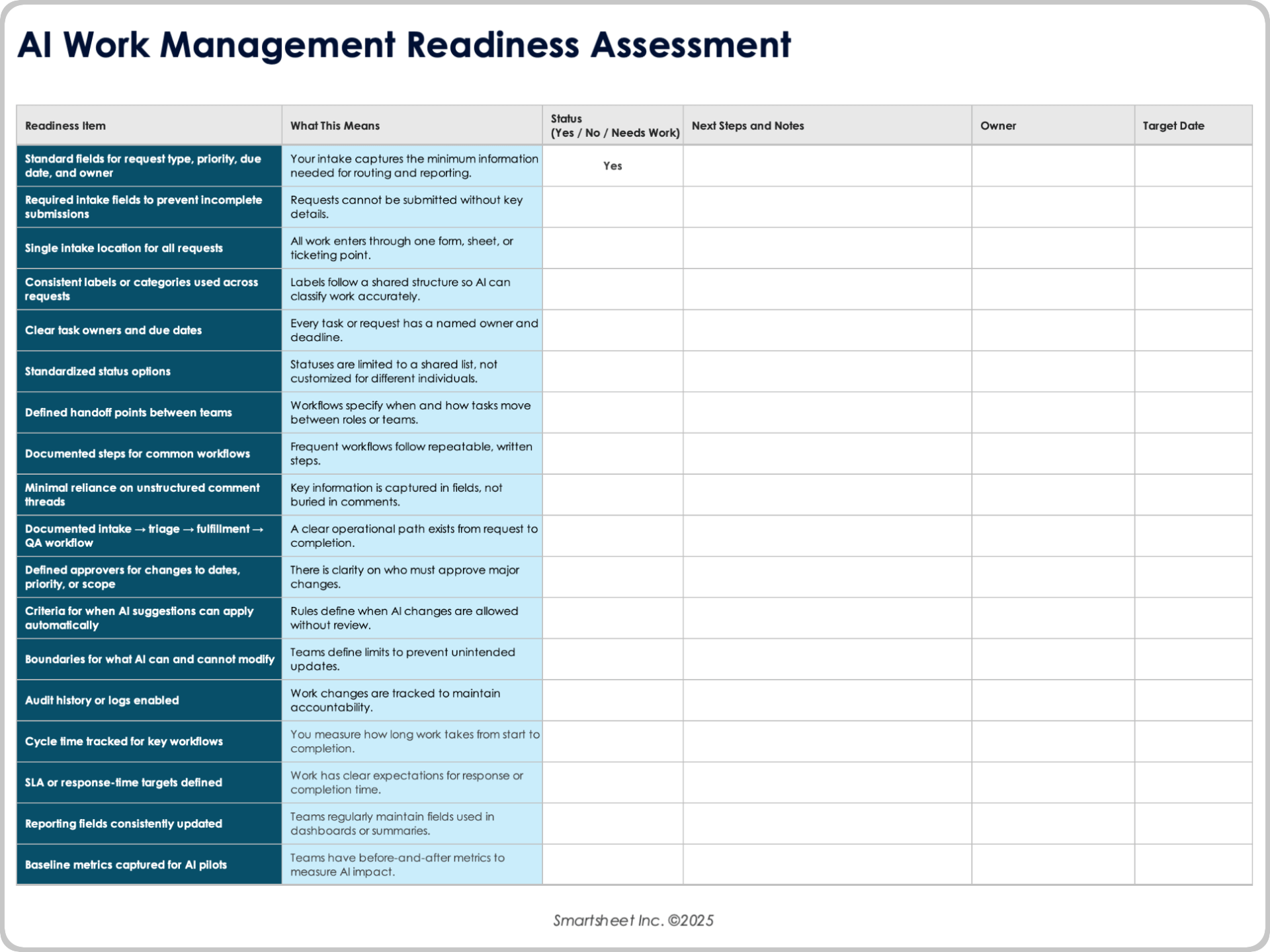
AI Work Management Readiness Assessment
This AI readiness assessment helps teams see if workflows, data, and roles are sufficiently structured for AI. Note your shortfalls, and list your next steps.
Download an AI Work Management Readiness Assessment for
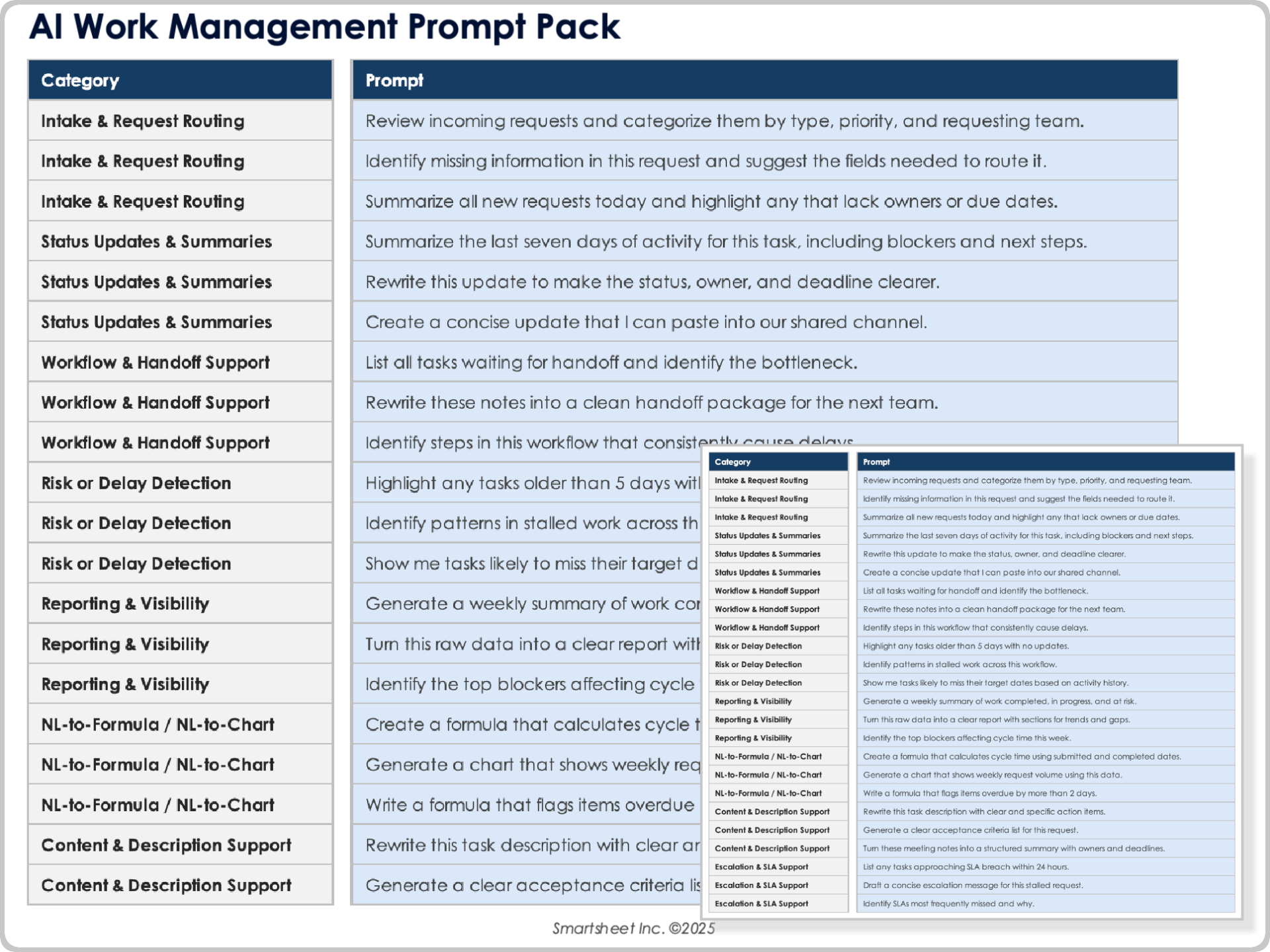
This work management AI prompt pack offers ready-made prompts for drafting updates, clarifying requests, summarizing threads, escalating stalled work, and much more.
AI-powered work management tools generally come in five categories: AI-enabled platforms, assistants, automation, search, and governance. Some tools, including Smartsheet, have features overlapping multiple categories.
See this overview with examples of each:
AI-Enabled Work Platforms: These backbones of day-to-day work house requests, tasks, files, comments, approvals, and dashboards in one place. When information is gathered, AI sees what’s up and gives useful summaries or early warnings. → Examples: Smartsheet; Asana; Monday.com; ClickUp; Airtable.
AI Assistants/Copilots: This group covers the tools that help write, clean up explanations, or summarize long threads or the contents of a sheet or document. They save time on the small things that add up during a week. → Examples: Smartsheet AI-powered tools (Text & Summaries, Generate Formula, Analyze Data, and Suggested Descriptions); Microsoft Copilot; Amazon Q Business; Glean.
AI Automation Tools: Some tools focus on moving work from one step to the next. They route requests, collect approvals, escalate delays, or keep different systems in sync. Increasingly, these tools can draft or refine a workflow from a plain-language description, rather than requiring someone to build everything by hand. → Examples: Smartsheet Automations (and coming soon, Smart Flows); Microsoft Power Automate; Zapier with AI Actions; Make; Workato; HubSpot Operations Hub.
AI Search/Knowledge Tools: Finding the right information at the right moment is half the battle. These tools look across messages, documents, sheets, and other systems for the surest context, so teams don’t have to bounce between apps. → Examples: Microsoft Copilot; Amazon Q Business; Glean; Atlassian Rovo; Smartsheet.
AI Governance/Security Tools: As AI conducts more of the repeatable work, organizations need usage rules, what data it will access, and how actions get logged. Governance keeps everything predictable and prevents unpleasant surprises. → Examples: Smartsheet platform governance (using audit logs plus permissions); Microsoft Purview; Google Workspace’s Security Center; Okta identity governance.
Where Smartsheet Fits: Smartsheet brings several of these tool types together in one place. The platform already includes AI-powered tools, including Suggested Descriptions, Generate Formula, Text & Summaries, and Analyze Data. And it is rolling out new AI experiences — namely Smart Assist, Smart Columns, Smart Flows, and early agent-style capabilities — as part of its Intelligent Work Management initiative. The Smartsheet Knowledge Graph unifies and contextualizes all data and content throughout the organization. Through integrations via Copilot, Amazon Q Business, Glean, and other enterprise search tools, Smartsheet can also reach into the wider systems teams use every day. See more about the emerging Smartsheet AI capabilities.
AI’s Work Management Future
Artificial intelligence is rising from simple assistance to proactive support that keeps operations stable, predictable, and responsive. As flows and data solidify, AI will move beyond drafting and summarizing into recommending next steps, preventing slowdowns, and smoothing cross-team flows.
Experts look for a future that includes:
More Proactive Agents
Early agentic features will evolve into platforms that watch workloads, dependencies, and handoff patterns, then recommend the next action before teams feel the impact.
“Proactive AI agents will continuously monitor work management platforms to autonomously act on routine patterns,” Rhodes says. “An agent might watch for approval bottlenecks, notice that three approvers consistently delay certain types of requests, and automatically escalate or reroute them based on past patterns. Or it might spot that a team is overloaded and recommend deprioritizing lower-impact requests before anyone hits burnout.”
Stabilized Workflows
AI will foster steady operating rhythms to lessen variability and overload while keeping tasks moving through defined paths.
“AI will become a proactive work regulator, enforcing healthy operating rhythms the same way thermostats regulate temperature,” states Meisel. “It will nudge teams to rebalance workloads before burnout signals appear. It will prevent over-allocation before deadlines slip. It will detect ambiguity before tasks stall.”
He adds: “People think that AI will just accelerate work. The real unlock is that it will stabilize work, creating predictable, sustainable flow without humans needing to micromanage it.”
Macroeconomic research backs this shift toward stabilizing work instead of supplanting it. A 2025 National Bureau of Economic Research paper concluded that AI primarily automates tasks rather than whole jobs, and that productivity gains are frequently offset by workers taking on higher-value activities and by firm growth.
People Freed from Repetitive Work
As routine, day-cluttering tasks get assigned to AI, teams will spend more time on decision-making, relationships, and problem-solving.
“The organizations winning with AI aren’t the ones seeking maximum automation,” Rhodes explains. “They’re the ones using AI to lessen the noise so humans can focus on the judgment calls that require business context, relationship understanding, and creative problem-solving.”
Workflow Redesign
While many experts advise sticking with current flows right now, that’s not the future. In a move toward “AI-native” thinking vs. “AI-powered,” whole workflows will be re-evaluated. If we rebuild this from scratch, how might we do it? Being standardized, likely asynchronous, and well-governed will be paramount. This will vault AI into higher-level functioning and follow-through.
Governance Becomes a Core Requirement
Many see this coming quickly. Organizations need governance to deal with sensitive information. This includes audit trails, controls, and tools to explain AI’s actions, reasoning, and defensibility.
Experience the Power of AI in Work Management with Smartsheet
Empower your people to go above and beyond with a flexible platform designed to match the needs of your team — and adapt as those needs change.
The Smartsheet platform makes it easy to plan, capture, manage, and report on work from anywhere, helping your team be more effective and get more done. Report on key metrics and get real-time visibility into work as it happens with roll-up reports, dashboards, and automated workflows built to keep your team connected and informed.
When teams have clarity into the work getting done, there’s no telling how much more they can accomplish in the same amount of time. Try Smartsheet for free, today.
AI in Work Management FAQs
AI often automates routine coordination and reporting. It can draft updates, summarize activity, route requests, generate formulas or charts from natural language, and do the next step in a workflow. It can also monitor stalled work, aging items, or uneven workloads.
Yes, AI tools commonly integrate with other software. Many platforms integrate into enterprise search tools, copilots, and productivity systems so you can get answers, pull context, or guide actions without switching tools. Integrations help AI interpret work taking place across systems while keeping consistent the source of truth.
It’s quite possible that AI is not safe to use with sensitive workplace data. Safety depends on the platform’s data handling and governance controls. Find platforms that exclude your data from public model training, enforce role-based permissions, and save audit trails.
To measure AI’s ROI in work management, start with one workflow and monitor a metric. For example, look at time savings on summaries or updates, fewer misrouted tickets, or fewer stalled tasks. Compare those metrics before and after implementing AI to quantify the impact. Then, calculate ROI by comparing the value of that impact (hours saved, errors avoided, or increased productivity) against the cost of the AI solution.
Companies can begin adopting AI for work management with a single, contained use. They can embed the AI solution into a current process. Standardize a few data fields, keep people in the loop for impactful decisions, and judge one outcome before expanding.
Discover why over 85% of Fortune 500 companies trust Smartsheet to get work done.