In order to properly identify, track, and manage potential risks to your project, you’ll need a strong project risk register. We’ve gathered expert tips and provided a step-by-step guide to using a risk register, including essential features, benefits, and common project risks to be aware of.
A project risk register, or a risk log, helps teams identify, track, and monitor potential risks that could impact a project’s execution. It serves as a central repository for all uncertainty surrounding a project. A risk register evolves and is continuously updated as the project progresses, risk statuses change, and new risks emerge.
In risk management, risk is defined as any uncertain event that could affect project objectives. A risk register typically tracks threats, or negative risks. These are events that could harm or derail the project. A robust register also tracks opportunities, or positive risks. These events are still uncertain, but could benefit the project if they occur.
Whether it’s a simple spreadsheet, a dedicated template, or part of a comprehensive work management platform, the register is a critical component of your broader project risk management plan. Check out this complete guide to project risk management, including best practices and how to create a risk management plan. Then, read this article to learn how to create a risk register step by step.
What Is the Purpose of a Risk Register?
The purpose of a risk register is to identify threats and patterns, manage priorities, delegate tasks, and develop risk management strategies. A risk register shifts your team from reactive firefighting to proactive management. By identifying risks early, you can lessen their impact or even prevent them altogether.
Here are the main functions of a risk register:
Identify Risk Patterns: Maintaining a risk register might shed light on risk patterns to which your team, organization, or projects are particularly vulnerable. Tracking these patterns can help your risk management team develop effective strategies.
Improve Risk Response: Routinely keeping a risk register improves overall security posture and risk response by making risk assessment and management a regular priority. This makes the risk management team more proactive and reduces the need for last-minute damage control.
Prioritize: A risk register helps teams ensure effective risk management by helping teams prioritize tasks based on time, budget, and resource limitations. It provides clear documentation of risk criteria that can help teams assess which tasks require the most attention.
Many experts consider a risk register one of the most important project management documents. Without a risk register, it is easy to lose track of all the risks that emerge during a project.
“If you try to keep track of your risks in your head, you’re going to forget things and you’re not going to be able to proactively manage and plan for that.”
Ultimately, a risk register is about visibility. A well-maintained register ensures that when issues do arise, leadership is already prepared with a plan.
“Nobody likes surprises. Stakeholders don’t like surprises. Shareholders don’t like surprises. And the CEO doesn't like surprises.”
A project risk register offers benefits beyond helping you identify and deal with project risks. It also helps organizations clearly understand the opportunities and risks their projects face. In addition, a risk register serves as essential regulatory documentation during audits and formal reviews.
Beyond simply avoiding surprises, a risk register drives better project outcomes in several specific ways:
Proactive Management: Risk registers can function as an early warning system. Instead of relying on reactive responses, the register allows teams to build mitigation strategies — including avoidance, transfer, or acceptance — into project plans from the start. It tracks triggers and changing conditions so teams can address emerging threats promptly.
Visibility and Communication: The register acts as a single source of truth, improving team and organizational alignment by providing a high-level view of risks. All stakeholders can have visibility into the project’s risk management process so that if issues arise, it enables collaboration rather than animosity.
Enhanced Decision-Making: By using standardized, objective assessments to score likelihood and impact of risks, the register should reduce individual bias and risk inflation. Risk scoring helps project managers make more informed decisions and develop a clear picture of opportunity costs.
Optimized Resource Allocation: Risk registers help teams filter and rank risks so they can focus on the most important threats at any given moment. This process supports advanced planning and rapid response, ensuring that people, money, and time are allocated where they are most needed.
Accountability: Teams use the risk register to assign every risk an owner. This owner is then responsible for monitoring, reporting, and implementing responses. To prevent bottlenecks and micromanagement, the register should have a clear process for escalating risks, including when they should be escalated and to whom.
Governance, Compliance, and Documentation: The register provides an audit trail for regulated industries, where documenting security or safety risks is essential. It demonstrates a formal process that aligns with external standards and regulatory requirements, providing a reliable basis for reporting.
Historical Analysis: As both a living document and a centralized repository, the risk register manages information so that it stays manageable, while also providing historical data for trend analysis. Organizations can then learn from past projects and identify patterns over time.
Asset Protection: Risk registers ultimately aim to strengthen a team’s or organization’s risk management structure, which helps protect organizational assets, including people, property, reputation, and income.
Try one of these free project risk templates to help you assess and evaluate your risks.
When to Use a Project Risk Register
Use a project risk register at every stage of the project lifecycle. It’s useful for projects of any size, but becomes especially important in high-risk situations, such as projects with significant uncertainty, tight deadlines, regulatory requirements, cross-functional teams, new technology, or large budgets.
Here are the different points in the project when it is useful to use the project risk register:
Concept: At this stage, a formal risk register may not exist yet. However, risk management can begin before the project officially starts. Discuss key uncertainties and assumptions identified during early feasibility or business-case work. Document clear or high-level threats and opportunities, and plan to create a formal risk register.
Initiation: Once the project is formally authorized, teams record major strategic risks tied to the project’s objectives, constraints, and assumptions. During this stage, the risk register helps teams review historical data and flag potential bottlenecks or high-level risks.
Planning: At this stage, teams build the risk register. Brainstorm and interview with the team and all stakeholders to collect input on the most important risks, and review historical data. Then populate the register with risks, recording a unique ID number, description, potential impact, cause, and an owner for each. Assign risk scores and decide on response strategies, and integrate them into the project plan.
Execution: During project execution, the team reviews the risk register daily or weekly to stay ahead of potential problems. Doing so can help teams execute response actions quickly and remain aware of risk triggers.
Monitoring: Continue to review and update the risk register during monitoring to reflect the current project environment. Add new risks as they come up, and re-asses existing risks as conditions change. Use the register to support change control by documenting how proposed changes might impact risks. Conduct formal risk reviews and audits during status meetings and reports to stakeholders. Remove risks when the window of opportunity for them to occur has passed.
Closing: During project close, the risk register becomes a historical record. Document final outcomes, record which risks materialized and which were avoided, and note whether the planned responses were effective. Record your lessons learned, and archive the register as an organizational process asset.
A risk register is especially important for complex projects with high uncertainty. Here are some examples of what high project complexity or uncertainty might look like:
Multiple Conflicting Stakeholders: When a project involves heads of multiple departments with competing priorities and different definitions of success, misalignment itself becomes a major risk. Teams can use the risk register to record those disagreements around key decisions or triggers, assess their potential impact, and surface them early. This shared visibility helps stakeholders resolve conflicts before committing budget or resources.
Operational Changes: When a project introduces significant internal or operational change, such as new processes, tools, or team structures, it causes uncertainty and increases risk. A risk register can help identify any change management problems that might emerge from the transition.
New Technology: If a project relies on a brand new software stack, machinery, or platform, a risk register is important for documenting and preparing for the possibility of technical failure.
High Vendor Dependency: If the project relies on a supplier for a critical component, material, or skill, a risk register helps teams determine whether they need to build buffers into the budget or schedule.
Hard Deadlines or Budget Constraints: For fixed-price contracts or contracts tied to hard launch deadlines, the risk register helps capture scope creep and other factors that might increase costs. It can also help teams decide which lower-priority features can be cut if high-priority risks emerge.
Industry Regulations and Compliance: For projects in healthcare, finance, or construction, a risk register is essential to track regulatory, legal, and audit-related risks, such as noncompliance that could result in fines. A risk register helps teams document compliance requirements, monitor regulatory changes, and keep track of legal deadlines to ensure no permit or audit is missed.
Common Project Risks to Track
While every project has unique challenges, certain categories of risk appear across almost every industry. These include scope creep and cost overruns, resource constraints and delays, and compliance issues. Operational risks and communication breakdowns are other common factors that could disturb a project.
Here are the most common project risks to watch for:
Scope Creep: This is one of the most common types of project risk. Project requirements often expand beyond the initial plan without adjustments to time or budget. Sometimes this is caused by poor planning, but sometimes it is unavoidable, particularly when clients or stakeholders request changes mid-project. Learn how to manage scope creep when it happens.
Resource Constraints: Over the course of a project, multiple teams may have to share limited resources, key team members may be pulled away for other priorities, certain skills may be scarce among teams, or high-end tools or equipment may be unavailable due to technical or budget constraints. Resource constraints can risk the project’s timeline and the quality of the output.
Cost Overruns: Financial risk is a primary concern and often stems from inaccurate initial estimates, unexpected price increases or currency fluctuations, scope creep, and hidden costs that weren’t accounted for during planning.
Delays: Most projects have strict deadlines. One common risk is project tasks taking longer than expected and disrupting the schedule. This might be caused by overly ambitious deadlines, a lack of buffer time, or task dependencies that create a domino effect across the timeline. They may also be caused by scope creep.
Communication Gaps: Misalignment between stakeholders and the project team is a major threat. Poor communication can lead to poor quality work, missed deadlines, low morale, low trust among team members, stakeholder disengagement, and even potential safety hazards in industries like construction.
Technical and Operational Risks: These risks involve project execution. They include integration issues, hardware failures, bugs, supply chain issues, and bottlenecks in workflow processes.
External Risks: Many common risks in a project are completely outside the project manager’s or organization’s control. For example, new regulations introduced mid-project, market volatility, global upheavals like pandemics, economic or political shifts, or vendor delays that occur mid-project could throw the project off course.
A risk register is a detailed record of all identified project risks, including descriptions, owners, status updates, and response plans. A risk matrix is a visual chart that maps risks by likelihood and impact, helping teams quickly spot high-priority threats. Teams often use both together — the register to manage risks and the matrix to prioritize them.
To better understand this difference, explore this collection of free risk matrix templates.
What to Include in a Risk Register
A risk register includes columns that capture different details about each risk the team tracks. These typically include the risk ID, description, category, impact, likelihood, trigger, and consequences. It should also list the response strategy, response description, and response owner.
Here are some common columns included on a risk register:
Basic Information: Clearly name each risk and assign it an ID number. Include the date when the specific risk was added to the register to help identify new or recently flagged risks.
Risk Description: Provide a brief description or summary of the risk.
Project Category: Include information on the broad project area that the risk belongs to. Categories vary by industry. In construction, some broad categories are materials, contracts, permits, and site work.
Impact: Describe the potential impact of the risk. You can also have a separate impact score using a defined scale. Giving the risk a numeric value makes it easier to evaluate.
Likelihood: Describe the likelihood of the risk occurring. You can also have a column quantifying that likelihood. This can be expressed as a whole number on a scale or as a percentage.
Risk Severity: Calculate risk severity using both the impact and the likelihood values. You can also describe it qualitatively.
Timing: Some risk registers include details on when the risk is most likely to happen during the project. This helps team members better prepare for and monitor the risk.
Prevention or Mitigation Plan: Most risk registers include a short description of what measures the project team will take to try to prevent each risk from happening, or how to effectively manage it if it does occur.
Risk Owner: Include the person or team responsible for managing the risk response strategy.
Risk Status: Many risk registers include a risk status, like “open” or “closed.” A risk is closed when the chance of it occurring becomes zero based on the progress of the project. Updating risk status in the register allows teams to focus only on open risks.
Mitigation Plan Status: This section of the risk register indicates the status of prevention and mitigation plans. Was the plan necessary? Is it currently underway? Is it working, or does it need to be adjusted?
How to Use a Risk Register Throughout Your Project
To use a risk register throughout your project, treat it as a living document that guides decision-making. Start by documenting every possible risk, then evaluate each one for likelihood and impact. Keep the register updated as the project evolves and test response plans before problems occur. Finally, close out or formally accept risks.
Once a risk register has been created, it is essential to use and update it throughout the project lifecycle. The risk register is important for identifying, analyzing, monitoring, and resolving issues. Here are the basic steps for how to use a risk register throughout the project:
1. Identify
Consult team members, departments, and stakeholders to flag risks during the planning stage of a project, as well as throughout the project lifecycle. Even if a potential risk seems unlikely, make sure it is identified in the risk register. Alan Zucker of Project Management Essentials advises: “If you think of it, document it.” If it’s not in the register, it is easy to forget.
Zucker recalls a project that his team took over, which involved building a new mobile app. They later discovered that a critical server purchase had not been formally tracked. With production approaching, an unresolved technical issue forced the team to delay deployment because the server ultimately needed to be replaced. “My immediate question was, ‘Was that identified in the risk register?’,” says Zucker. “There would have been plenty of opportunities to do something different, but because they weren’t formally tracking it, it fell through the cracks.”
The risk identification process should include both positive and negative risks. Document opportunities whose likelihood is uncertain, like potential budget surpluses or early delivery dates. This can improve team morale and, according to Luis Contreras, “changes the flavor of the meeting,” making it more optimistic and strategic rather than pessimistic.
2. Analyze
Once you’ve flagged and listed your risks, assess their potential likelihood and impact. Use “if-then” statements, Alan Zucker advises. “If this occurs, then this is the impact.” This encourages teams to explore and assess all potential consequences, which may all require a different mitigation approach or response strategy.
For example, Zucker says, “If there’s a hurricane, I could lose power, I could lose internet, I could have a tree limb fall on my house…If I just said: ‘There’s going to be a hurricane,’ I haven't thought of those different risk events. Each one of those different risk events may have a different likelihood and may have a different response strategy associated with it.”
3. Monitor
The risk register should be a living document that is regularly updated. This ensures that risk owners can track triggers and change statuses over the course of the project. Use a collaborative tool or platform to ensure access and visibility to any team member who requires it.
Monitoring can also involve testing mitigation plans and knowing exactly when a plan will be put into action, and by whom. Ensure your mitigation steps are realistic and actionable before the crisis hits.
“Let’s say there was a risk of the system going down. That always can happen whenever you introduce new code. Who would you talk to if that happened? What are the options? Are you going to have to back out all the code together? Can you just back out parts of it? Who makes that call? You’ve got to know all that upfront.”
During this phase, use the risk register to verify that all identified risks have been closed, mitigated, or formally accepted. Ensure that there are no outstanding risks that could surprise you in the aftermath of the project. Review the project, including how risks were predicted and handled, and document final outcomes and lessons learned. Archive the risk register for use in future projects, post-project reviews, or audits.
Risk registers will look different in different organizations and industries. Check out these real-world risk register examples for project management, software, construction, IT, and more.
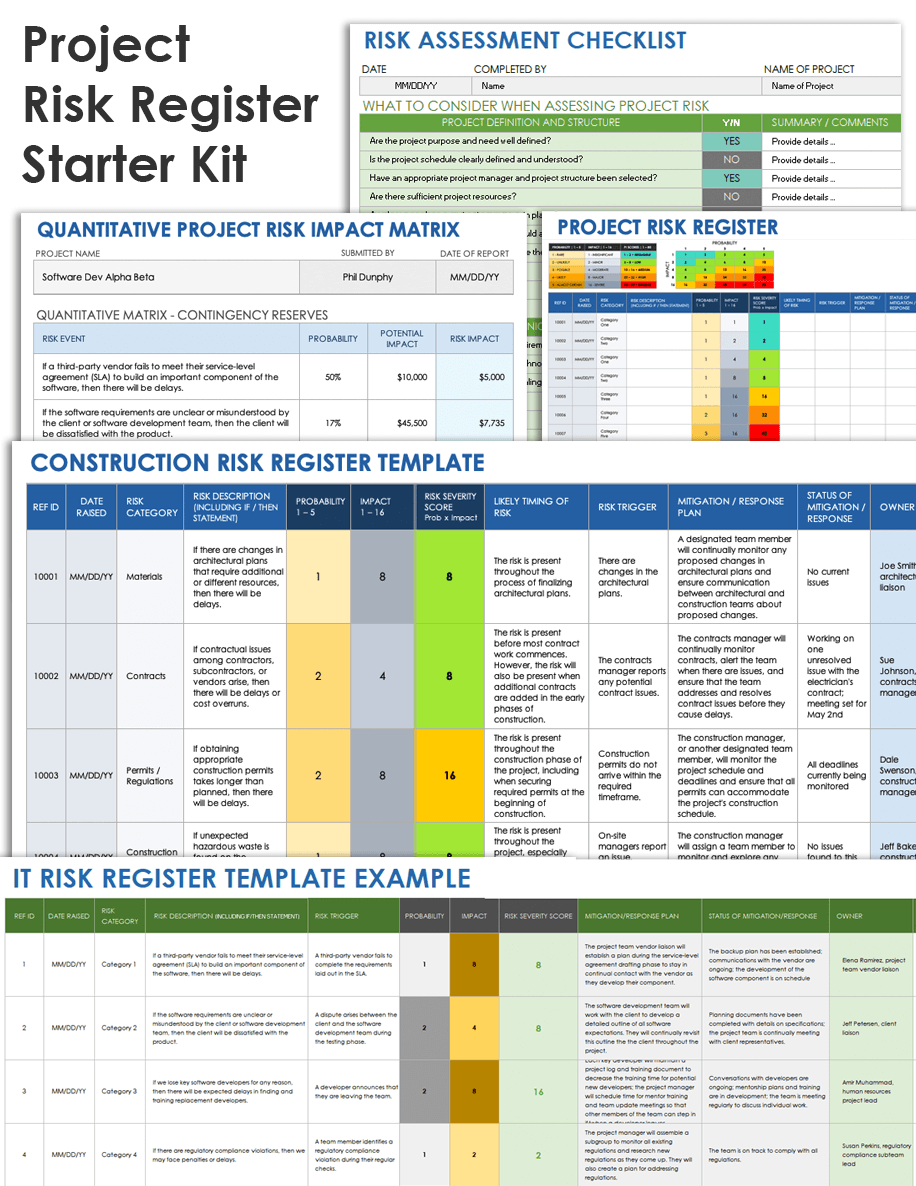
This starter kit includes a checklist on assessing possible project risks, a risk register template, an example qualitative risk impact matrix, and a template for a quantitative risk impact matrix. The kit will help your team better understand how to identify and assess risks and use a project risk register.
Get the Most Out of Your Risk Register with Smartsheet for Project Management
From simple task management and project planning to complex resource and portfolio management, Smartsheet helps you improve collaboration and increase work velocity -- empowering you to get more done.
The Smartsheet platform makes it easy to plan, capture, manage, and report on work from anywhere, helping your team be more effective and get more done. Report on key metrics and get real-time visibility into work as it happens with roll-up reports, dashboards, and automated workflows built to keep your team connected and informed.
When teams have clarity into the work getting done, there’s no telling how much more they can accomplish in the same amount of time. Try Smartsheet for free, today.
Frequently Asked Questions About Risk Registers
The three main components of a risk register are risk identification, assessment, and planned response, which includes the risk response owner. Teams should evaluate each risk in terms of likelihood, impact, and given a severity score. The risk register should also include a field to note the risk status, risk triggers, and the status of every planned risk response.
A good risk register includes all essential components and promotes proactive risk management. It is easy to understand, simple to access, and updated regularly throughout the project lifecycle. An effective risk register clearly defines each risk, assigns owners, outlines response and contingency plans, and ranks risks by priority and potential impact so teams know where to focus resources.
The difference between a risk register and a risk log lies in their scope and purpose. A risk register is often more comprehensive and is used throughout the project lifecycle to identify, assess, prioritize, and manage potential risks. A risk log is usually a simpler document that tracks risks as they emerge. Some teams use the terms interchangeably.
A risk register is often confused with an issue log, where teams document problems that have already occurred. An issue log is reactive, while a risk register is proactive.
Yes, a risk register can and should be used to document and track positive risks. These are uncertain events that could benefit the project. The risk register can help teams identify potential opportunities, prepare for them, and take advantage of positive outcomes when they arise.
Smartsheet helps you identify threats early, automate response plans, and keep projects on track with a secure, flexible project risk management platform.