RAID logs provide project managers with a structured framework to identify and address factors that can impact a project. Below, you’ll find the most useful information and resources for understanding and implementing RAID logs.
A RAID log is a document that helps track and manage a project’s risks, assumptions, issues, and dependencies (RAID). By managing these four elements in one place, a RAID log improves visibility, accountability, and decision-making, helping teams manage uncertainty and keep projects on track.
These are the key elements of a RAID log:
Risks: These are potential events that might impact a project’s objectives. For example, a key supplier might delay delivery of materials, which could push the project timeline back.
Assumptions: These are factors that are assumed to be true for a project to be successful. For example, the team might assume that they will have access to key software or digital assets without ensuring that licensing and permissions are up-to-date.
While the standard definition of a RAID log lists the A as assumptions, some project managers also use the A to represent actions. These are specific tasks or follow-up items assigned to individuals to mitigate risks, resolve issues, or move the project forward.
Issues: These are current problems that are negatively affecting a project and require resolution. For example: “The project’s testing phase is stalled because a critical integration is failing.”
Dependencies: These are tasks that rely on other work being completed first before they can begin or move forward. For example: “The marketing launch cannot begin until the product development team finalizes and approves the feature set.”
Another version of the RAID log can also use the D to represent decisions. These are key choices made by stakeholders that shape project direction, scope, timeline, or budget. This is a good alternative to tracking dependencies when you need to document major decisions for audit trails.
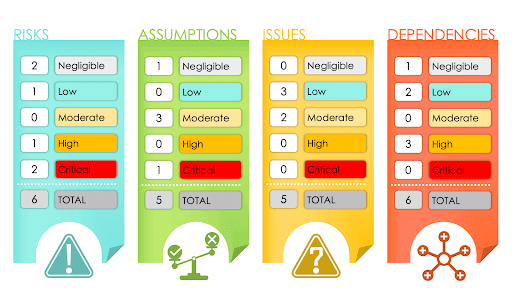
The following image shows how teams can use a RAID log to categorize items by severity level so they can quickly assess project health and prioritize attention:
A RAID log includes four core components: risks, assumptions, issues, and dependencies. Many RAID logs also include supporting details for these categories, such as impact level, owner, status, mitigation plan, and target resolution date. Including these components helps improve visibility and project control.
Here are the elements you can include in a RAID log:
RAID Category: Identify whether the item is a risk, assumption, issue, or dependency.
Description: Provide a clear, concise explanation of each item.
Impact: Summarize the potential or actual effect on the project, such as delays, added costs, scope changes, or quality concerns.
Item Owner: While the project manager typically owns and maintains the RAID log as a whole, team members take responsibility for specific items. Identify the person or role responsible for monitoring or resolving each risk, assumption, issue, or dependency.
Priority: Indicate the level of urgency or importance (e.g., critical, high, moderate, or low) for each element of the RAID log. Critical and high-priority items typically require immediate attention, while moderate or low-priority items can be addressed according to the project schedule.
Status: Note the current status of each item (e.g., open, in progress, on hold, or closed).
Action Plan: Outline the steps required to mitigate, manage, or resolve the item, including any relevant milestones or deadlines.
Due Date: Identify the target date for resolution or formal review.
Make sure you include everything you need by downloading one of these free RAID log templates.
How to Create a RAID Log: Step-by-Step Guide
To create a RAID log, first define the project scope, objectives, and constraints. Next, hold a meeting — such as a kickoff workshop — to identify risks, assumptions, issues, and dependencies. Finally, categorize each item, assess its impact and priority, and assign an owner to ensure accountability.
Here is a step-by-step guide to creating a RAID log for your project:
Define the Project Scope and Objectives
Document project goals, deliverables, constraints, and boundaries before creating the RAID log. A well-defined scope reduces ambiguity and helps the team distinguish between legitimate risks and scope misunderstandings. This can minimize the likelihood of scope creep.
Learn more about how to prevent scope creep in this guide.
Conduct an Initial RAID Identification Session
Hold a structured working session or kickoff workshop to brainstorm and identify the project’s potential risks, assumptions, current issues, and dependencies. Capture items clearly and in real time to avoid vague or overlapping descriptions.
Categorize, Prioritize, and Assign Ownership
Organize each item under the appropriate RAID category. Assess impact and urgency using a consistent scale (e.g., critical, high, moderate, low), and assign a clear owner responsible for monitoring or resolving each item. Prioritization ensures the team addresses high-impact risks and active issues promptly.
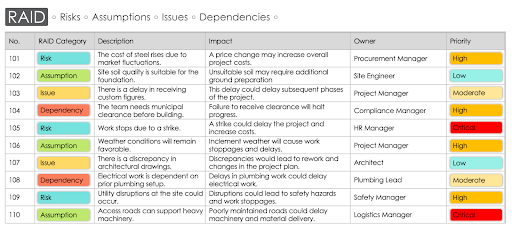
See this sample RAID log to better understand how this would look in a real-world project:
How to Effectively Manage a RAID Log
To effectively manage a RAID log, align risks, assumptions, issues, and dependencies with specific project milestones. Track each of these elements using reporting tools. Review and update the log regularly, adjusting priorities as needed. Be sure to communicate changes to stakeholders. At project close, confirm final statuses and use the completed log to improve future projects.
Effectively managing a RAID log can help with project risk mitigation, improve visibility into potential issues, and support more informed decision-making throughout the project lifecycle.
Here is a step-by-step guide to effectively managing a RAID log:
Establish Timelines and Tracking Mechanisms — Align RAID items with key project milestones and review cycles. Use dashboards, status indicators, or reporting views to track progress and highlight overdue or escalating items.
Choose Effective Tools — Select a project management template, software, or other organizational tool that suits your project’s needs. User-friendly project management software can be a great option for efficient RAID log maintenance and seamless team integration. Dedicated project risk management software offers RAID logs and centralizes risk tracking, making it easier for distributed teams to manage updated information.
Update and Review Log Regularly — Make RAID review a standing agenda item in project meetings. Update statuses, revise impact assessments, close resolved items, and add new risks or dependencies as the project evolves.
Monitor, Adjust, and Communicate — Use insights from the RAID log to inform project decisions and planning adjustments. Share relevant updates with stakeholders to maintain transparency, manage expectations, and support informed decision-making.
Close and Learn From the Project — At project closure, confirm the final status of each RAID item and use the completed RAID log for post-project evaluation. Review patterns, recurring risks, and decision points during retrospectives to compile lessons learned and improve future project planning and risk management practices.
To use a RAID log in Agile project management, maintain a log alongside your sprint backlog. Review and update RAID items during sprint planning, daily stand-ups, retrospectives, backlog refinement, stakeholder check-ins, and release planning. This approach supports Agile’s iterative and adaptive principles while improving accountability and risk management.
Here are some ways to incorporate RAID logs into your Agile projects:
Sprint Planning: Use the RAID log during sprint planning to identify and document potential risks and dependencies for the upcoming sprint. Find tips and tools in this sprint planning guide.
Stand-Ups: Reference the RAID log in stand-ups to provide concise updates on new or escalating issues and dependencies that may be blocking progress.
Retrospectives: Use the RAID log in retrospectives to review and adjust tracked items. By doing so, teams can learn from past sprints and improve risk management. Learn how to run a retrospective.
Product Backlog Refinement: Apply the RAID log during backlog refinement to assess and update risks and dependencies associated with upcoming backlog items.
Stakeholder Check-Ins: Reference the RAID log in stakeholder meetings to clearly communicate high-impact risks, issues, and mitigation plans.
Release Planning: Incorporate the RAID log into release planning to identify dependencies and risks that could affect the release timeline.
Agile Scaling: When scaling Agile across multiple teams, use a RAID log to maintain a shared, cross-team view of risks, assumptions, issues, and dependencies.
Continuous Improvement: Regularly review and update the RAID log to support Agile’s commitment to continuous improvement and to ensure the log evolves with the project.
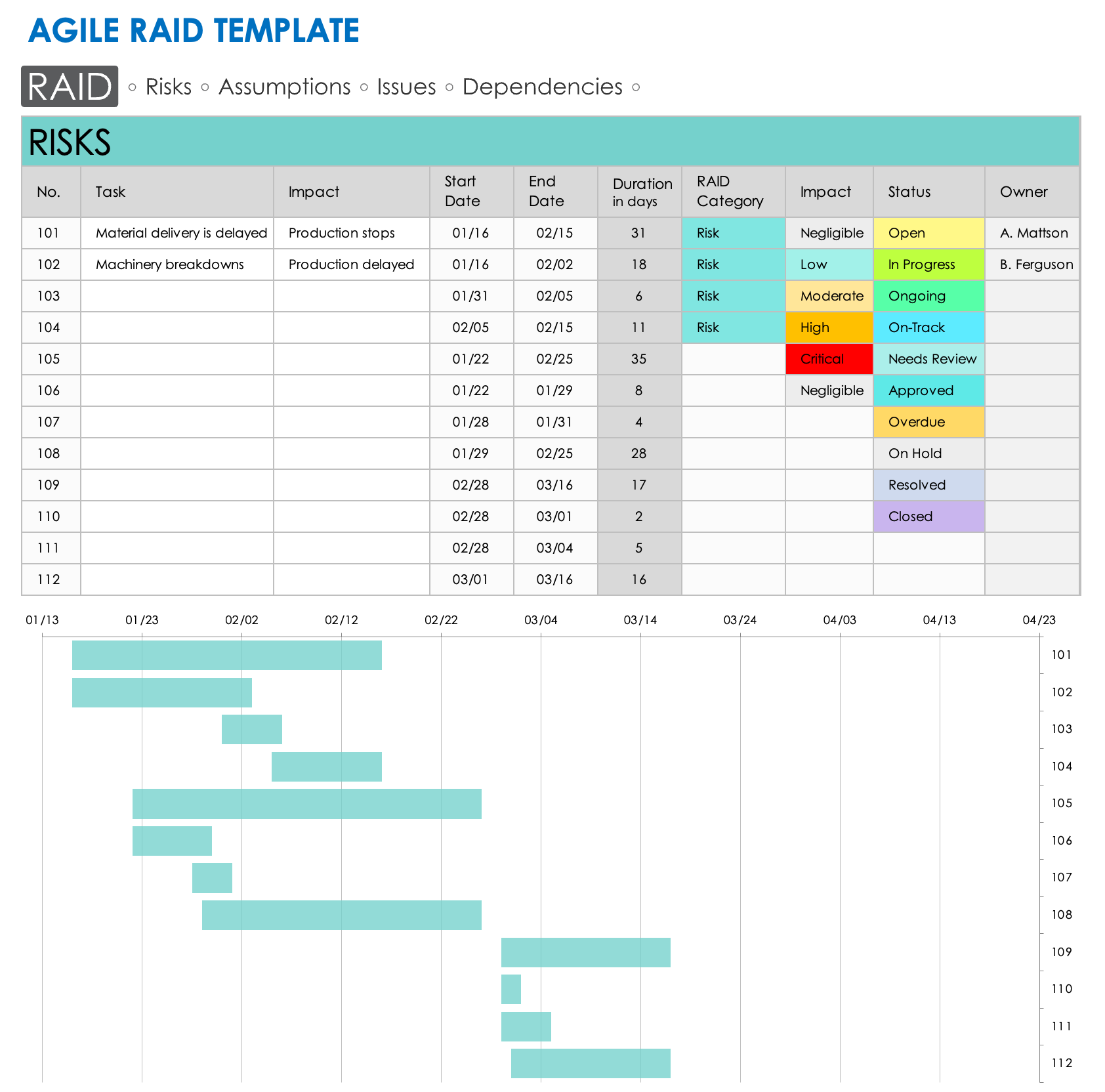
This Agile RAID template gives Agile teams an adaptable way to document potential risks and revisit assumptions throughout a project. Enter your identified risks, assumptions, issues, and dependencies in the appropriate worksheet. Add each item’s impact, start and end dates, status, and owner. The template automatically generates a timeline chart at the bottom of each worksheet, allowing you to track RAID items over time.
A RAID log is commonly used in project management to identify potential problems early, monitor active issues, coordinate dependencies, and keep stakeholders informed. By regularly reviewing and updating the log, project teams can improve visibility, respond quickly to emerging challenges, and keep projects on track.
"A RAID log is a valuable tool in project management. It should be utilized when managing complex projects involving multiple variables that could impact a project’s success. RAID logs help project managers proactively identify and address potential risks, challenges, assumptions, and dependencies, ensuring that projects stay on track and potential issues are mitigated."
— Percy Grunwald, personal finance expert and Co-Founder of Compare Banks
Here are the most common uses of RAID logs:
Risk Identification and Tracking: Document potential risks early and monitor them throughout the project. Assumption Validation: Track key assumptions made during project planning and revisit them to ensure they remain valid.
Issue Management: Record active problems affecting the project and assign owners to resolve them, so teams can address problems quickly.
Dependency Coordination: Identify tasks, teams, vendors, or deliverables that rely on one another, and coordinate as needed to prevent delays.
Stakeholder Communication: Use RAID logs to update stakeholders on project risks, issues, and dependencies that could affect the project.
Project Oversight and Governance: Maintain a record of critical project factors so project managers and leadership can make informed decisions and keep the project aligned with its goals.
The earlier a project manager incorporates a RAID log into project planning, the better prepared they are to address these factors proactively.
“In my experience, RAID logs should be initiated at the outset of a project. They’re integral to mapping out potential challenges and dependencies during the early stages.”
RAID logs help professionals across roles and industries. Here are industries that commonly use RAID logs:
Information Technology: IT projects often involve complex systems and software development, making RAID logs an essential tool for managing various project elements.
Construction: In construction, RAID logs help teams identify potential risks and issues related to a build, such as delays due to weather, dependency on suppliers, and more.
Healthcare: In healthcare, project managers use RAID logs to manage healthcare system improvements, the implementation of new systems, and other key initiatives.
Manufacturing: Leaders in manufacturing use RAID logs to identify and record potential issues and dependencies related to production, the supply chain, and logistics.
Consulting: Consultants use RAID logs to assess the risks and issues in client projects and recommend strategies to manage those concerns effectively.
Benefits of Using a RAID Log
The benefits of using a RAID log in project management include improved decision-making, stronger accountability, clearer communication, and better visibility into risks, assumptions, issues, and dependencies. By documenting these elements, teams can identify potential problems early, coordinate responses, and keep stakeholders informed.
These are some of the key benefits of utilizing RAID logs:
Better Decision-Making: A RAID log offers insights that enable teams to make more informed, timely, and effective decisions throughout the project lifecycle. “By identifying risks, assumptions, issues, and dependencies upfront, project teams can make informed decisions and take necessary actions to prevent or mitigate potential roadblocks,” says Grunwald.
This structured visibility helps teams move from identifying potential challenges to taking concrete action. “It functions as a roadmap, guiding teams toward what needs attention and action,” says Aird.
Increased Accountability: The use of a RAID log ensures that team members are aware of their responsibilities, their roles, and the risks or issues they are tasked with managing.
Improved Communication: A RAID log enhances transparency and facilitates better communication among project team members and stakeholders. “This proactive approach enhances project efficiency, reduces surprises, and ultimately contributes to better project outcomes,” explains Grunwald.
Preserved Audit Trail: Maintaining a RAID log preserves a detailed record of all risks, issues, assumptions, and dependencies, offering valuable insights and references for future projects or audits. “RAID logs provide a structured framework for capturing and organizing key project elements, allowing for easy tracking and monitoring,” says Grunwald.
Amplified Clarity: By clearly outlining and organizing project risks, issues, assumptions, and dependencies, a RAID log reduces ambiguity and enhances overall project focus, coordination, and clarity.
“RAID logs provide a structured overview of all significant aspects of a project,” explains Aird. “Over the years, I’ve observed that our most successful business tenants employ RAID logs to ensure comprehensive project oversight.”
RAID Log Best Practices
RAID log best practices include assigning clear ownership for each item, keeping entries concise, and reviewing the log regularly. Teams should also prioritize items based on impact and maintain open communication so risks, assumptions, issues, and dependencies stay visible to stakeholders.
Here are some best practices and expert tips to keep in mind as you start to use RAID logs:
Assign Ownership: By clearly assigning ownership for each element in the RAID log, teams can ensure accountability, promoting efficient problem solving. “Designate an individual or a small team to manage the RAID log,” advises Aird. “Doing this ensures accountability and currency.”
Keep It Simple: Maintaining simplicity in the RAID log encourages regular communication among and contribution from all team members. “While it’s essential to be thorough, it’s equally crucial to be concise,” explains Aird. “A RAID log should be easily comprehensible to anyone who reviews it.”
Maintain a Routine: By establishing a regular habit of updating and consulting the RAID log, you can ensure that no element is overlooked. Grunwald suggests maintaining a routine for updating the RAID log, “ideally during project status meetings, to ensure that it remains current and relevant.” suggests Grunwald. Schedule regular reviews to reassess and update the RAID log as needed.
Maintain Open Communication: When used correctly, a RAID log can enhance project transparency and communication. “Encourage open communication among team members to ensure that all inputs are captured accurately,” says Grunwald.
Prioritize Entries: By prioritizing entries in the RAID log, teams can better allocate resources strategically, reducing potential project delays and obstacles. Grunwald recommends prioritizing entries based on their potential impact to allocate resources appropriately.
Common RAID Log Challenges (and How to Overcome Them)
A RAID log comes with many benefits, but meticulous and consistent updates can be time-consuming and resource-intensive. A RAID log also needs to be accessible and understandable to all relevant stakeholders.
“One potential issue is that of overlooking or underestimating certain risks or dependencies,” Grunwald says. “Additionally, maintaining and updating a RAID log requires ongoing effort and communication. Ensuring that all team members contribute to and stay engaged with a RAID log can be a challenge, particularly in large or distributed teams.”
Here are some common challenges associated with RAID logs and how to address them:
Challenge
Why It's a Problem
How to Fix It
Data Overload
A RAID log can become overwhelming if it is overloaded with excessive information.
Prioritize information and regularly review and update your log to remain focused on essential data.
Decision Paralysis
The information in a RAID log can lead to decision paralysis.
Use the log as a tool for informed decision-making, not as the sole basis for decisions.
Information Silos
Information in a RAID log might become siloed, limiting its visibility and utility.
Ensure that the log is easily accessible to all team members, and encourage regular communication and updates.
Risk of Overlooking Critical Elements
You can potentially overlook or underestimate certain risks or dependencies in a RAID log.
Review and update the log regularly, ensuring diverse team input for a comprehensive view.
Skill Gap
A lack of experience or expertise in maintaining a RAID log can lead to ineffective use.
Provide training and resources to the team members responsible for maintaining the RAID log.
Tool Limitations
The limitations of the tools used for RAID logging can restrict the ease of updating and accessing a log.
Choose a robust and flexible tool that is easily accessible to all team members.
Getting Started with RAID Logs in Smartsheet
Turn your RAID log from a static spreadsheet into a dynamic project control center with Smartsheet, an intelligent work management platform. Build custom RAID logs that automatically alert owners when items need attention, create real-time dashboards that give executives instant visibility into project health, and establish workflows that keep your team aligned on critical risks and dependencies. Try Smartsheet for free, today.
Frequently Asked Questions about RAID Logs
A risk register and a RAID log differ in scope and purpose. A risk register focuses on identifying and managing project risks. It includes their likelihood, impact, and mitigation plans. A RAID log tracks risks, assumptions, issues, and dependencies. This gives project managers a broader view of project health.
Use a RAID log when you want a comprehensive management tool that captures multiple project factors in a single place. While a risk register enables a focused approach to risk management, a RAID log provides a high-level overview to support ongoing project monitoring.
Yes, you can use a RAID log in Agile projects if you adapt it. Teams use RAID logs during sprint planning to identify risks and dependencies, in daily stand-ups to track issues, and in retrospectives to improve future sprints. To work in Agile environments, the RAID log should be flexible and updated.
A RAID log and a RACI chart serve different purposes in project management. In short, RAID tracks problems, and RACI defines ownership. A RAID log documents risks, assumptions, issues, and dependencies that could impact a project. A RACI chart outlines who is responsible, accountable, consulted, and informed for specific tasks.
Discover a better way to streamline workflows and eliminate silos for good.