Excel Project Risk Management Plan Templates
Project Risk Management Plan Template
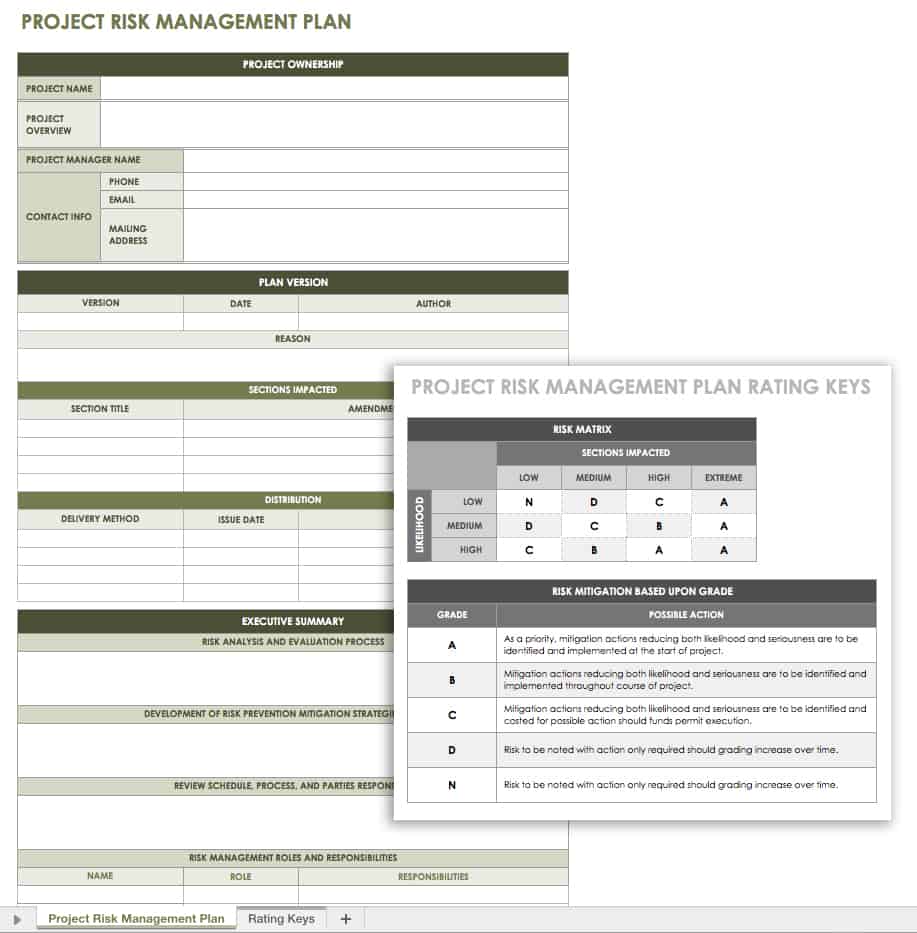
Download the Project Risk Management Plan Template for Excel
When to Use This Template: Use this template to create a comprehensive risk management plan to share with stakeholders. It's ideal for documenting risk strategy, roles, evaluation methods, and mitigation actions.
Notable Template Features: This customizable template includes project ownership, plan version, and executive summary sections so users can provide context and document changes. Use the risk matrix to assess likelihood and impact, and refer to the chart to guide risk mitigation strategies based on each risk’s grade.
Open a Smartsheet project risk template and get more functionality such as the ability to add comments, attach files to provide more context, and real-time collaboration.
Risk Register Template
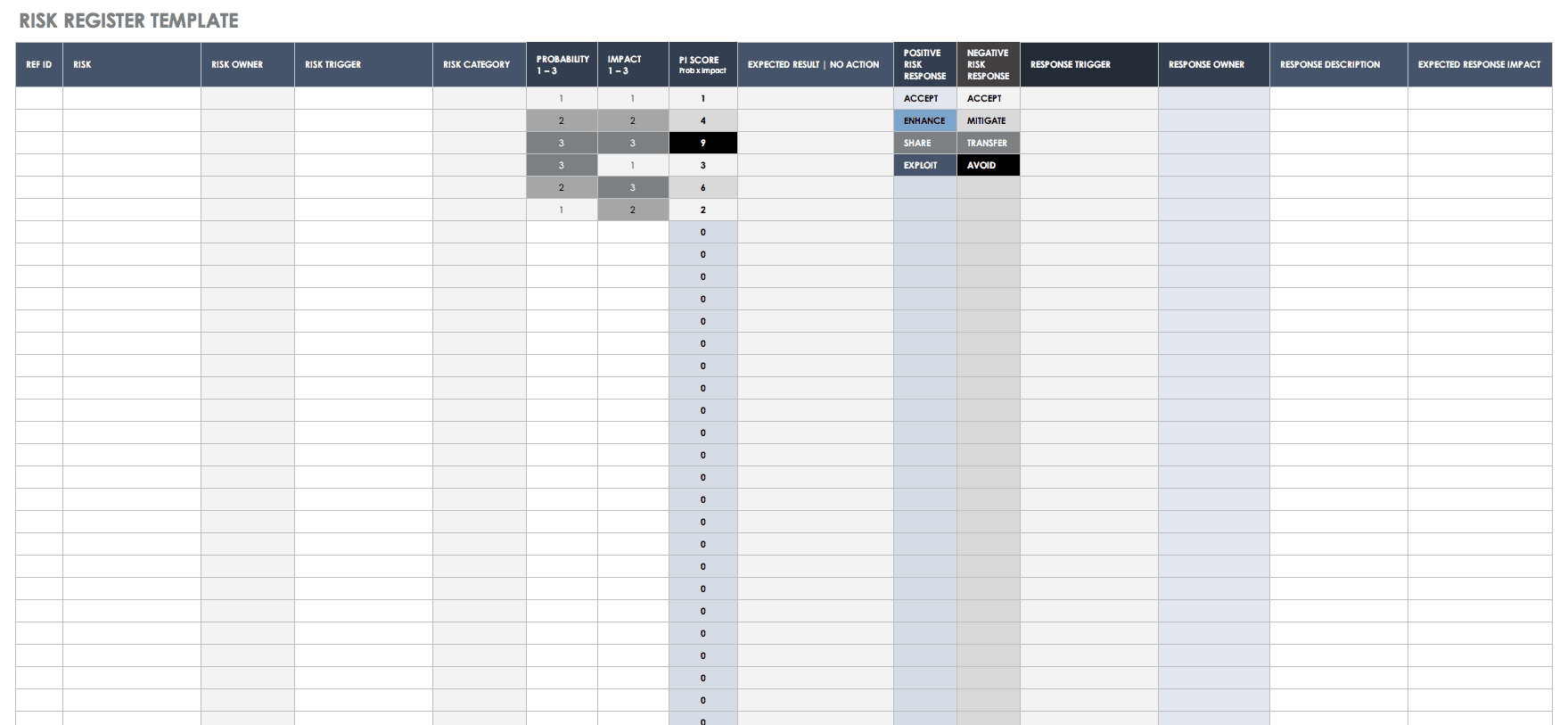
Download a Risk Register Template for
When to Use This Template: This template helps users document, track, and manage risks throughout the project lifecycle. It's ideal for risk assessments, mitigation strategies, or risk status updates during stakeholder reviews.
Notable Template Features: The template includes fields for reference IDs and risk owners, categories, and triggers. Use these columns to identify, assign, and categorize project risks. Then use the probability, impact, and PI score fields to evaluate and prioritize those risks.
Check out this collection of free risk register templates to help you identify, categorize, track, and manage project and organizational risks.
Risk Assessment Matrix Template
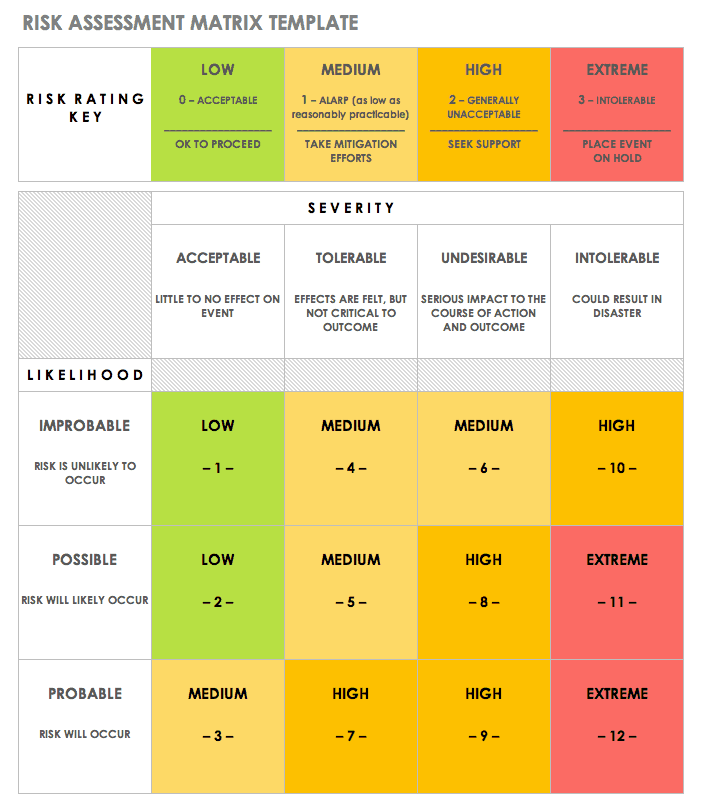
Download a Risk Assessment Matrix for
Excel | Microsoft Word | Adobe PDF | Smartsheet
When to Use This Template: Use this template to evaluate and prioritize risks based on their likelihood and potential impact. It's ideal for project kickoff meetings or team planning sessions that require risk-scoring visualization.
Notable Template Features: This template includes a color-coded risk rating key ranging from low to extreme, with associated guidance labels like OK to Proceed or Place Event on Hold. The layout makes it easy to identify high-priority items at a glance and categorize risks based on acceptable thresholds and mitigation urgency.
Check out this collection of risk assessment matrix templates to help you visualize, assess, score, and prioritize project risks.
Risk Management Matrix Template
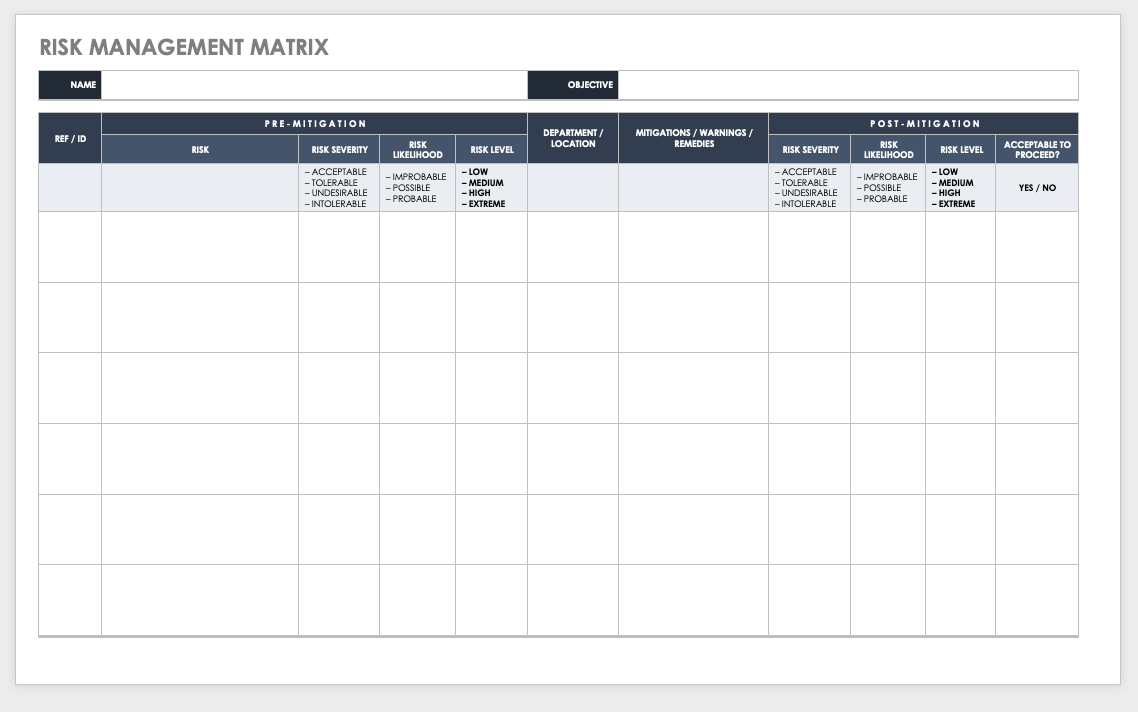
Download a Risk Management Matrix Template for
Excel | Microsoft Word | Adobe PDF | Smartsheet
When to Use This Template: This template is ideal for evaluating, visualizing, and managing project risks. Use it to track initial and residual risks and improve decision-making for mitigation actions.
Notable Template Features: This template includes pre-mitigation and post-mitigation sections. Use them to assess the severity, likelihood, and level for each risk, and to document the mitigations, warnings, and remedies taken.
Learn more about the benefits, goals, elements, and best practices of project risk management with this practical guide.
Risk Breakdown Structure Diagram Template
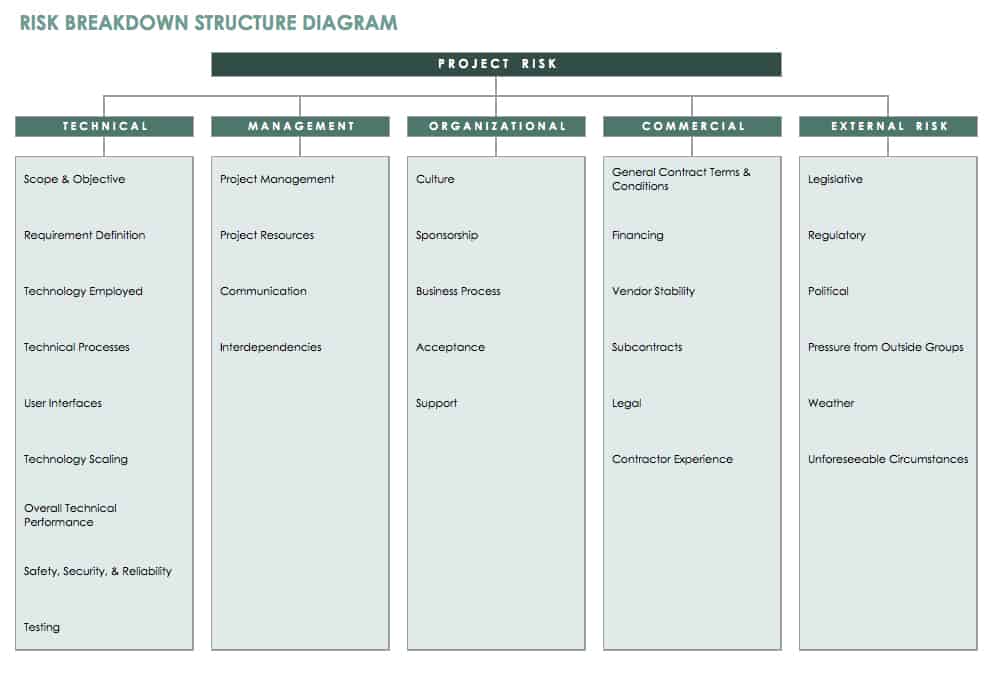
Download a Risk Breakdown Structure Diagram Template for Excel
When to Use This Template: Use this template to document, organize, and categorize project risks. Use it during project planning or risk workshops to identify potential risks across all project categories.
Notable Template Features: This RBS diagram template divides risks into five main categories: technical, management, organizational, commercial, and external. Use this template to identify risks and align mitigation planning across all categories.
Other Risk Management Templates
Risk Management Plan Template - Word
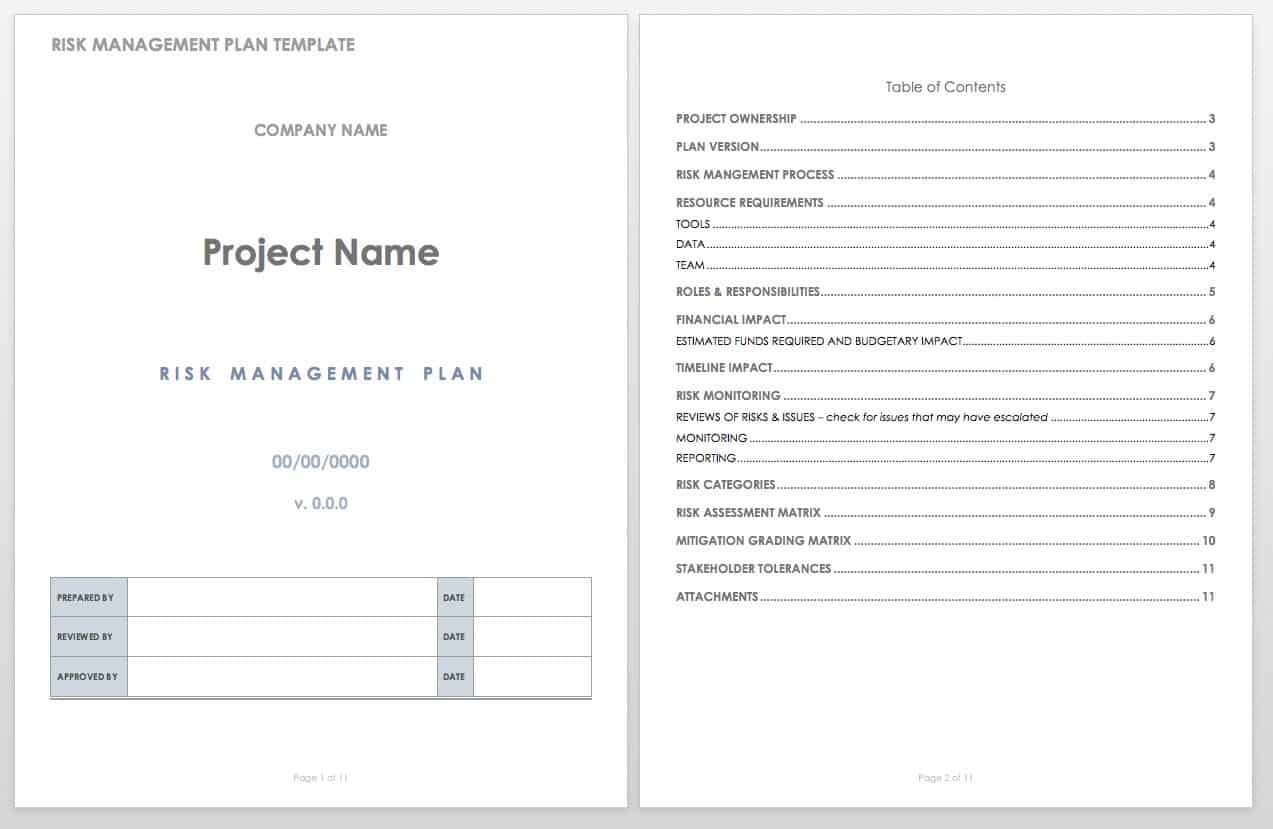
Download the Risk Management Plan Template for Microsoft Word
When to Use This Template: Use this template to create a comprehensive risk management plan. It's ideal for detailing how your team plans to identify, evaluate, and mitigate risks.
Notable Template Features: This template includes sections for recording project ownership, risk management processes, resource requirements, and the financial and timeline impacts of risks. It also has a risk assessment matrix for analyzing and scoring risk severity and likelihood.
Learn more about the history, goals, frameworks, and best practices for risk mitigation in this comprehensive guide to enterprise risk management. Find expert tips and learn everything you need to create a project risk management plan in this guide.
Risk Action Plan Template
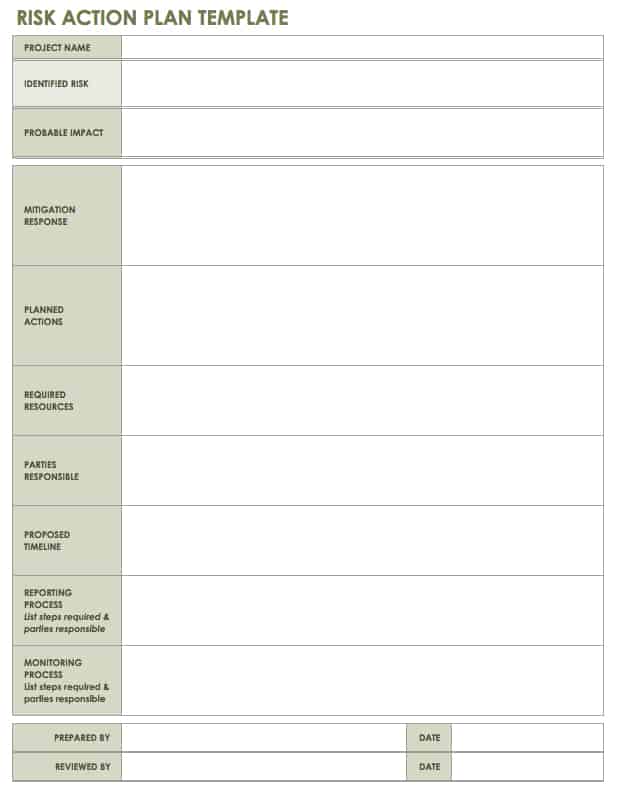
Download a Risk Action Plan Template for
Excel | Microsoft Word | Adobe PDF
When to Use This Template: Use this template to document response actions for a specific project risk. It's ideal for creating a targeted mitigation plan with clear responsibilities, resources, and a timeline.
Notable Template Features: This template includes fields for identifying risks, assessing their probable impact, and outlining a mitigation response. Use the planned actions and required resources sections to outline steps and support needs.
Ways to Handle Risk
Ways to handle risk include avoiding it, transferring it, mitigating its impact, or accepting it when cost of action outweighs potential harm. The right approach helps reduce uncertainty, limit disruption, and ensure the response aligns with the risk's likelihood and impact.
Use these responses to handle risks:
- Avoid: Avoiding risks is ideal, and especially important if the risk is high impact and likely to occur. Avoidance tactics may require greater investment (in order to develop alternative strategies), but this additional cost and effort is appropriate for high-impact, high-probability negative risks.
- Transfer: This method refers to transferring risk to another party (for example, the act of purchasing insurance moves the risk to the insurance provider). This response is common for risks that have a high negative impact but a low probability of occurring.
- Mitigate: Mitigation aims to reduce either the likelihood or the level of impact of a risk, and is used for risks that are likely to occur, but also likely to be low-impact.
- Accept: Acceptance is an option when there is no other solution, but would only be used for low-impact risks that have a low probability of occurring.
Risks can be internal or external, and projects may face a combination of both. Internal risks may include issues with technology, staffing, financial security, and other factors that can be controlled within your organization. External risks can be harder to predict and control, and may include factors such as issues with suppliers, changes in the political climate or economy, or even the weather. The process of analyzing risks and measuring them on a scale of probability and severity can provide the initial framework for determining which of the above methods will be the most effective response to a given risk.
Risk Management and HIPAA Compliance in Healthcare Organizations
Healthcare organizations are under strict regulations when it comes to risk and compliance. That’s why the ability to determine where those risks exist and establish a plan to manage them is extremely important for the business, both legally and functionally.
Risk management for healthcare organizations helps to ensure the all businesses are compliant with HIPAA requirements, and outlines potential risks that could occur in a healthcare organization, such as clinical testing errors, hospital facilities issues, security breaches of protected health information PHI, and more. To ensure that all healthcare data is effectively analyzed for security and protection purposes, you need a tool that is able to quickly identify, mitigate, and prevent risks from coming to fruition, while also offering real-time visibility into all potential risks.
Smartsheet is a work execution platform that enables healthcare companies to view and update risks across the company with real-time dashboards, so you can make the best decisions at the right time. Highlight all identified risks and manage how they are addressed, all while ensuring utmost security and protection of PHI. Set sharing settings to ensure that only authorized users have access to confidential information, so your organization remains compliant with HIPAA regulations.
Interested in learning more about how Smartsheet can help you accurately and securely document healthcare processes and maximize your efforts? Discover Smartsheet for Healthcare.
Example of a Risk Management Plan Outline
An example of a risk management plan outline typically includes an introduction, followed by sections on how risks will be identified, analyzed, and addressed throughout the project lifecycle. It reflects project scope and organizational needs, providing details to support decision-making and promote stakeholder confidence.
Here is the information to include in a risk management plan:
- Introduction: The first section in a risk management plan may focus on an executive summary or project description, including the purpose of the project. It may go into detail about the scope of the project, objectives, and important background information, and provide an overview of risk management approach and strategies.
- Risk Management Approach: This may be a brief summary or detailed section providing information on the risk management process, the methodology used, and specific tools and techniques to be utilized.
- Roles and Responsibilities: Here you list the project staff members involved in the risk process, along with each of their roles and responsibilities.
- Risk Identification: This section describes how you will identify risks and/or lists risks that you have already found. Methods for risk identification may include brainstorming, examining the project’s work breakdown structure (WBS) in order to identify risks and create a corresponding risk breakdown structure (RBS), conducting expert interviews, consulting with key stakeholders, or reviewing common risks from similar projects.
- Risk Analysis and Evaluation: You must analyze risks that you identify to determine what effects they might have on a project, such as a delayed timeline or reduced quality. You must also evaluate these risks for probability and impact. This section may describe how probability of occurrence and impact are calculated and combined to create a numeric score for each risk. Here, you can also define the categories and terms you use to describe the different levels of probability and impact. In addition, if you’ve determined top risks, you can list them here.
- Risk Response Planning: You can explain the process for conducting response planning here, including how a project team will develop actions to address both negative and positive risks.
- Risk Mitigation: You can list potential risk mitigation strategies here, connecting possible actions to risks based on the level of seriousness. This section may also consider important risks that you have identified, providing detail on what type of mitigation you’ve proposed, ownership for implementing the action, and cost implications.
- Risk Monitoring and Reporting: This section may describe how you will monitor risks, the frequency of reviews, how you will identify new risks, and the method and schedule you will use for reporting.
- Risk Register: Also called a risk log, the register typically appears at the end of a risk management plan, or as a separate document. The register tracks important details about each risk including probability, impact, overall score, and status. It essentially combines the results from risk analysis and response planning into a spreadsheet or chart for easy reference.
You will need to adjust the content and formatting of this example plan to meet the needs of your business or project. To see how others have handled this process for similar projects, you can search for sample risk management plans online and compare different approaches. Comparing project risk management plan examples may save you time in the long run, especially if you are new to the process. To use the free templates provided below, simply download your chosen file, and make any required edits.
Create a Powerful Risk Management Plan with Smartsheet
Empower your people to go above and beyond with a flexible platform designed to match the needs of your team — and adapt as those needs change.
The Smartsheet platform makes it easy to plan, capture, manage, and report on work from anywhere, helping your team be more effective and get more done. Report on key metrics and get real-time visibility into work as it happens with roll-up reports, dashboards, and automated workflows built to keep your team connected and informed.
When teams have clarity into the work getting done, there’s no telling how much more they can accomplish in the same amount of time. Try Smartsheet for free, today.
Any articles, templates, or information provided by Smartsheet on the website are for reference only. While we strive to keep the information up to date and correct, we make no representations or warranties of any kind, express or implied, about the completeness, accuracy, reliability, suitability, or availability with respect to the website or the information, articles, templates, or related graphics contained on the website. Any reliance you place on such information is therefore strictly at your own risk.
These templates are provided as samples only. These templates are in no way meant as legal or compliance advice. Users of these templates must determine what information is necessary and needed to accomplish their objectives.