Project Management Workflow Template
Download a Project Management Workflow Template for
Excel
|
Microsoft Word
|
Adobe PDF
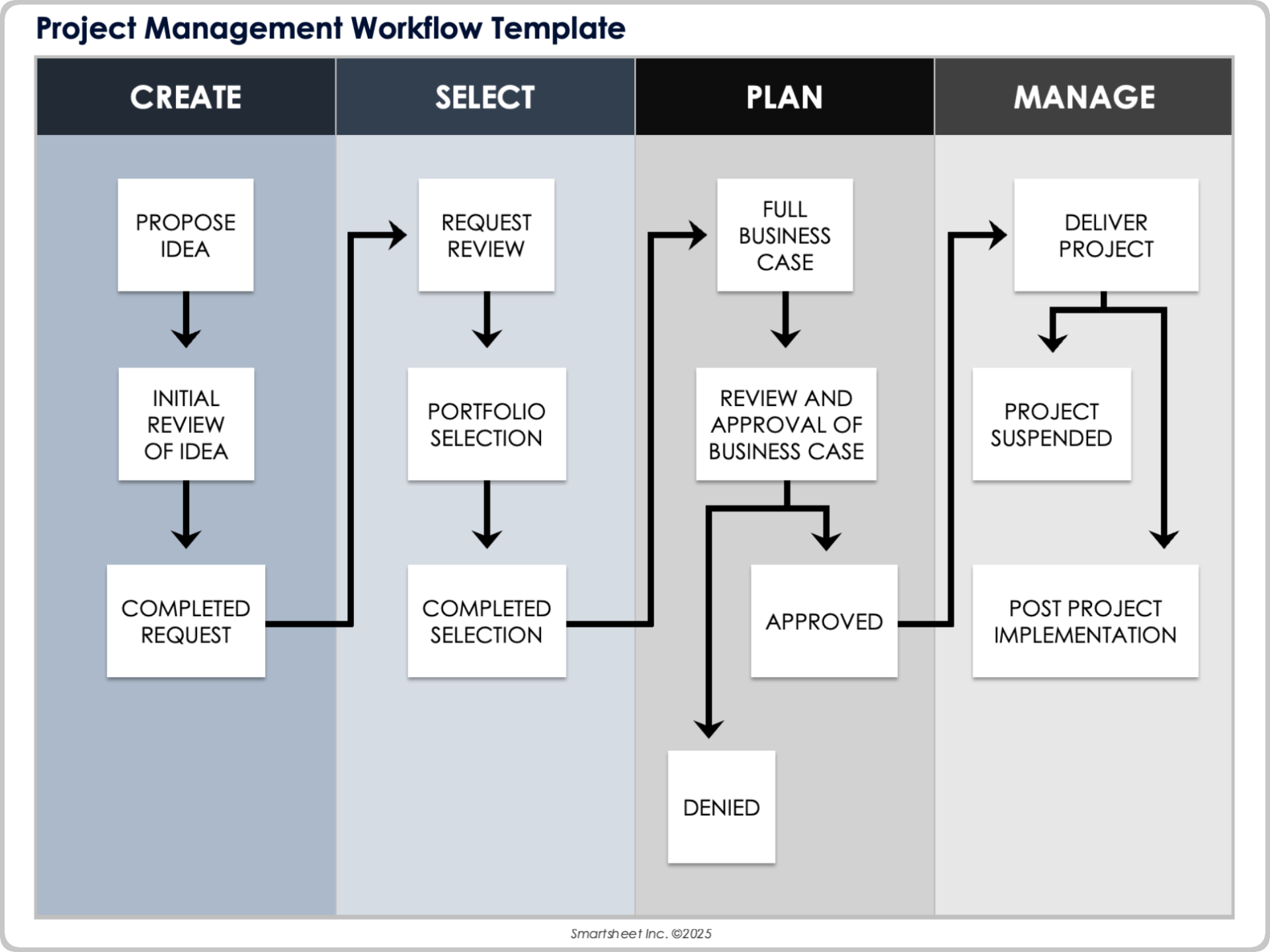
When to Use This Template: Use this template to guide projects from an idea to implementation review. It is ideal for organizations looking to standardize project evaluation, approval, and execution across teams and departments.
Notable Template Features: This template features workflow stages, including Create, Select, Plan, and Manage, with decision points at each step. It has paths for approved and denied projects, options for suspended delivery, and fields for business case review and portfolio selection.
Learn about streamlining processes, key features, and real results with this workflow automation software guide.
Construction Workflow Template
Download a Construction Workflow Template for
Excel
|
Microsoft Word
|
Adobe PDF
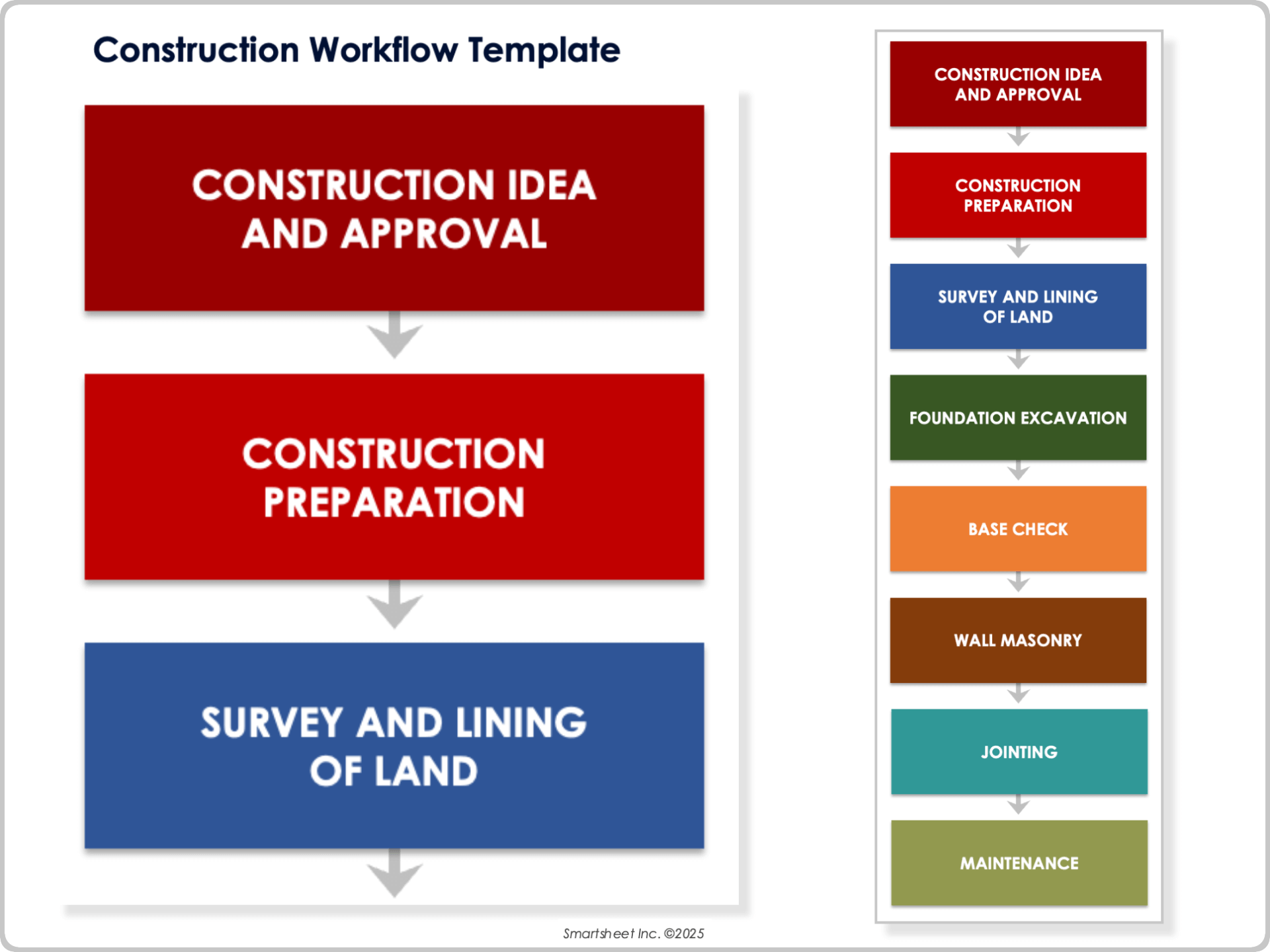
When to Use This Template: This construction workflow template outlines key project phases from early planning through post-construction maintenance. Use it to document a clear, sequential project roadmap.
Notable Template Features: This template includes construction stages such as site preparation, excavation, and masonry. It highlights early approval checkpoints and post-build maintenance, making it useful for both residential and commercial projects.
Learn what workflow automation is, why it’s important, how it benefits your business, what to look for in software, and more.
Recruiting Workflow Template
Download a Recruiting Workflow Template for
Excel
|
Microsoft Word
|
Adobe PDF
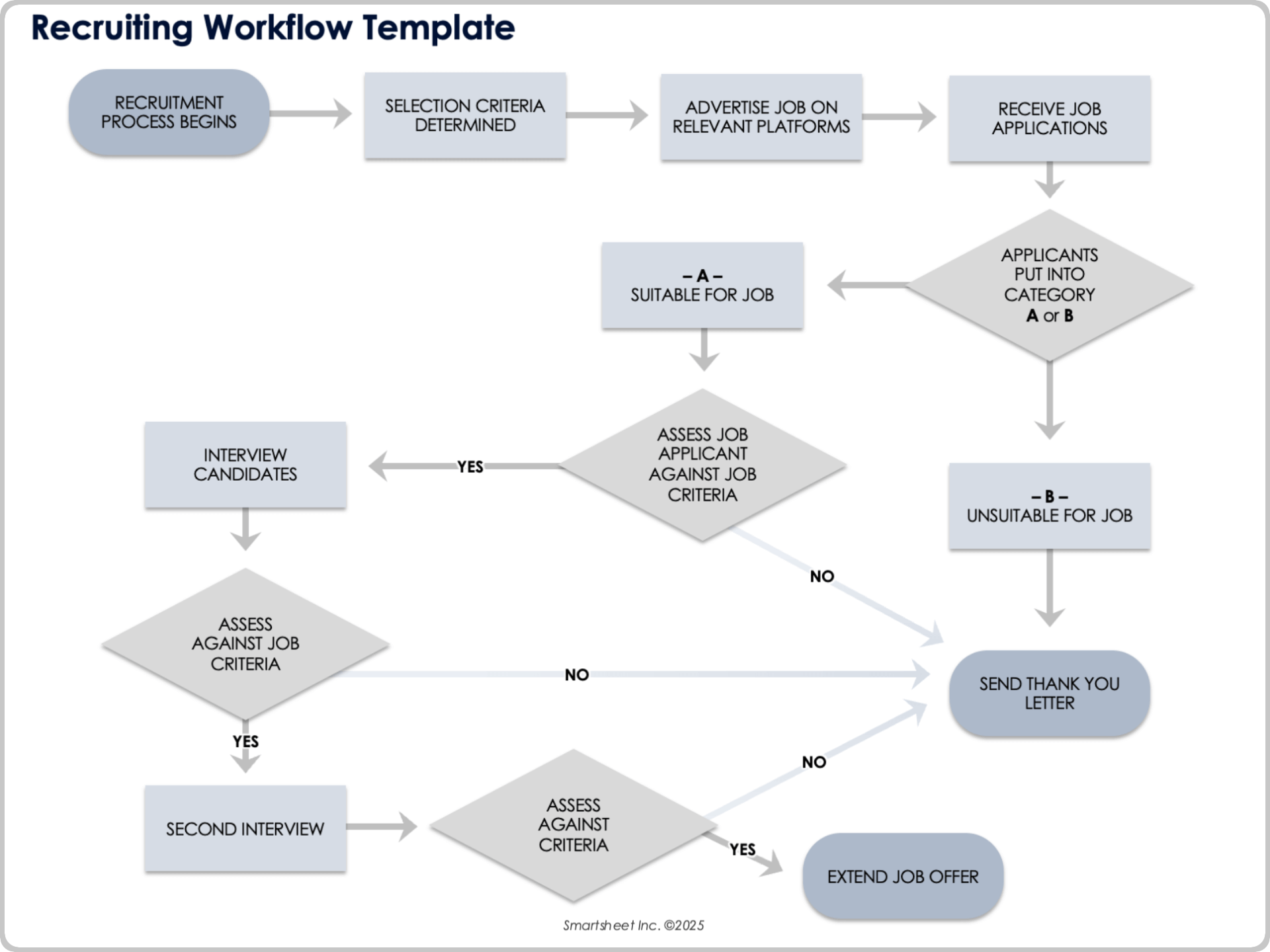
When to Use This Template: This recruiting workflow template helps manage the hiring process from job posting to offer extension. It streamlines candidate evaluation and ensures fair, consistent decision-making.
Notable Template Features: This template outlines the hiring workflow, including applicant categorization, multiple interview rounds, and decision points based on selection criteria. It includes paths for both suitable and unsuitable candidates, with built-in actions such as thank-you letters and second interviews.
Explore the benefits, strategies, techniques, and more with this complete guide to workflow optimization.
Software Development Workflow Template
Download a Software Development Workflow Template for
Excel
|
Microsoft Word
|
Adobe PDF
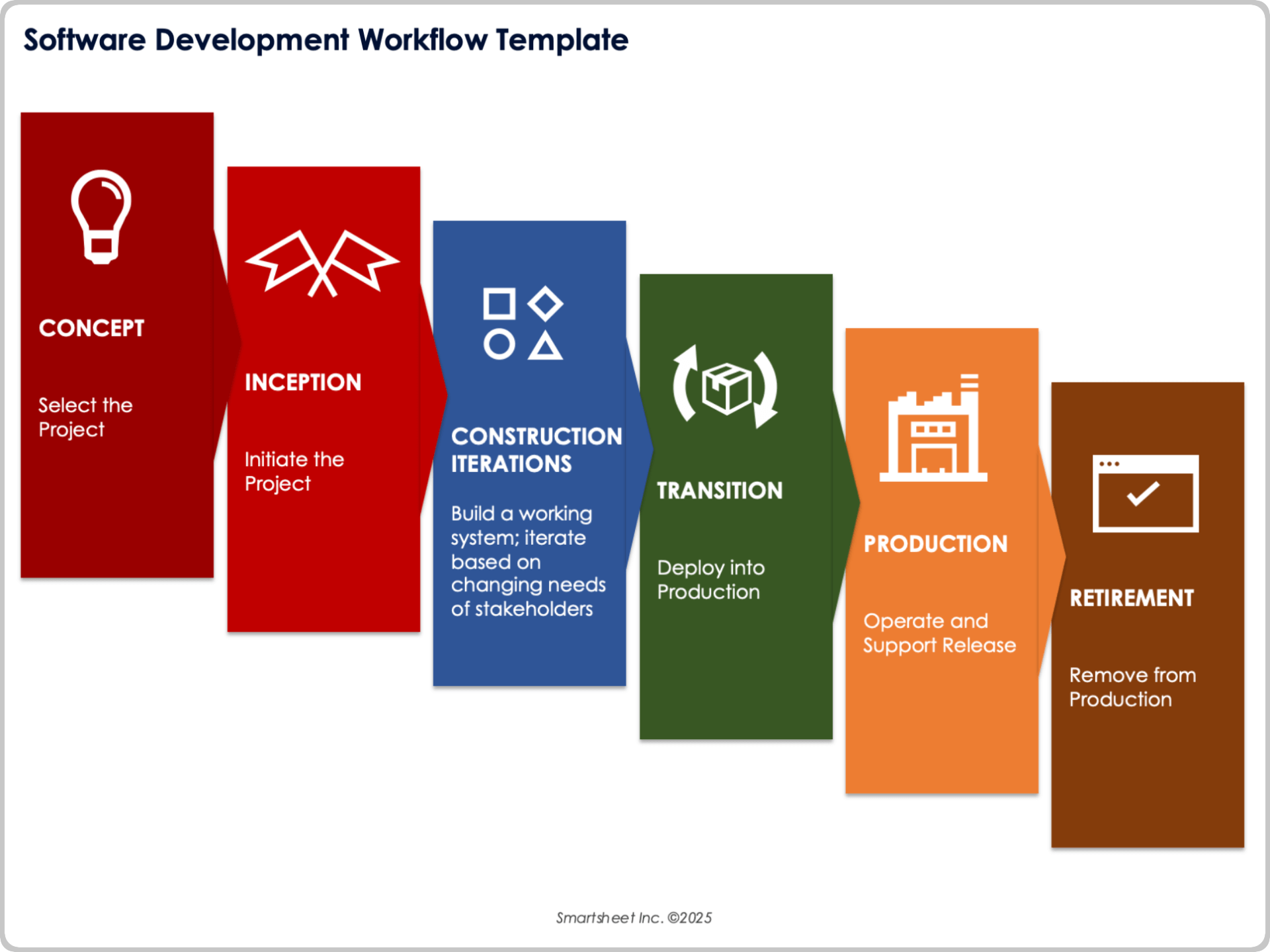
When to Use This Template: This workflow template can be used to manage software projects that require structured development, frequent iteration, and long-term product support. It works well for agile, hybrid, or traditional teams building systems that change over time.
Notable Template Features: This template includes workflow stages from Concept and Inception to Production and Retirement. Each phase supports hands-on collaboration, regular stakeholder input, and a defined path from development to release and system removal.
Healthcare Workflow Template
Download a Healthcare Workflow Template for
Excel
|
Microsoft Word
|
Adobe PDF
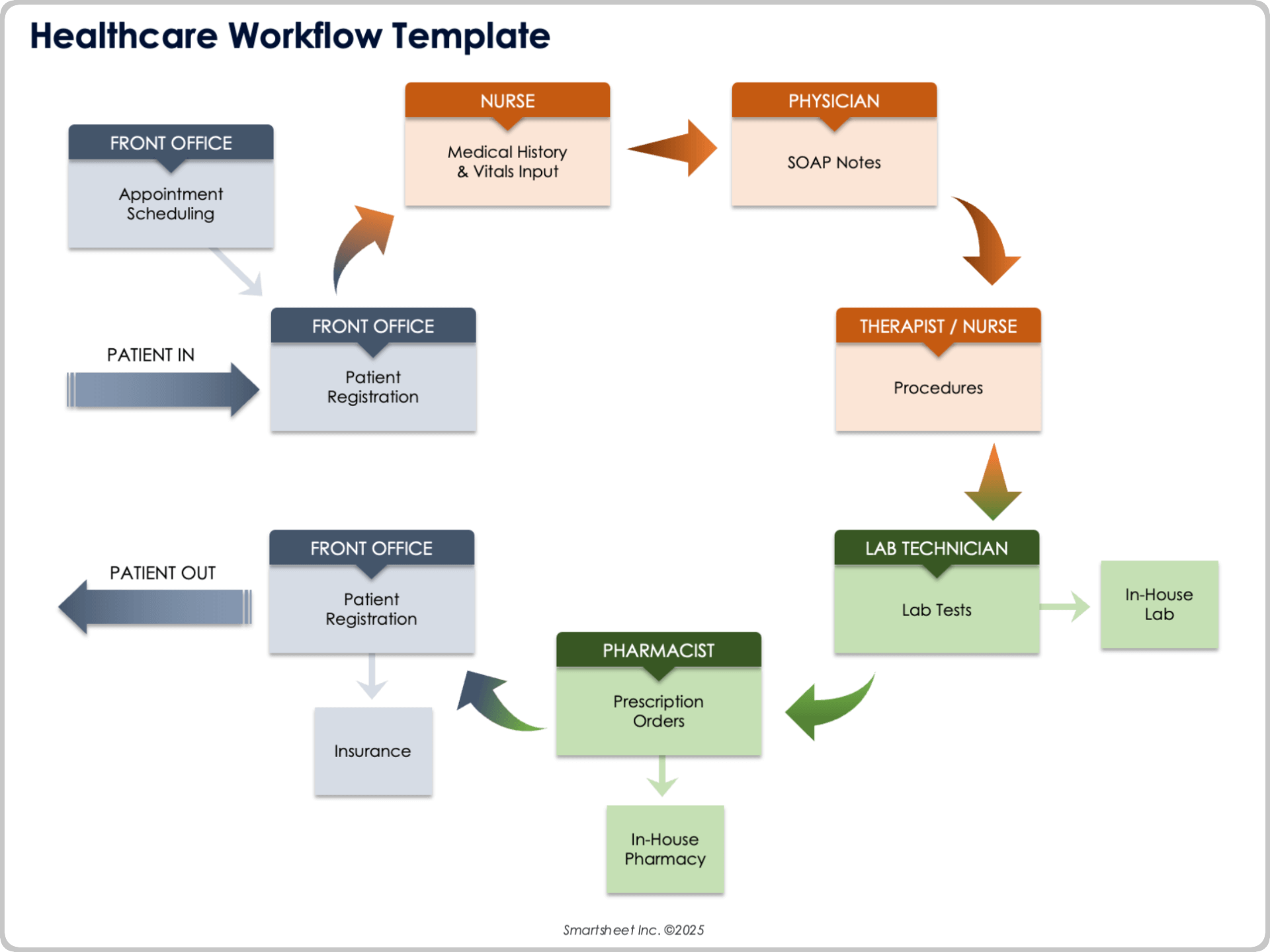
When to Use This Template: Follow this healthcare workflow to coordinate front office tasks, clinical care, and pharmacy or lab services. This template helps clinics and practices provide reliable patient flow from intake to discharge.
Notable Template Features: This workflow template connects front office scheduling, registration, and insurance with nursing input, physician documentation, lab testing, and pharmacy orders. It charts patient entry and exit and outlines communication paths among clinical staff, labs, and support services.
Document Management Workflow Template
Download a Document Management Workflow Template for
Excel
|
Microsoft Word
|
Adobe PDF
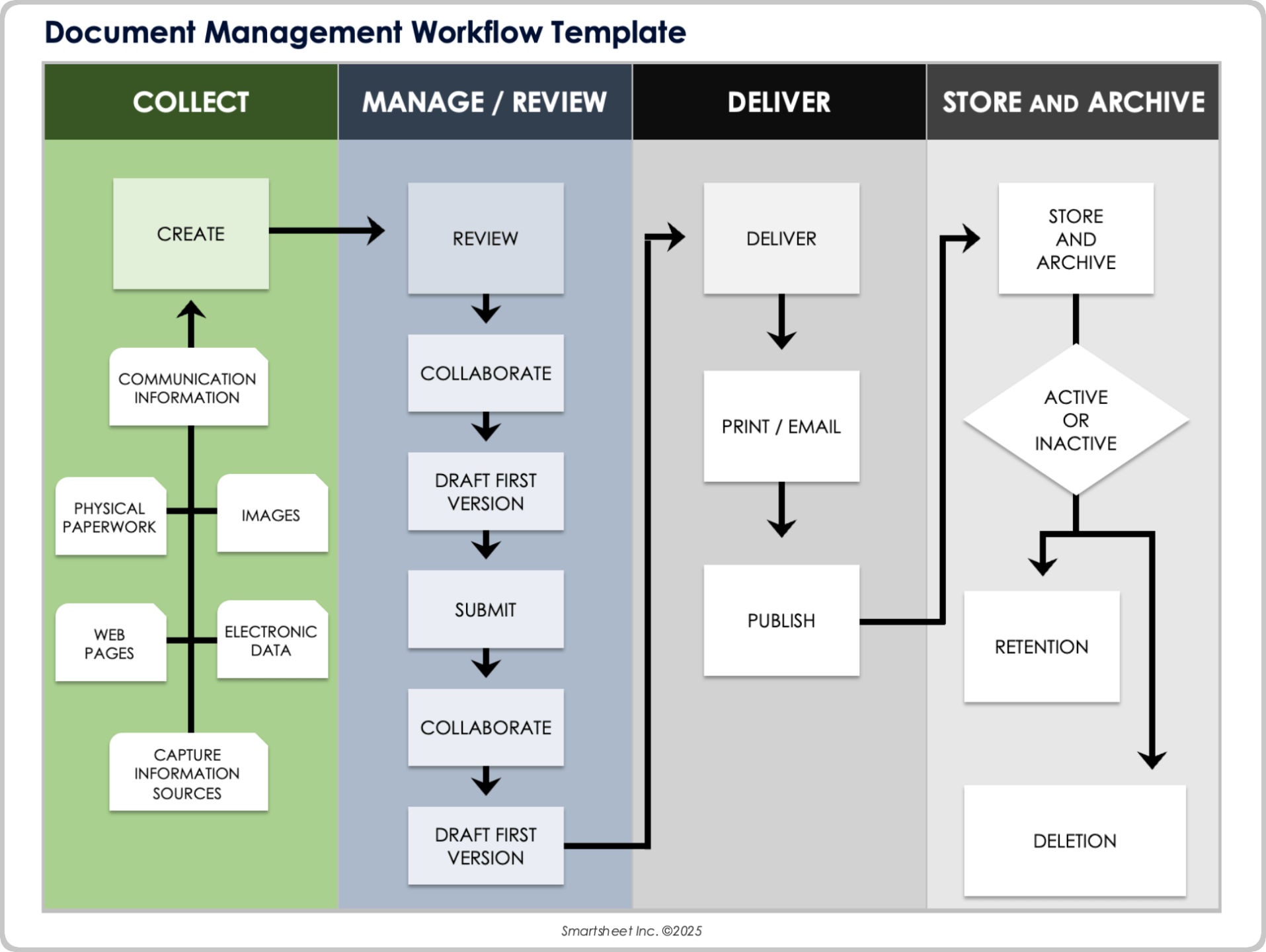
When to Use This Template: Use this template to manage the creation, review, delivery, and archiving of documents across teams. It helps organizations handle multiple formats and maintain a consistent process for document collaboration and lifecycle tracking.
Notable Template Features: This template includes steps for capturing information from sources such as physical paperwork, communication records, electronic data, web pages, and images. It outlines tasks for review, collaboration, submission, publishing, and storing or archiving based on retention or deletion rules.
E-Commerce Workflow Template
Download a E-Commerce Workflow Template for
Excel
|
Microsoft Word
|
Adobe PDF
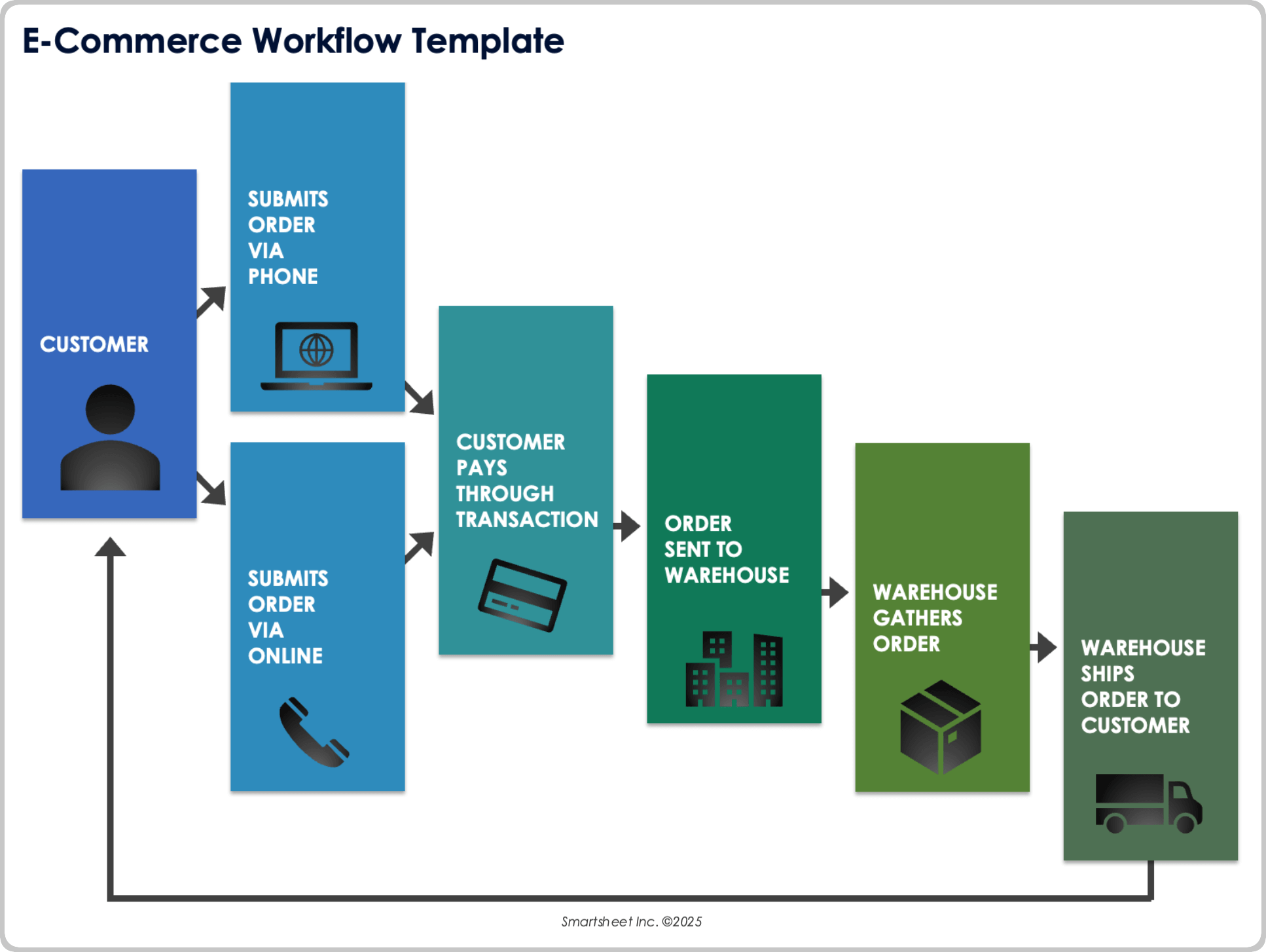
When to Use This Template: This workflow template helps manage e-commerce order processing from customer purchase to final delivery. It suits businesses that need to coordinate order intake, payments, warehouse fulfillment, and shipping through a simple, repeatable system.
Notable Template Features: The template includes steps for order submission by phone or online, payment through transaction, and order delivery. It shows the movement of an order from customer ordering to warehouse fulfillment.
Finance Workflow Template
Download a Finance Workflow Template for
Excel
|
Microsoft Word
|
Adobe PDF
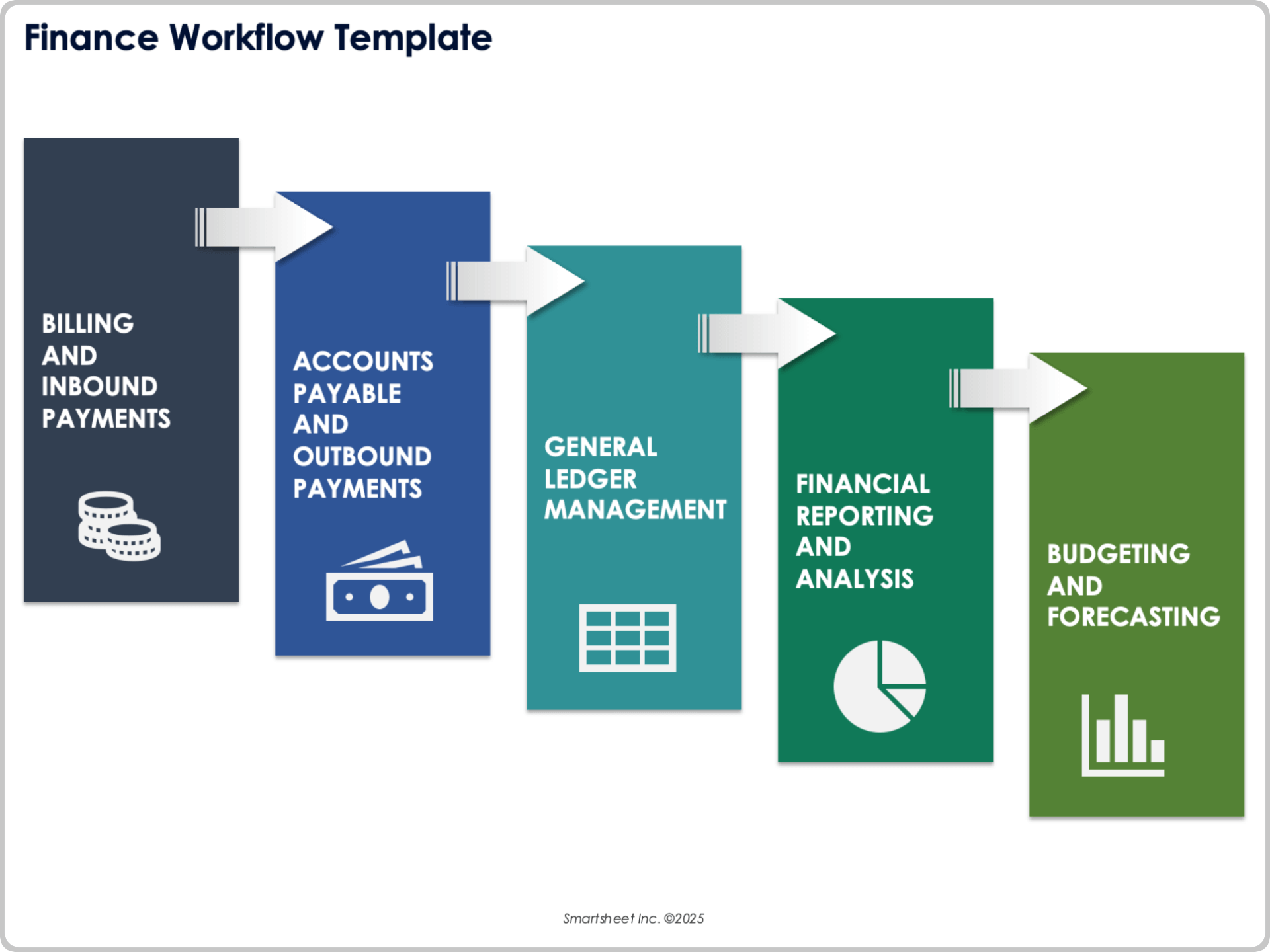
When to Use This Template: This template can be used for finance operations like managing incoming payments and forecasting future budgets. It is ideal for teams and departments that handle recurring transactions, reporting cycles, and strategic planning.
Notable Template Features: This template includes workflow steps like billing and inbound payments, accounts payable and outbound payments, general ledger management, and budgeting and forecasting. Each stage connects to the next for a complete financial process.
Architecture Workflow Template
Download an Architecture Workflow Template for
Excel
|
Microsoft Word
|
Adobe PDF
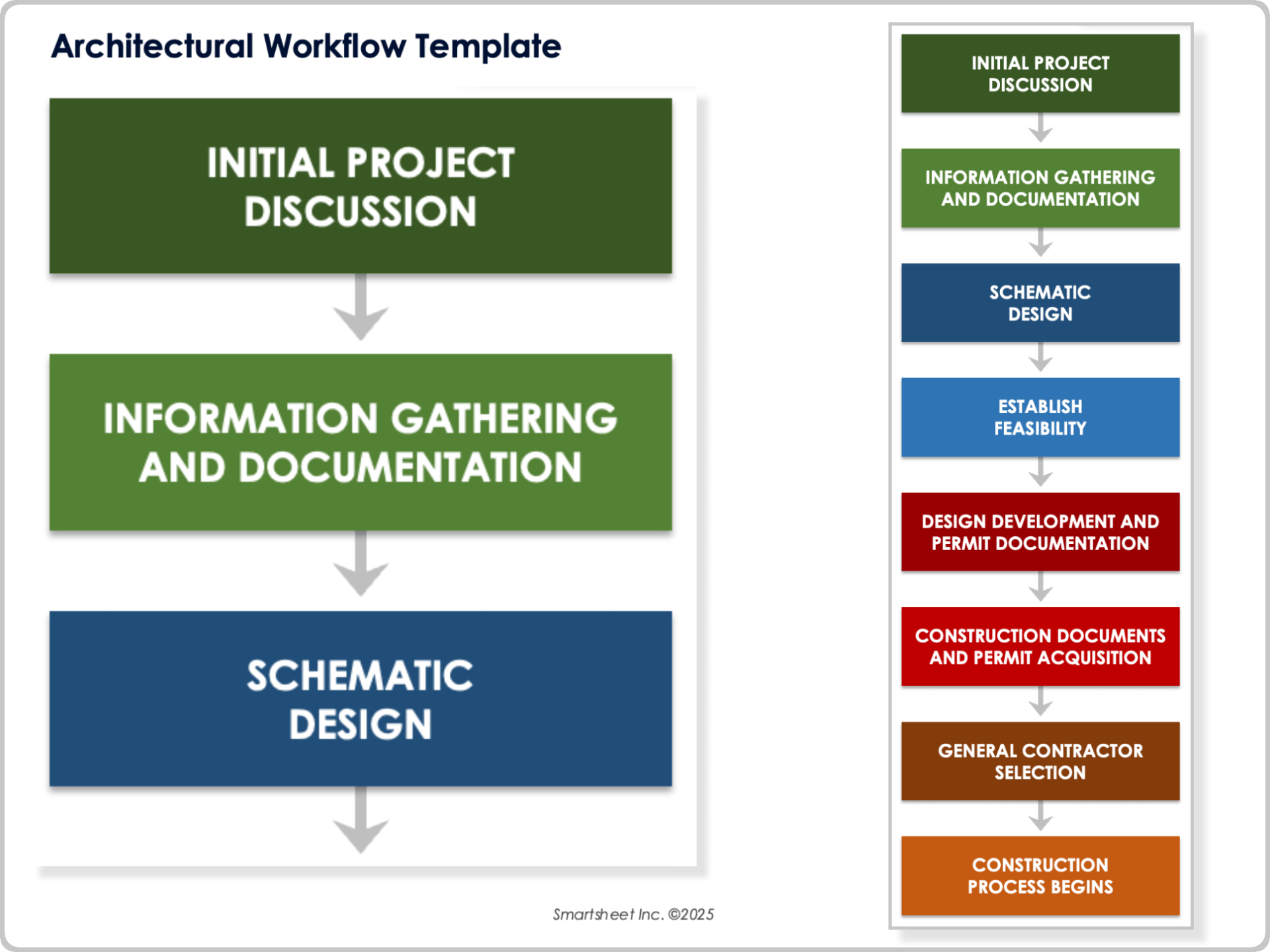
When to Use This Template: Use this workflow template to guide design and permits from early discussions through the start of construction. It works well with projects that require formal approvals and phased development planning.
Notable Template Features: This template includes steps for initial project discussion, information gathering and documentation, schematic design, and feasibility. It also covers design development and permit documentation, construction documents, permit acquisition, general contractor selection, and the start of the construction.
Sales Process Workflow Template
Download a Sales Process Workflow Template for
Excel
|
Microsoft Word
|
Adobe PDF
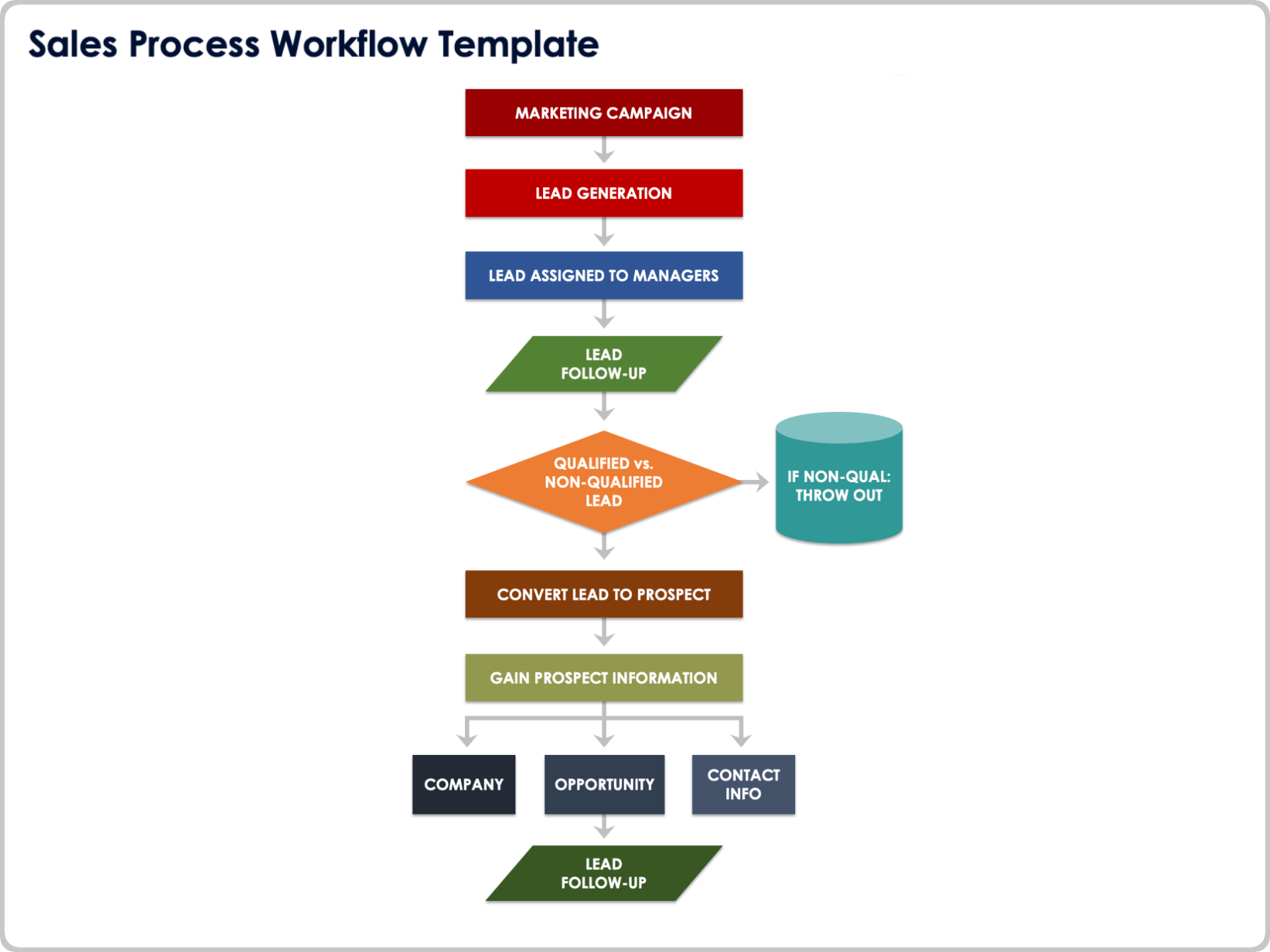
When to Use This Template: This template helps manage leads from initial marketing efforts through qualification and follow-up. It works best for organizations that need a structured way to move leads through the pipeline and track prospect details.
Notable Template Features: The template includes steps for marketing campaigns, lead generation, lead assignment, follow-up, and lead qualification. It also covers converting leads to prospects. It helps collect prospect information such as company, opportunity, and contact info, and follow-up.
Manufacturing Workflow Template
Download a Manufacturing Workflow Template for
Excel
|
Microsoft Word
|
Adobe PDF
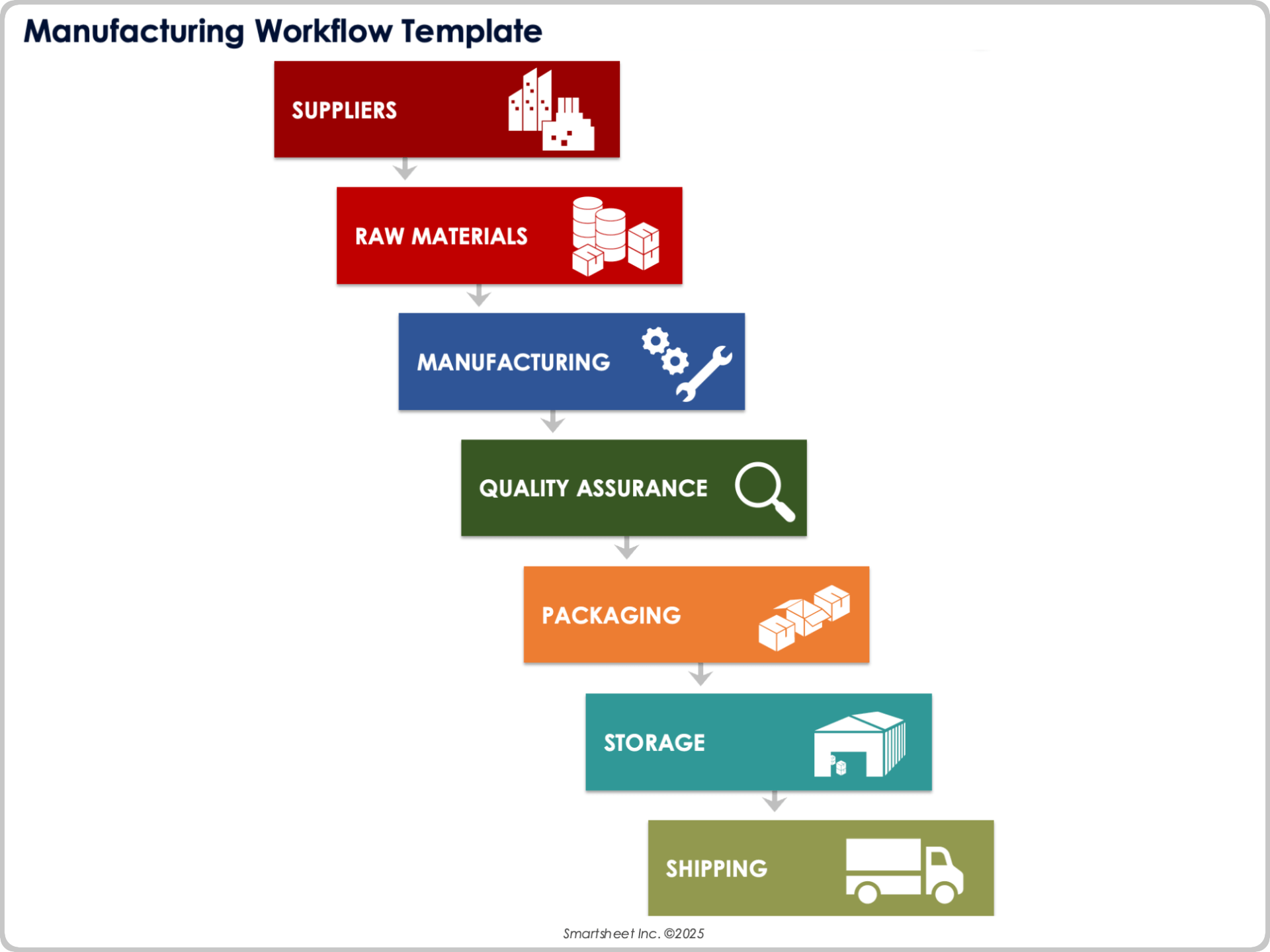
When to Use This Template: Use this template to track the manufacturing process from sourcing raw materials through final product shipment. It is ideal for teams that need visibility across supply, quality, and delivery stages.
Notable Template Features: The template includes steps for suppliers, raw materials, manufacturing, quality assurance, packaging, storage, and shipping. Each phase supports a clear transfer from one function to the next, maintaining product flow and meeting delivery targets.
What Is the Purpose of a Workflow Diagram?
The purpose of a workflow diagram is to bring structure, clarity, and visibility to a process. Workflow diagrams show how a task or project unfolds by clearly outlining each stage. They help teams understand, follow, and improve business processes and make the entire workflow easier to execute, analyze, and optimize.
Additionally, a diagram is useful for workflow planning because it helps establish the order of process steps while ensuring a visually satisfying manner and easy-to-follow, structured format. You can quickly identify and make changes within a process to render even the most common business situations more efficient.
You can use a workflow template to capture, visualize, and build process requirements unique to each business process and vertical, from project management to healthcare and construction. Customize the template with columns, headings, metrics, and data to track or include. Document targeted rules for a workflow and approval order, and the steps that ensue after an approval.
Why Is a Workflow Diagram Necessary?
A workflow diagram organizes tasks, clarifies roles, and improves team performance. Identify each step of your process, track progress, and adjust responsibilities. Visual layouts help everyone see what happens next and where action is needed.
Workflow diagram templates are an invaluable resource in identifying key details, including the following:
- Appropriate team members for each process
- Areas for improvement or a process that could increase efficiency
- Data collection or monitoring
- Approval processes and key stakeholders who provide approval
Additionally, workflow diagram templates can make even the most complex, detailed processes more understandable and concise. These diagrams can also help businesses and their team members do the following:
- Easily show the flow between steps
- Define, analyze, and discuss every part of the process to provide a clear understanding of its function and business value
- Standardize a process and identify any gaps
- Identify and eliminate any processes that are not adding value to the business
- Facilitate communication and teamwork among team members
People tend to veer away from using workflows for a variety of reasons. They may be hesitant to disrupt an already-existing process or prefer to maintain complete control over steps that don’t follow a preformatted structure.
However, using a workflow template can help provide consistency and can improve efficiency for teams. They can be flexible with how much of a process is customizable.
Capabilities of a Workflow Diagram
Workflow diagrams give businesses more control over how work gets done. Teams can assign tasks to the right people, build clear approval paths, and pause or restart workflows when needed. They can also define conditions that shape how and when work moves forward.
Workflow diagrams help teams be more flexible and efficient with the following capabilities:
- Specify the frequency and ideal duration of tasks
- Provide task instructions for each process or step
- Initiate next steps in a process, either automatically or manually
- Send approval requests and reviews to key stakeholders
- Set approval gates to ensure specific steps are carried out only after approval is granted
- Pause or stop the workflow at a specific step, or until a specified date
- Set the workflow status and send updates to any involved resources
- Update steps directly within the workflow to increase efficiency
Creating a Workflow Diagram or Template
You can create a workflow diagram by mapping out the full process from start to finish. Define the key steps and mark clear entry and exit points. Be sure to consider how the process works in real time. This starting point will help you build a workflow that is both structured and adaptable.
Make sure you understand the entire process, from start to finish, and identify the basic steps of the process to ensure that those are highlighted and included within the diagram. Document clear start and end points for the process. Draft the steps that occur in between these two points of the process.
Look for alternate ways to complete each process, and make sure to note each exception within the diagram. This will give your team flexibility to customize the workflow as it progresses. Learn more about how creating a workflow can help your business.
How to Create a Workflow Template in Microsoft Word
Microsoft Word offers a variety of free workflow templates that you can use to design and format your own workflow template. Follow the steps below to achieve the best results:
Open Microsoft Word.
In the window, select the Lightbulb icon at the top of the page, and search for “Workflows.”
Choose the related link that comes up under the “Workflows” search.
Select a workflow template that suits your needs, and click OK.
Create and fill out the workflow template based on your unique business process by editing or adding workflow steps.
How to Create a Workflow Template in Excel
Microsoft Excel has preformatted workflow templates within its platform, which you can download and customize for your needs. To access these templates, follow these steps:
Open Microsoft Excel.
Using the search bar at the top of the Excel workbook, search for “Workflow Templates.”
In the Flowcharts Template Workbook, you will find a variety of existing workflow templates.
Select the one appropriate for your business needs, and click Create to open the worksheet.
Create and fill out the workflow template based on your unique business process by editing or adding workflow steps.
How to Create a Workflow Template in Powerpoint
Microsoft PowerPoint offers a unique capability called SmartArt that allows users to insert premade flowcharts directly into a PowerPoint slide. To access this feature, follow these sequential steps:
Open Microsoft PowerPoint.
Select the Insert tab at the top of the screen in the Illustrations Group, and select SmartArt.
In the SmartArt Gallery, click the Process tab. Here, you will find a large quantity of flowchart templates.
Select the SmartArt process template that suits you, and insert it into the PowerPoint.
Edit the template for your process. You can insert both text and pictures within the template to efficiently explain and represent you process as needed.
How to Create a Workflow Template in Visio
Visio offers every from basic to detailed workflow templates that outline business process with shapes, images, and text. Follow these steps to learn how to build the most effective Visio template for your business:
Open Visio and select the Flowchart category, and select Basic Flowchart.
For each step in your process, select and drag a new flowchart shape into your template.
Connect flowchart shapes by simply holding your mouse over the first shape, selecting the arrow that pops up after a few seconds, and dragging it over to the shape you want to connect it to.
Select any shape and click inside of it to add text to it to include additional information not evident from the shapes alone.
Continue to add shapes and text to the template until your business process is completely explained via the visual Visio workflow template.
Build Powerful, Automated Approval Processes and Workflows with Smartsheet
Empower your people to go above and beyond with a flexible platform designed to match the needs of your team — and adapt as those needs change.
The Smartsheet platform makes it easy to plan, capture, manage, and report on work from anywhere, helping your team be more effective and get more done. Report on key metrics and get real-time visibility into work as it happens with roll-up reports, dashboards, and automated workflows built to keep your team connected and informed.
When teams have clarity into the work getting done, there’s no telling how much more they can accomplish in the same amount of time. Try Smartsheet for free, today.
