Basic RAID Log Template
Download Blank and Sample Versions of a Basic RAID Log Template for
Excel
|
PowerPoint
| Google Slides | Google Sheets
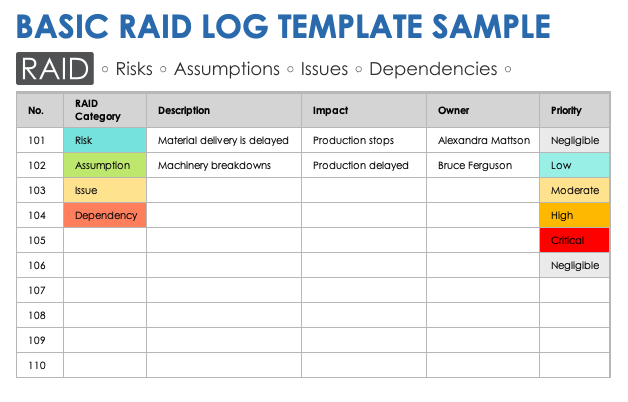
When to Use This Template: Use this template to track and manage project risks, assumptions, issues, and dependencies. It's ideal for early planning, team check-ins, and stakeholder updates.
Notable Template Features: This template includes RAID category, description, impact, and priority columns. Use the color-coded RAID category and impact status key to distinguish between categories.
Learn more about benefits and best practices in this guide to RAID logs. You can also explore these free issue tracking templates that cover software, product, production, and customer issues.
RAID Matrix Log Template
Download Blank and Sample Versions of a RAID Matrix Log Template for
Excel
| Google Sheets
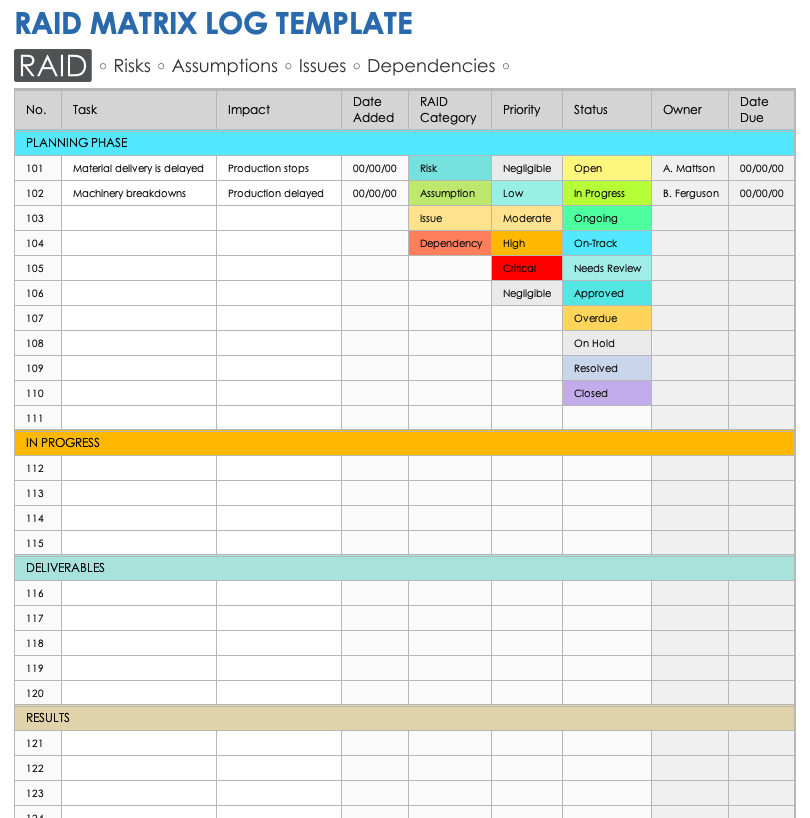
When to Use This Template: Use this template to categorize and track project tasks. It provides a simple visual record of RAID items.
Notable Template Features: This template includes fields for entering task number, description, and impact data. Swimlanes divide tasks by phase: planning, in progress, deliverables, and results. It also features color-coded RAID category, impact, and status dropdown options.
See this collection of free, customizable risk matrix templates to ensure you proactively account for all risks in your project.
RAID Log Presentation Template
Download a RAID Log Presentation Template for
PowerPoint
| Google Slides
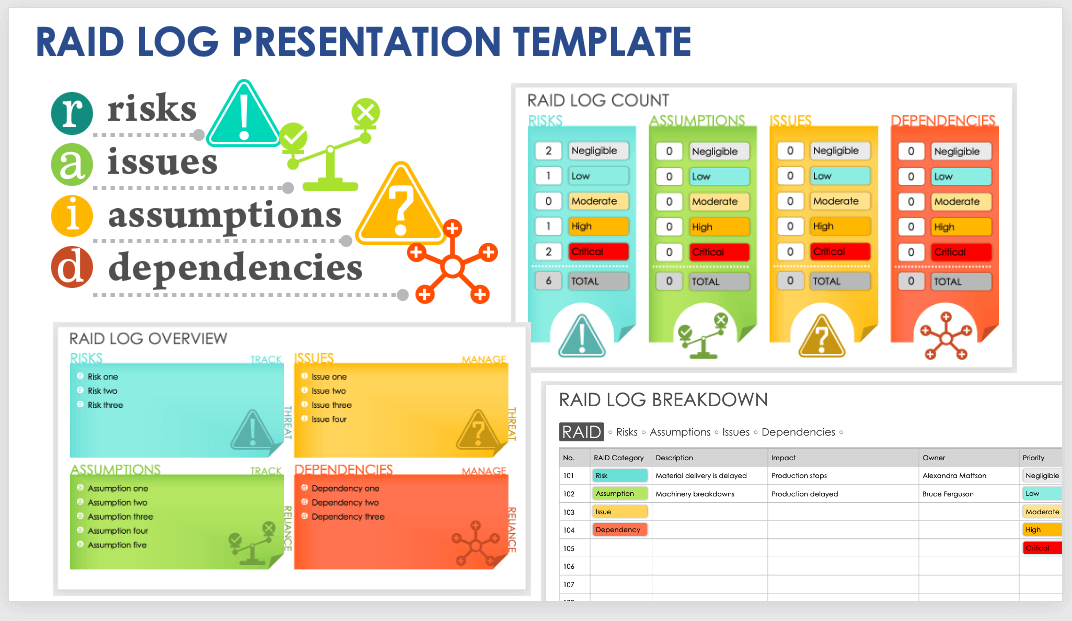
When to Use This Template: Use this template to present an overview of project risks, assumptions, issues, and dependencies. It's ideal for summarizing challenges during stakeholder meetings or project reviews.
Notable Template Features: This template includes a color-coded RAID log count slide and a RAID log breakdown table that categorizes, describes, and prioritizes RAID items. Use the overview slide to present all RAID items at a glance.
To find resources for optimizing your RAID efforts, see this collection of free risk management plan templates.
Agile RAID Template
Download an Agile RAID Template for
Excel
| Google Sheets
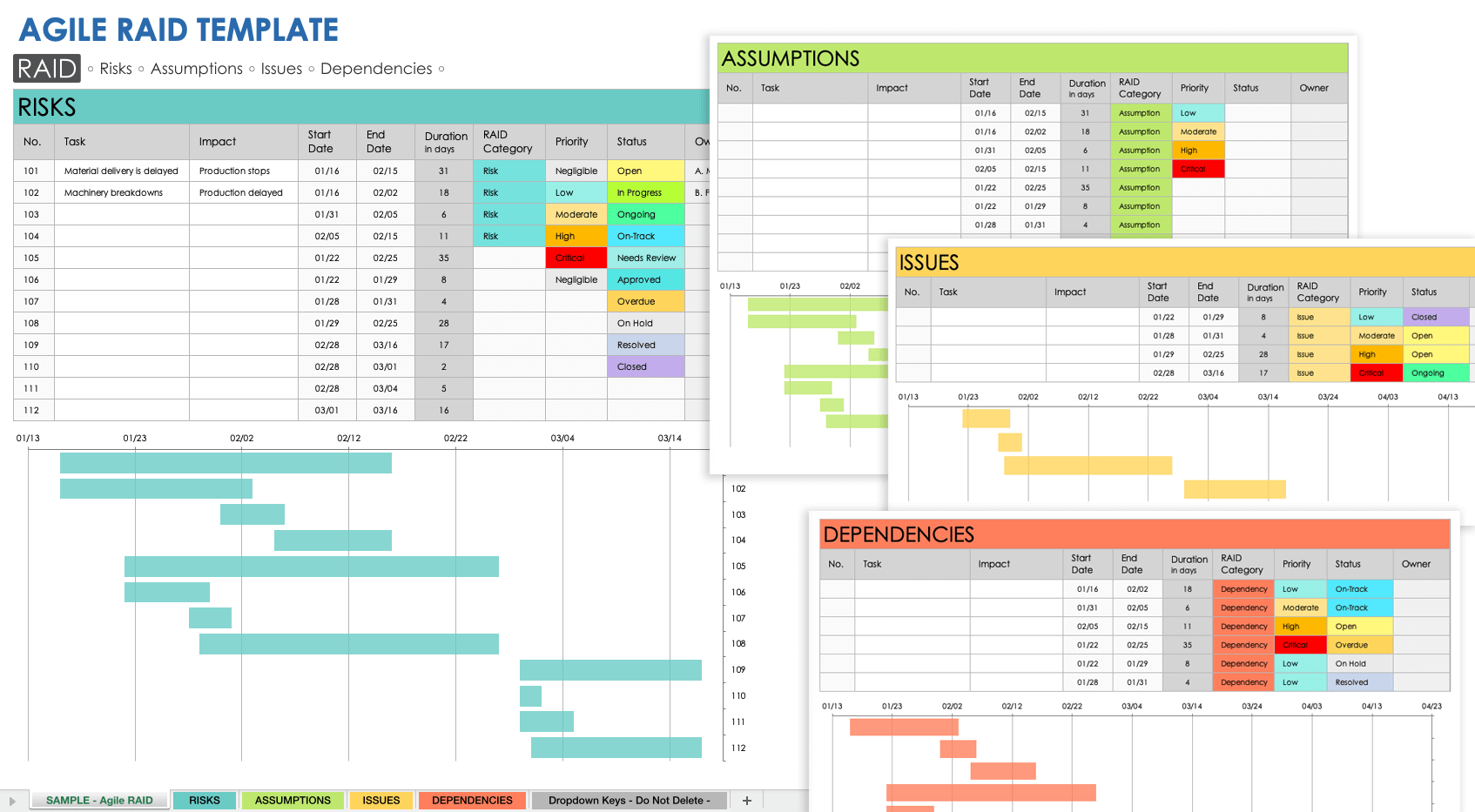
When to Use This Template: Use this template to identify, track, and manage RAID items throughout the project lifecycle. This template is ideal for teams managing changing requirements, sprint planning, or frequent stand-ups.
Notable Template Features: This template features color-coded dedicated sheets for risks, assumptions, issues, and dependencies. Each sheet includes a Gantt-style timeline visualizing RAID item durations and overlaps.
To learn more about mitigating risk in your Agile development projects, check out these free, customizable risk register templates and forms.
RAID Analysis Report Template
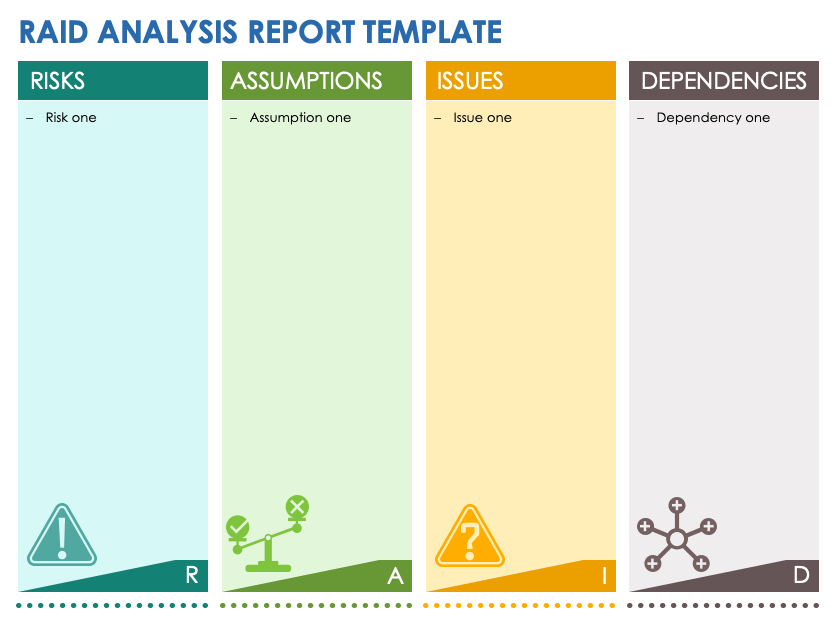
Download a RAID Analysis Report Template for
Microsoft Word
|
Adobe PDF
| Google Docs
When to Use This Template: Use this analysis report template to identify and summarize project risks, assumptions, issues, and dependencies. It's ideal for kickoff meetings, stakeholder updates, or project phase reviews.
Notable Template Features: This template includes color-coded columns to document items in each RAID category. It optimizes project planning, tracking, and quality standards.
Read our guide to RAID analysis to ensure that you optimize your project, program, or product according to RAID organizational principles.
What Is a RAID Log Template?
A RAID log template is a tool for identifying your project’s risks, assumptions, issues, and dependencies. Use this template to proactively resolve issues, monitor progress, and identify potential roadblocks. A RAID log can help you and your team execute projects successfully.
With a RAID template, you can clearly illustrate the following: your project’s risks, the ways in which you might mitigate those risks, and your team’s assumptions regarding the requirements of your project. For example, your team might assume that a vendor will deliver a project component on time, but if that component arrives behind schedule, the delay could present risks to the project.
Additionally, a RAID template helps you capture issues that you need to document, so you can assign them to the appropriate team members for resolution. Moreover, a RAID template enables you to clarify any project dependencies, so you can properly notify and adequately resource the necessary parties. Now you can proactively account for every project factor.
Benefits of a RAID Log Template
A RAID log template offers a number of benefits: It provides you and your team with an effective method for organizing your project; ensures that you’ve accounted for all risks, assumptions, issues, and dependencies; and more.
From project planning to project delivery, a RAID log template gives you the power you need to complete your project successfully. This tool enables you to break your project into phases and tasks, assign the responsibilities, set due dates, and monitor their progress to ensure completion. With such a system in place, nothing can derail your project.
What Should a RAID Log Template Contain?
A RAID log template should contain a comprehensive list of a project’s features, deliverables, and individual tasks. Each item should contain these designations: a risk, assumption, issue, or dependency; an identification number; a deadline, a description, and an assignee.
Reference the following list of RAID definitions to determine how to categorize each project item:
- Risk: Identify a project item as a risk if that item could have a negative impact on the project.
- Assumption: Identify a project item as an assumption if that item is something you consider to be true without verification.
- Issue: Identify a project item as an issue if you need to resolve that item in order to complete the project.
- Dependency: Identify a project item as a dependency if that item involves personnel or resources from another department or a third party.
Though individual RAID templates might vary, they typically include the following components:
- Task Name: Enter a name for each project task.
- RAID Category: Identify each project task as a risk, assumption, issue, or dependency.
- Description: Provide a brief description of each project item, so team members, project sponsors, and other stakeholders can easily identify the item.
- Assignee: Include the name of the task owner, i.e., the person responsible for completing the task.
- Due Date: Set a deadline for the completion of each project task.
- Priority: Select the priority level for each task (i.e., low, medium, high, critical) so that all relevant parties are in lockstep.
Some RAID templates also include the following details:
- Item Number: Designate a unique ID number to easily track and reference each project item.
- Phase: For multiphase projects, enter the phase during which the project task will occur (e.g., planning, quality assurance, review, results).
- Impact: Select the impact that each project item has on the overall project. For example, if a project item falls into the risk category, then the impact of this item would be high because the project is at risk if you don’t mitigate the item.
- Status: Include the status of each project item.
- Date Raised: Provide the date during which you and your team first brought up the subject/item (if that date falls outside the project planning phase).
- Notes: Provide any additional notes related to each project item.
How to Use a RAID Log Template
Use a RAID log template to capture and track risks, assumptions, issues, and dependencies throughout your project lifecycle. Start by recording each item in the appropriate category. Then document its potential impact, assign an owner, and prioritize. Teams should review and update the RAID log regularly.
Follow these steps to use a RAID log template effectively:
- Download and open the basic RAID log template.
- Review the four RAID categories and list each project item under the appropriate category:
- Risks: Potential problems that could impact scope, timeline, or resources.
- Assumptions: Things you believe to be true that may need validation.
- Issues: Active problems that require resolution.
- Dependencies: Work items that rely on other tasks or deliverables to proceed.
- Describe the impact of each item on your project goals or schedule.
- Assign owners to ensure each item has an accountable owner.
- Set a priority level (Negligible, Low, Moderate, High, or Critical) for each item.
- Update the log regularly as new items emerge, statuses change, or ownership shifts.
Anticipate and Mitigate Project Risks with RAID Templates from Smartsheet
From simple task management and project planning to complex resource and portfolio management, Smartsheet helps you improve collaboration and increase work velocity -- empowering you to get more done.
The Smartsheet platform makes it easy to plan, capture, manage, and report on work from anywhere, helping your team be more effective and get more done. Report on key metrics and get real-time visibility into work as it happens with roll-up reports, dashboards, and automated workflows built to keep your team connected and informed.
When teams have clarity into the work getting done, there’s no telling how much more they can accomplish in the same amount of time. Try Smartsheet for free, today.