Simple IT Risk Assessment Template
Download Blank and Sample Versions of a Simple IT Risk Assessment Template for
Excel
| Google Sheets
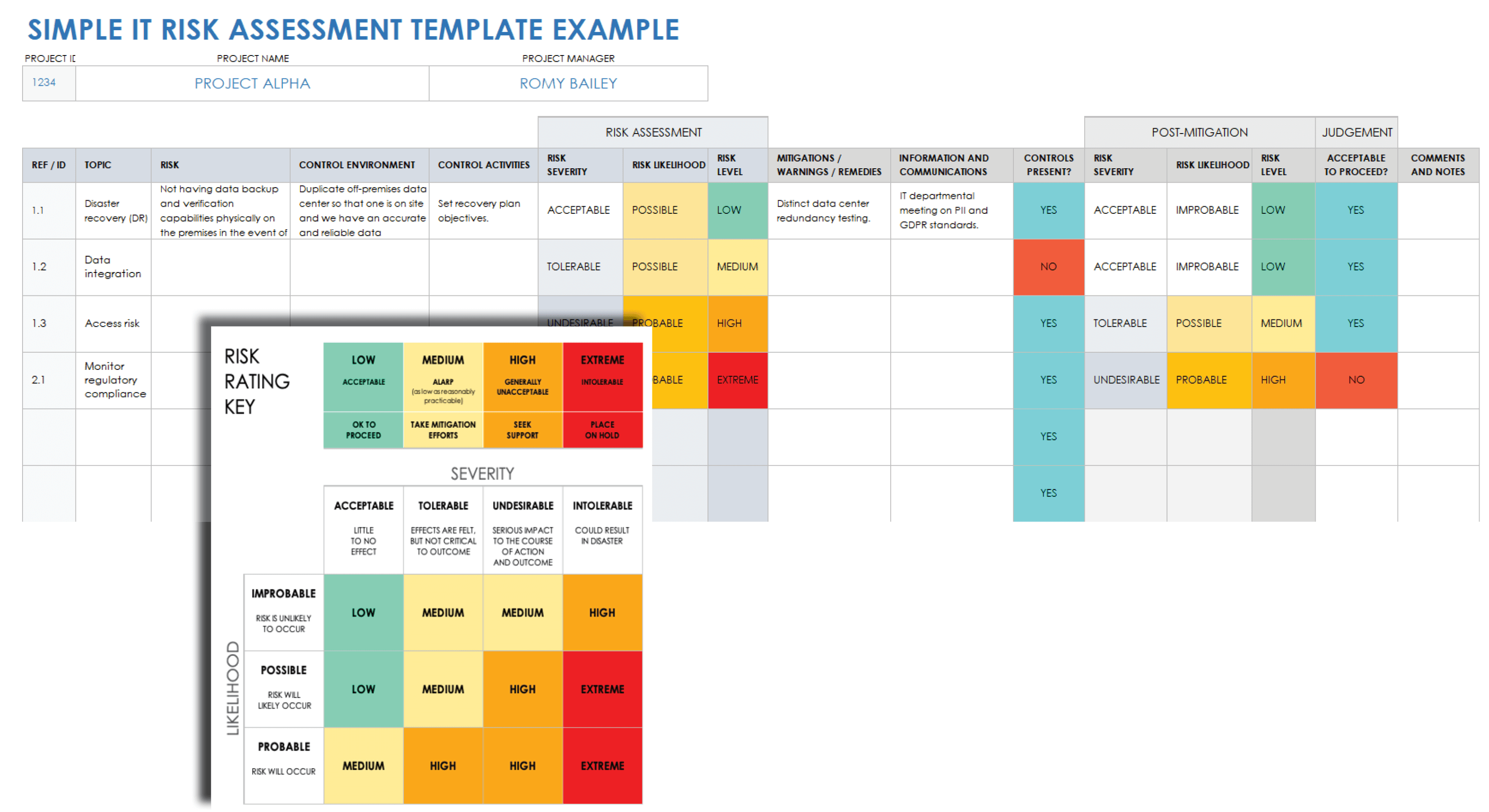
When to Use This Template: Use this template to identify, score, and track risks during the IT project lifecycle, which includes reviews, planning, and compliance checks. This template helps evaluate whether risks are acceptable and what actions are needed.
Notable Template Features: This template includes fields for recording risk, control environment, and risk assessment. It also has sections labelled Control Activities, Controls Present, and Comments and Notes. It has a risk rating key with color-coded scoring for severity and likelihood, both before and after mitigation. Use the Acceptable to Proceed column to guide decisions and document outcomes for each identified risk.
Learn more about best practices and benefits from IT experts in this guide to IT compliance strategy.
IT Risk Assessment Checklist Template
Download an IT Risk Assessment Checklist for
Excel (Sample + Blank)
|
Adobe PDF (Sample)
|
Adobe PDF (Blank)
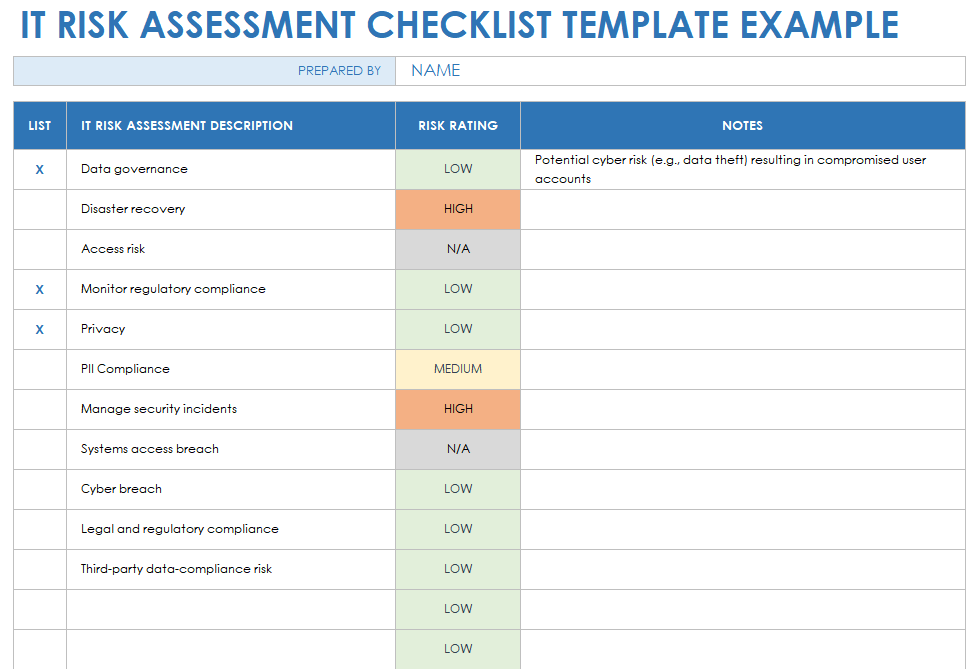
When to Use This Template: This template is ideal for reviewing potential risks across your IT systems, policies, and procedures. It can be used for audits, compliance reviews, or project readiness assessments.
Notable Template Features: This template includes columns called IT Risk Assessment Description, Risk Rating, and Notes. Use the List column to show completed risk reviews. The Risk Rating field has color-coded statuses for Low, Medium, High, and N/A.
Learn more about enterprise risk management framework types, components, application techniques, and more with this enterprise risk management framework guide.
IT Risk Analysis Template
Download an IT Risk Analysis Template for
Excel
|
Adobe PDF
| Google Sheets
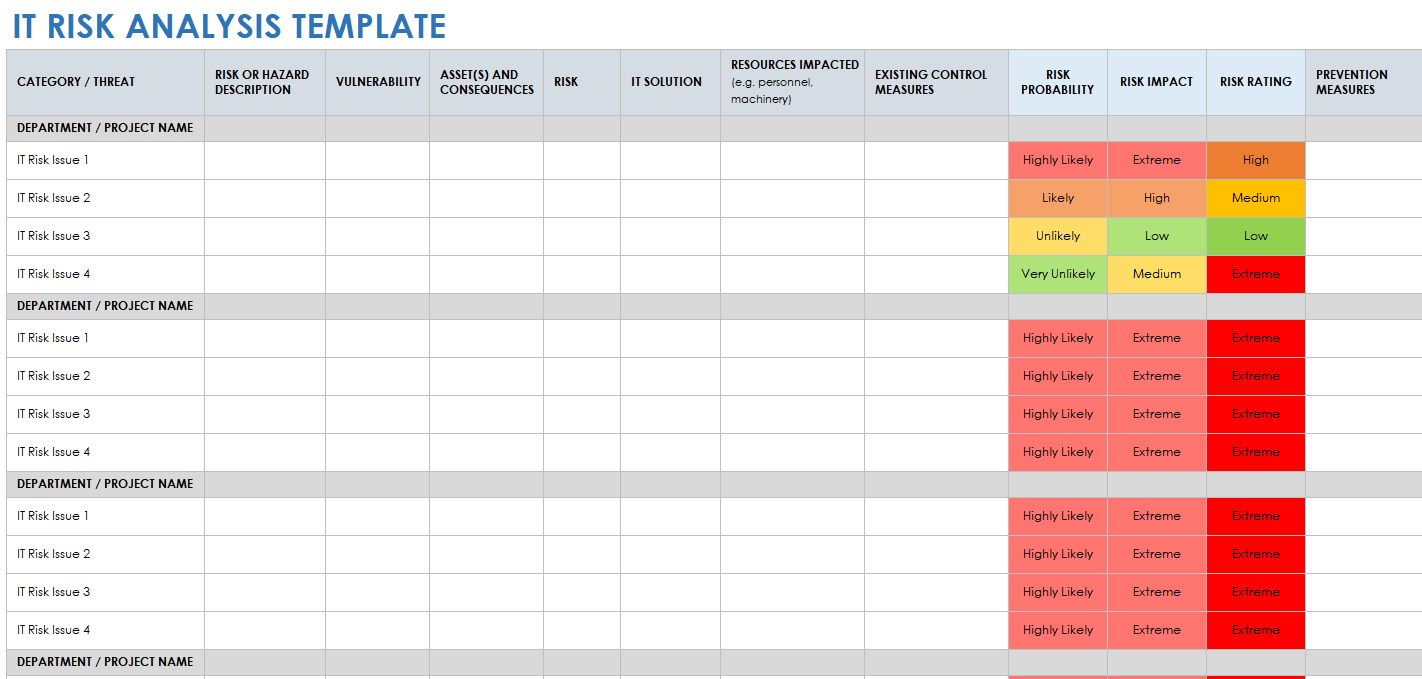
When to Use This Template: Teams can use this template to document and score IT risks by likelihood and impact, particularly when reviewing multiple risks across systems or projects. Entries are grouped together so that related risks are easy to manage.
Notable Template Features: This template includes fields for recording risk or hazard description, vulnerability level or status, asset(s) and consequences, resources impacted, and the IT solution. It also has color-coded sections labeled Risk Probability, Risk Impact, and Risk Rating to determine overall severity.
For more resources, expert tips, best practices, and goals, check out this enterprise risk management guide.
IT Risk Assessment Policy Template
Download an IT Risk Assessment Policy Template for
Microsoft Word
|
Adobe PDF
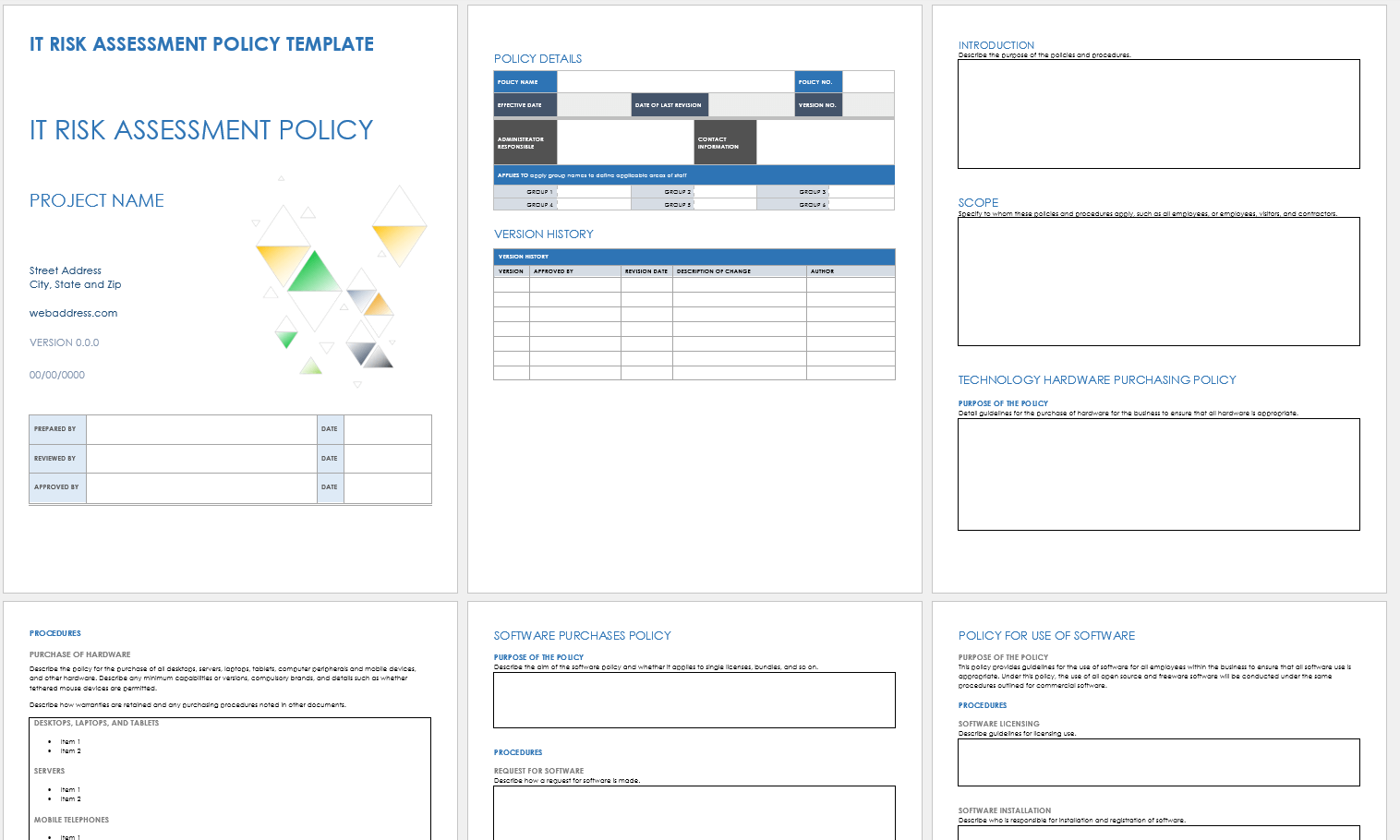
When to Use This Template: This template helps define how your IT department identifies, manages, and mitigates technology-related risks. Teams can use it to formalize risk procedures and ensure the organization maintains a framework for IT risk ownership and response.
Notable Template Features: This template includes space to note policy details and sections titled Technology Hardware Purchasing Policy, Software Purchases Policy, and Policy for Use of Software. Use the included Version History table to list policy versions, approvals, revision dates, change descriptions, and authors.
Check out this collection of project risk templates to help you identify potential risks, assess their probability, and implement mitigation methods.
IT Risk Management Plan Template
Download an IT Risk Management Plan Template for
Microsoft Word
|
Adobe PDF
| Google Docs
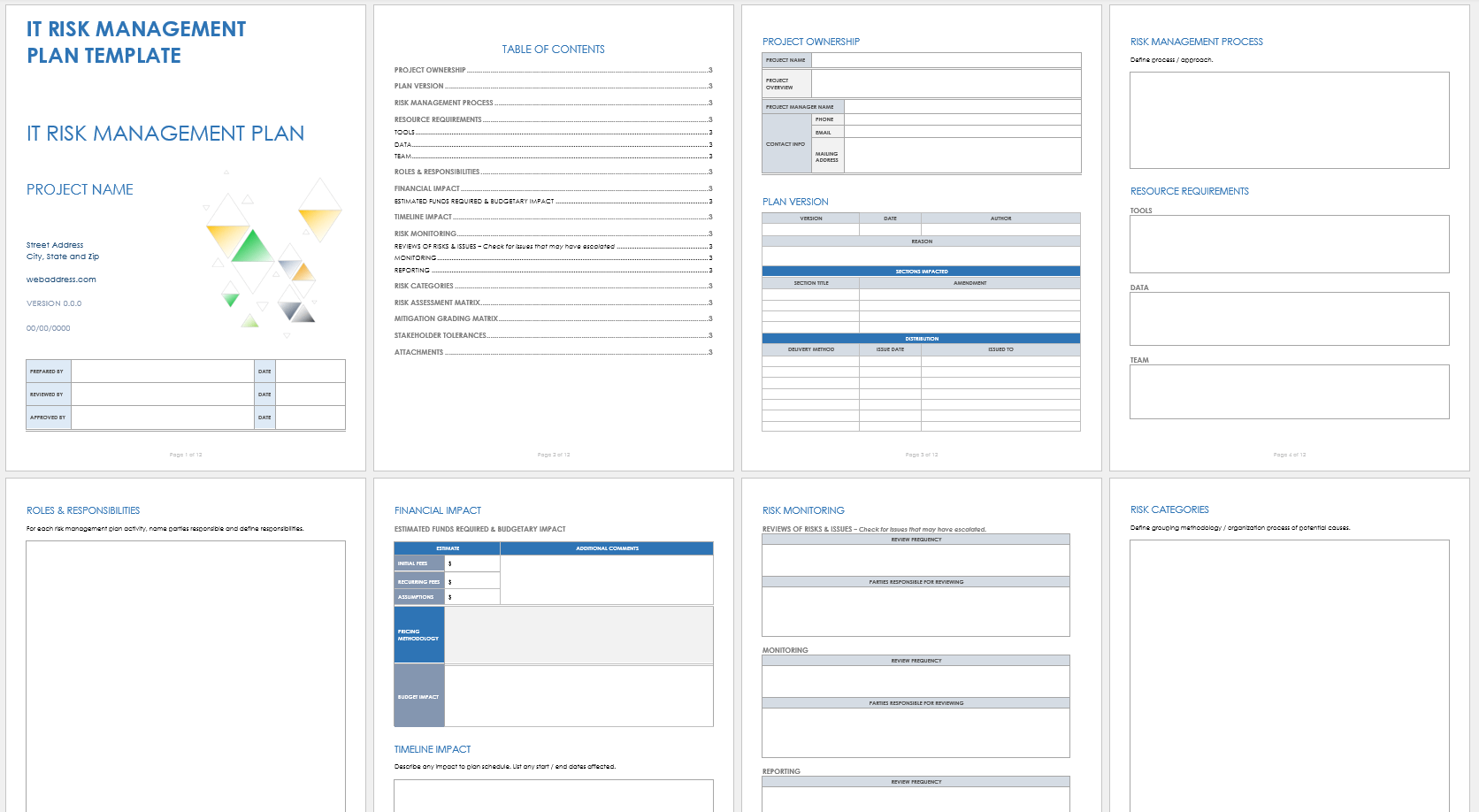
When to Use This Template: IT departments can use this template to formalize their risk management plan by documenting how they find, rate, and manage risks over time.
Notable Template Features: This comprehensive template includes sections for detailing project ownership, resource requirements, and risk monitoring. The risk assessment matrix and the mitigation grading matrix help you score and prioritize risks. Budget impact, tools, data, and stakeholder tolerances fields make it easy to tailor your plan.
IT Risk Assessment Matrix Template
Download an IT Risk Assessment Matrix Template for
Excel
|
Microsoft Word
|
Adobe PDF
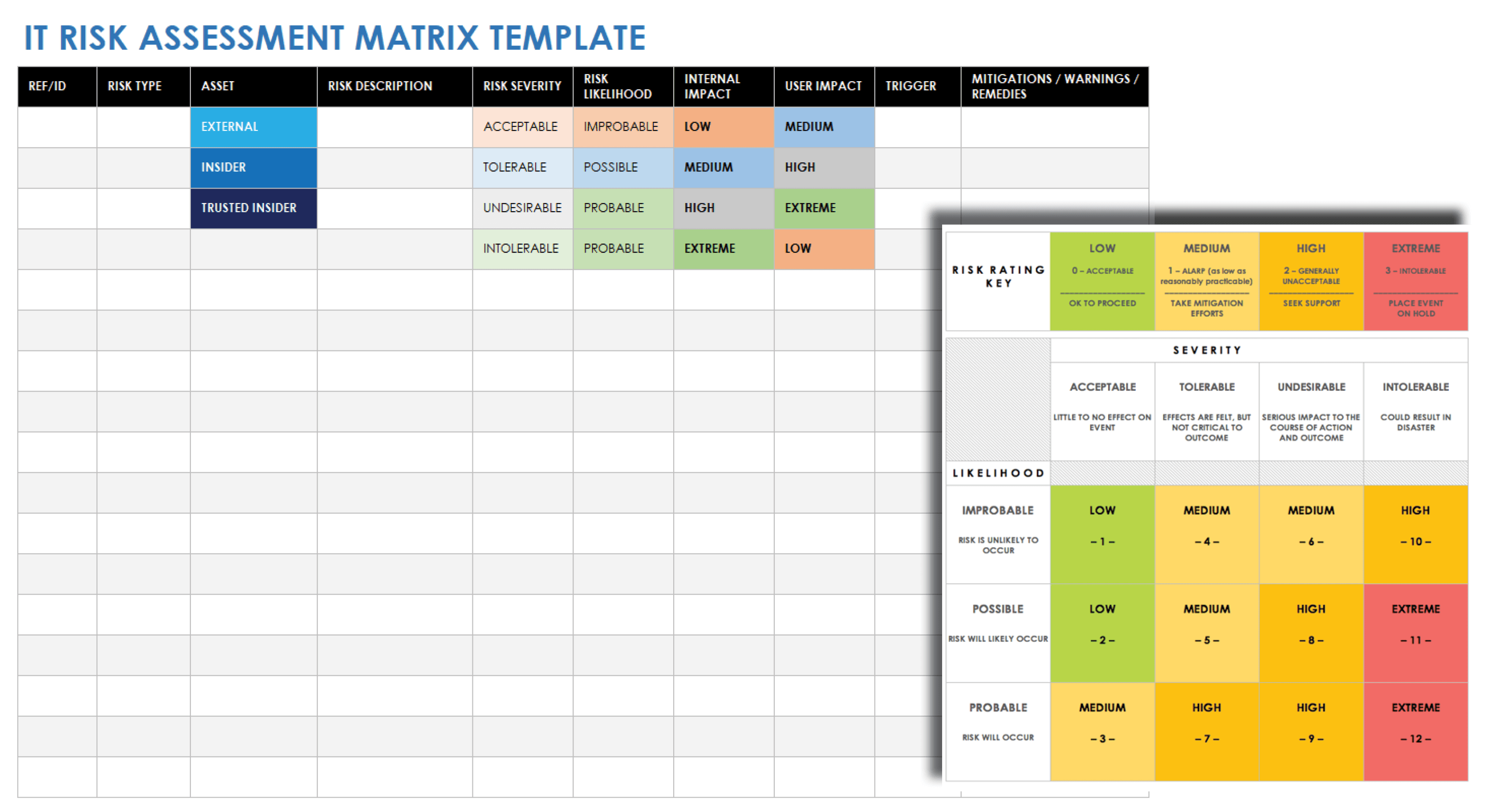
When to Use This Template: Use this template to plan threat responses with a clear, consistent structure, including risk reviews, compliance audits, and team check-ins.
Notable Template Features: This template has fields for noting the reference or ID number, risk type and description, and asset. Use the color-coded status columns to document risk severity, likelihood, internal impact, and user impact.
IT Risk Acceptance Form Template
Download an IT Risk Acceptance Form Template for
Excel
|
Adobe PDF
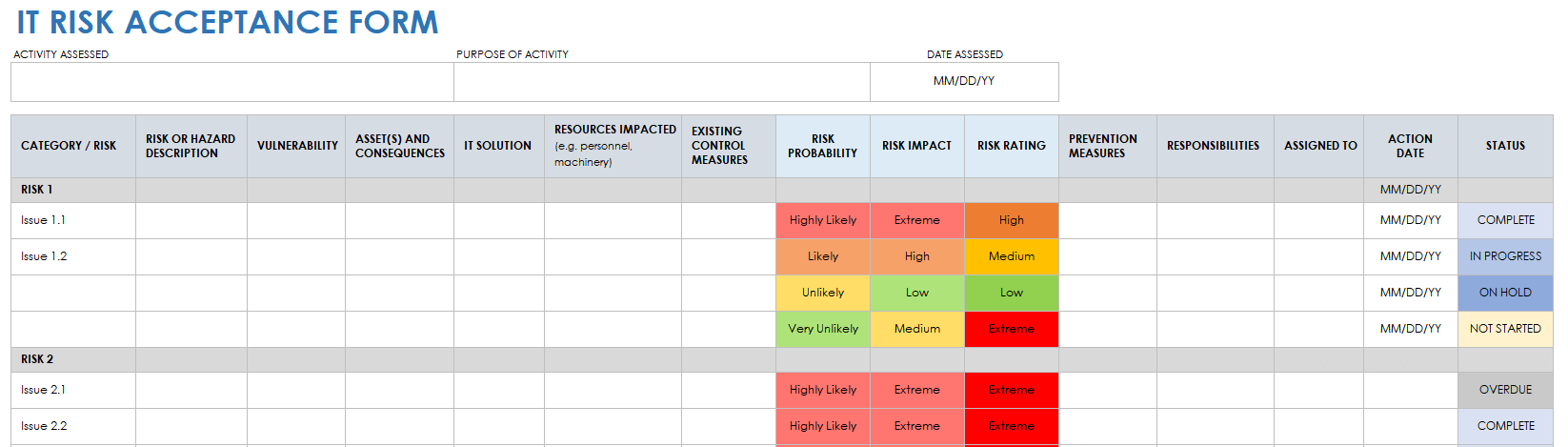
When to Use This Template: Use this template to document, review, and accept IT risks. It helps capture risk ownership, sign-off, and justification during compliance checks, audits, or project risk reviews.
Notable Template Features: This template includes fields labeled Category/Risk, Risk or Hazard Description, Vulnerability, Resources Impacted, and Existing Control Measures. Assign risk items using the columns labeled Responsibilities, Assigned To, and Action Date, and track progress with the color-coded status column.
IT Risk Assessment Questionnaire Template
Download Blank and Sample Versions of an IT Risk Assessment Questionnaire Template for
Excel
| Google Sheets
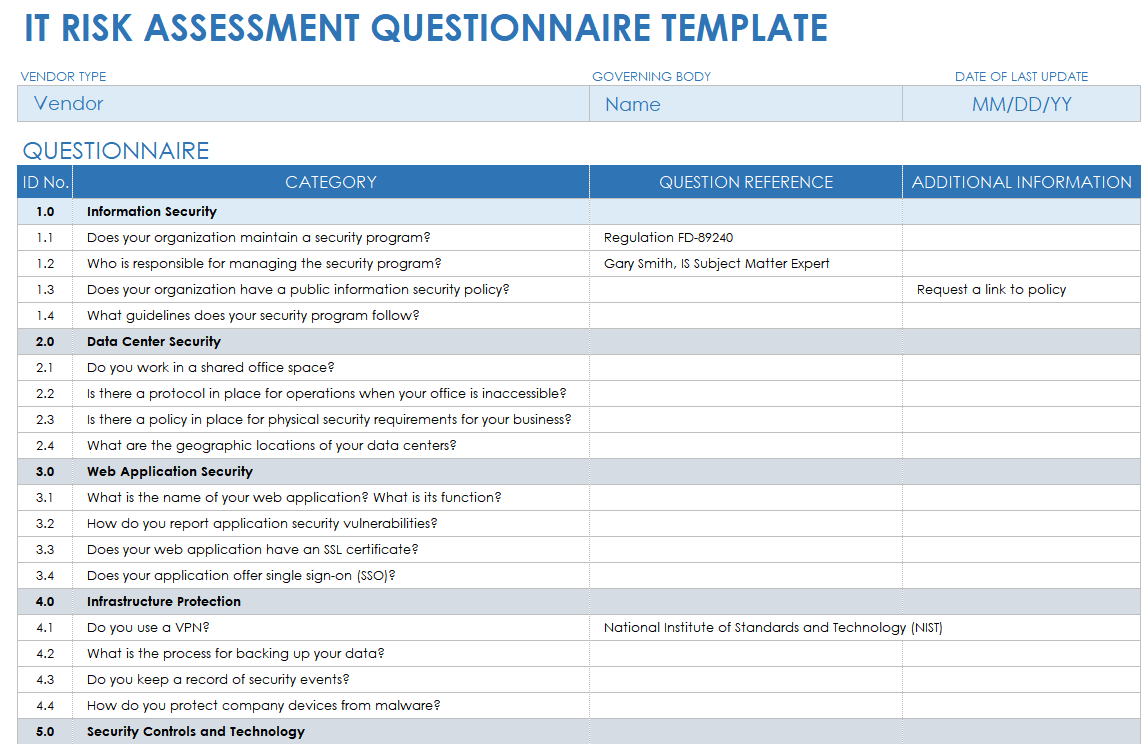
When to Use This Template: Use this questionnaire template in audits, vendor onboarding, compliance reviews, or other situations to assess IT risk practices across teams or vendors. Completing it helps ensure that responses align with security frameworks.
Notable Template Features: This template includes question category rows for information security, data center security, web application security, infrastructure protection, and security controls and technology. Use the Question Reference column to reference standards like ISO 27001 or NIST.
Download one of these free vendor risk assessment templates to help ensure that your third-party providers are compliant with your IT security standards.
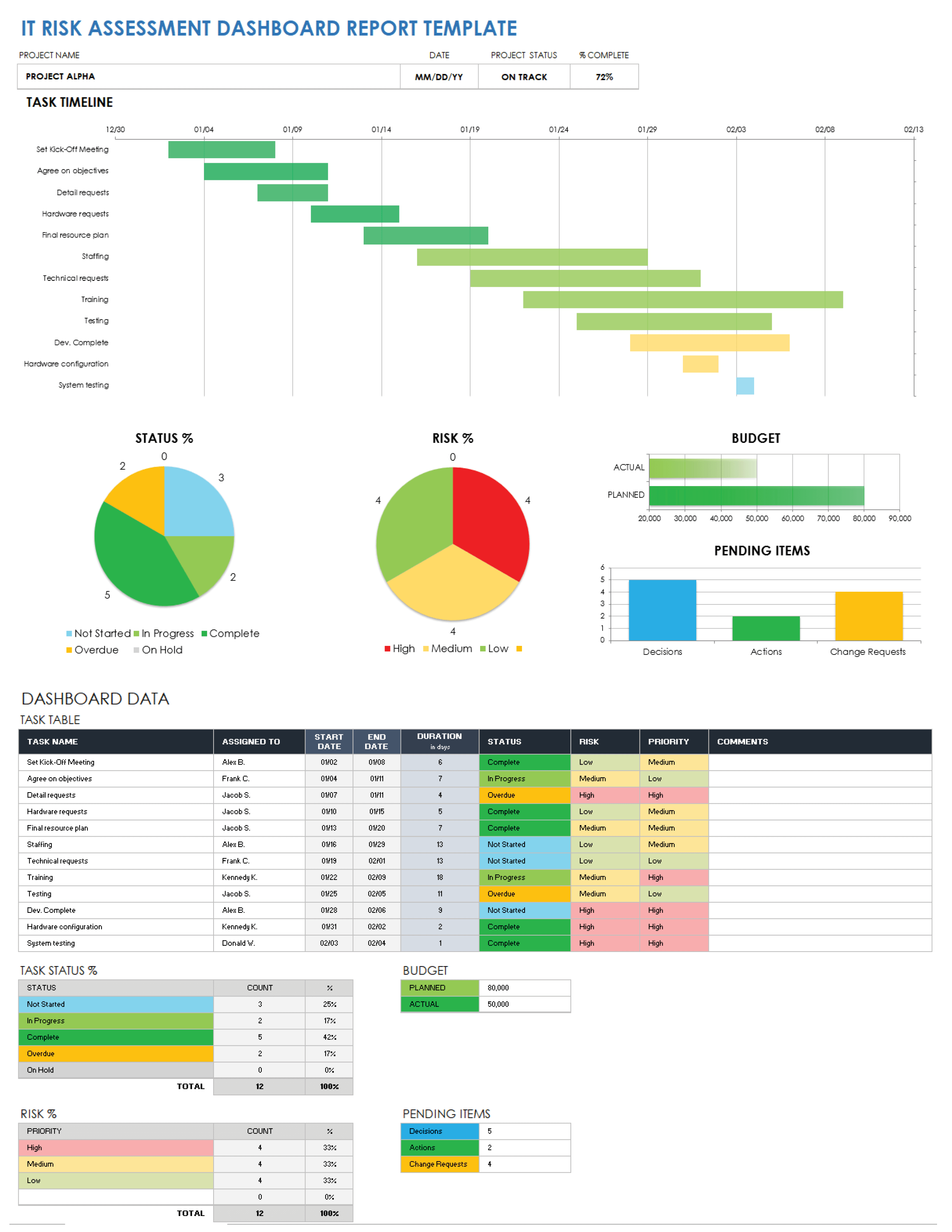
IT Risk Assessment Dashboard Report Template
Download Blank and Sample Versions of an IT Risk Assessment Dashboard Report Template for
Excel
| Google Sheets
When to Use This Template: Use this template to assess, track, and manage IT risks across your project in real time. It provides an at-a-glance view of task progress, risk levels, and unresolved items.
Notable Template Features: This template includes a Gantt-style task timeline and pie charts for status and risk percentages. Use the section called Dashboard Data to track task status, risk, priority, and team assignments. The chart titled Pending Items breaks down decisions, actions, and change requests.
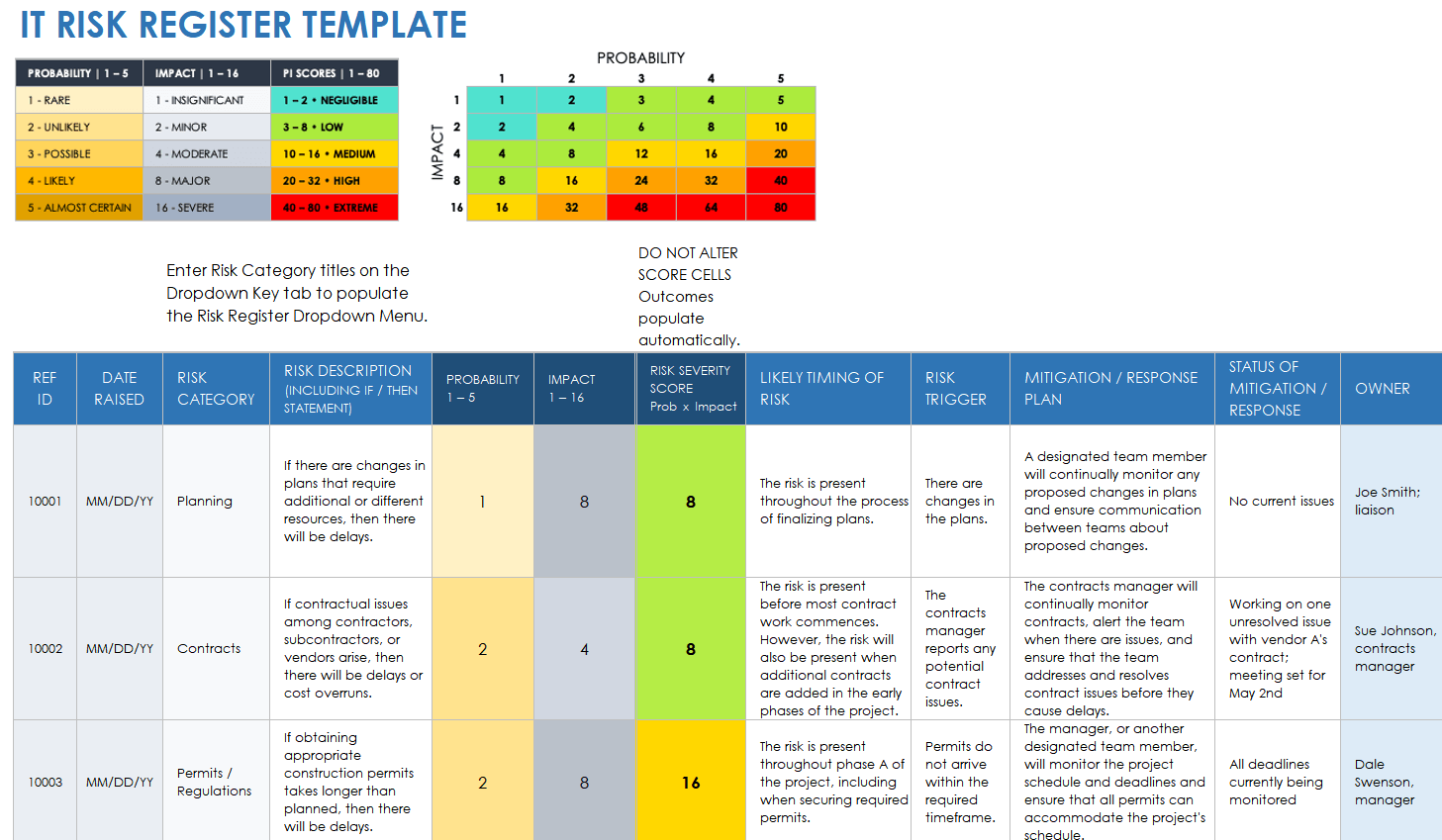
IT Risk Register Template
Download Blank and Sample Versions of an IT Risk Register Template for
Excel
| Google Sheets |
Microsoft Word
|
Adobe PDF
When to Use This Template: This template logs, scores, and tracks IT risks as they occur across a project or organization. It provides a centralized view of ongoing risks, their impact, and mitigation actions.
Notable Template Features: This template includes columns titled Ref ID, Date Raised, Risk Category, and Risk Description. The project risk register matrix calculates the severity score automatically based on the formula Probability × Impact.
What Is an IT Risk Assessment Template?
An IT risk assessment template is a tool that provides a framework for addressing potential IT threats and ensuring effective safeguards are in place. Use an IT risk assessment template to assess and manage potential cyber breaches and data-integrity issues.
IT risk assessment templates use risk probability and risk severity ratings to determine the impact of potential risks to an IT team and a larger organization. An IT risk assessment template also lists what controls are present for the mitigation of each potential risk and what control activities have been taken to remedy threats to service or data integrity.
Information security analysts (ISAs), network security engineers (NSEs), cryptographers, and chief information security officers (CISOs) can all use IT risk assessment templates to improve their organization’s risk assessment and management effectiveness and efficiency.
How to Use an IT Risk Assessment Template
Successful IT risk assessment templates help IT teams identify potential risks, including disaster recovery, data integrity, and cyber breaches. These templates also reflect the details of each risk, including impact and likelihood, risk ratings, control measures, and mitigation information.
A customizable IT risk assessment template allows you to modify the details surrounding your IT department’s risks, while also enabling you to detail each risk’s level, likelihood, impact, and mitigation plan. Though IT assessment templates vary, they typically include the following components:
- Risk ID: Enter the unique reference identification number for the potential or existing risk so that any IT team member or other stakeholder can reference it.
- Risk Name: Provide the name of each unique risk.
- Risk Category: List each risk’s category (e.g., disaster recovery, data integrity, regulatory compliance) so that it is clear to everyone what the risk is related to.
- Risk Description: Add a brief description for each risk so that it’s clear to each team member what the risk is and what it entails.
- Control: List what control(s) are present to mitigate each potential risk.
- Risk Assessment: Document your assessment of the risk.
- Control Activities: Record your risk control activities so that any team member reviewing a risk’s mitigation status will be able to quickly gather what actions have already been taken.
- Impact Level: List the estimated damage that could be caused by the risk.
- Probability Level: Select the probability of each risk so that it’s clear to all IT team members the likeliness of each risk occurring.
- Risk Level: Assign a risk level for each risk so that IT team members can more easily prioritize risks.
- Owner: Assign an IT team member to each identified risk for assessment, management, or mitigation.
- Notes: Provide any additional details that will help IT team members assist in risk management and mitigation.
Assess and Manage Risks with Ease Using Real-Time Work Management in Smartsheet
Empower your people to go above and beyond with a flexible platform designed to match the needs of your team — and adapt as those needs change.
The Smartsheet platform makes it easy to plan, capture, manage, and report on work from anywhere, helping your team be more effective and get more done. Report on key metrics and get real-time visibility into work as it happens with roll-up reports, dashboards, and automated workflows built to keep your team connected and informed.
When teams have clarity into the work getting done, there’s no telling how much more they can accomplish in the same amount of time. Try Smartsheet for free, today.


